Start8 brings the Start menu and button back to Windows 8

In preparation for the Windows 8 launch, Stardock has released a near-final version of its highly anticipated Start8 utility.

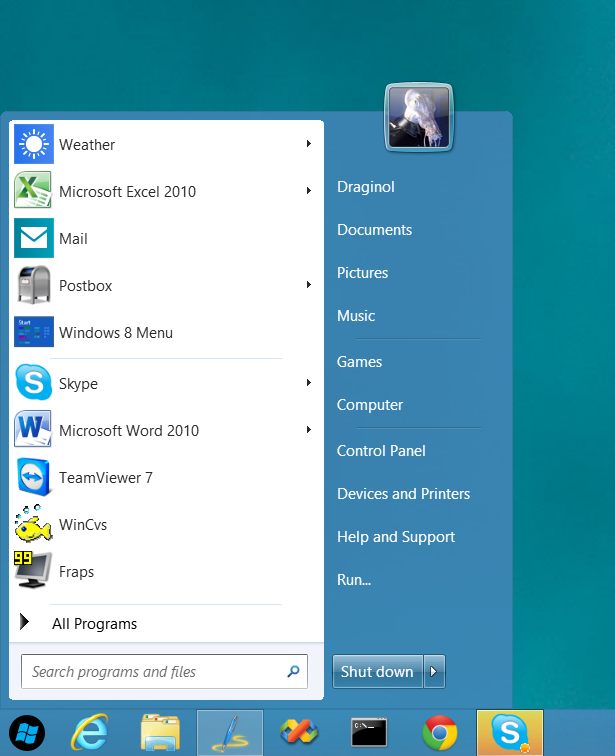
Start8 is a program that adds the Start button back to the Windows 8 desktop as well as provides a fully function post-Windows 7 style Start menu.


What’s New:
  • Windows 7 style Start menu with Windows 8 enhancements
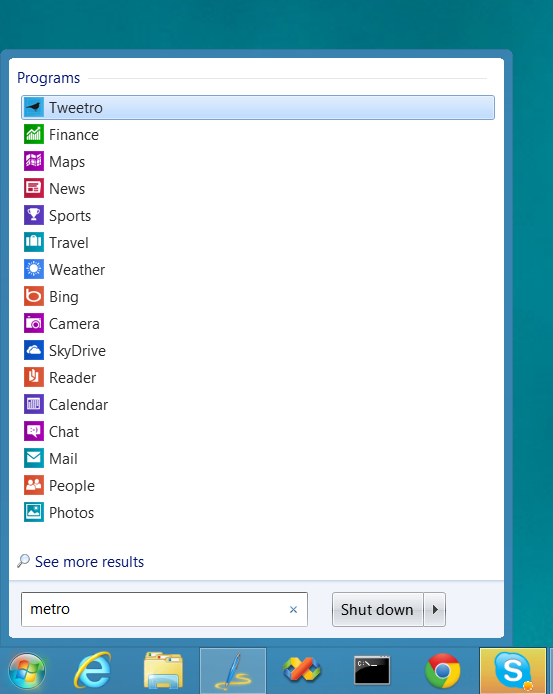
    • Users can search for Windows 8-style (Metro) apps with it
    • Users can pin Metro apps to it
    • Full support for Jump Lists
    • Unified Search
    • Automatically matches color to the color of the taskbar
  • Start button is now skinnable
  • Users can boot directly to the Windows 8 desktop
  • Optionally disable the desktop “hot spots”.
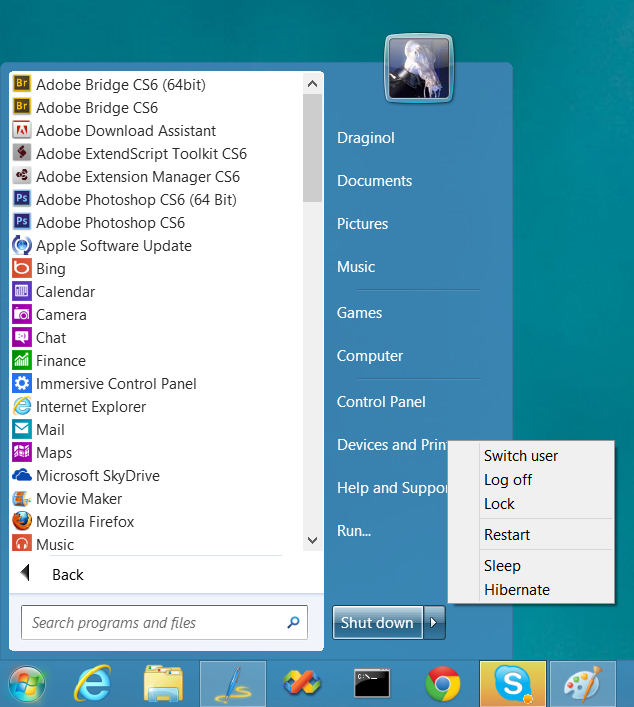
  • Fast access to shut down, devices, music, documents, videos
  • Supports WindowFX 5.1 startmenu animations (currently in beta)
  • The Windows 8 Start screen becomes accessible from the Start menu
  • Start menu size fully configurable
  • Adds option for WinKey to show fullscreen Metro desktop.


Screenshots:
image

Post Windows 7-style start menu: Can “see” and interact with Windows 8 style apps.

image

Start button orb image can be changed
image

All installed Windows 8 style apps can be found by typing “Metro”.
image

Users can quickly access all their programs and shut down options


Download at https://www.stardock.com/products/start8

117,191 views 30 replies
Reply #1 Top

Is the start menu part going to be skinnable? If so, will Windowblinds skin it or will we have to do that separately?

Reply #2 Top

Absolutely fantastic! Love getting a normal looking start menu and button back, beats out Classic Shell by a mile! Only one question, does anyone know how to add and remove items from the places panel in Windows 8?  In Windows 7 it just a simple right click and selecting Properties and then Customize the start menu, in Windows 8 right clicking on the start menu does absolutely nothing. Thanks in advance!

Reply #3 Top

Tom, right click the start button.

Reply #4 Top

As an aspiring programmer and video game designer, apps like this are the only thing that could get me to try to use Windows 8 instead of XP or 7, and I have hardly even use 7.

Reply #5 Top

Quoting RedneckDude, reply 3
Tom, right click the start button.
End of RedneckDude's quote


I have been Jim, all it does is bring up Start 8's menu.

Reply #6 Top

Oops, it was a guess.....I'm on 7 right now...sorry.  :blush:

Reply #7 Top

Quoting LightStar, reply 2
Absolutely fantastic! Love getting a normal looking start menu and button back, beats out Classic Shell by a mile! Only one question, does anyone know how to add and remove items from the places panel in Windows 8?  In Windows 7 it just a simple right click and selecting Properties and then Customize the start menu, in Windows 8 right clicking on the start menu does absolutely nothing. Thanks in advance!
End of LightStar's quote

You cannot alter that in the current release of Start8.  You can expect to be able to do that in the future though.

Reply #8 Top

Thanks Neil! :)

Reply #9 Top

hmmmmmmm. i may have to try win8 again because of this app. i'll wait until my new ssd arrives, tho.

Reply #10 Top

Quoting MadDeez, reply 9
hmmmmmmm. i may have to try win8 again because of this app. i'll wait until my new ssd arrives, tho.
End of MadDeez's quote


FYI if you have VMWare workstation ver 8, Win8 runs pretty darn good in it. If you have the $$ to shell out VMWare just released Ver 9 which will make it even better. ( but that is a topic for another thread ).

Reply #12 Top

I have it dual booted with 7 on my main rig.


Working ok. If SD keeps messing around, they're gonna make me like 8.

Reply #13 Top

What are the odds that MS makes changes to disable this in the near future?

Reply #14 Top

Quoting RichVR, reply 14
What are the odds that MS makes changes to disable this in the near future?
End of RichVR's quote
We are betting on "unlikely".   :thumbsup:

Reply #15 Top

Quoting Xiandi, reply 1
Is the start menu part going to be skinnable? If so, will Windowblinds skin it or will we have to do that separately?
End of Xiandi's quote

Im also interested in that/ it would be good or more likely great to get some info on that thanks Xiandi for asking- with the RTM out, there should be some releasable info about Windowblinds and windows 8... 

Quoting Zubaz, reply 14

Quoting RichVR, reply 14What are the odds that MS makes changes to disable this in the near future?We are betting on "unlikely".  
End of Zubaz's quote

Does that mean there will be a pro version in the future or will it remain a freebee? 

Reply #16 Top

Quoting Zubaz, reply 14

Quoting RichVR, reply 14What are the odds that MS makes changes to disable this in the near future?We are betting on "unlikely".  
End of Zubaz's quote


Yeah, Microsoft probably knew someone would develop an application to get rid of Modern (Metro) UI, so they probably figured why bother with everyones complaints if someone else will do all the work. No doubt they saved some money hot having to worry about that one. ;P

Reply #17 Top

Quoting RedneckDude, reply 12
I have it dual booted with 7 on my main rig.
End of RedneckDude's quote

makes one wonder why you give YRAG ulcers...

Reply #18 Top

Looking good!

Now you just need to map a Nelson_ha_ha.wav to the menu navigation and you're done. ;)

Reply #19 Top

Quoting Zubaz, reply 15

Quoting RichVR, reply 14What are the odds that MS makes changes to disable this in the near future?We are betting on "unlikely".  
End of Zubaz's quote

I'm guessing that you're right considering the lateness of the build. But I have to think that LightStar has made a good point. Is MS going to the "mod" community now? Not saying that Stardock is to, in any way, be considered as 'modders'. But let's look at the facts:

1. Win 8 is a tablet oriented OS.

2. They want to get a big bite of the tablet market.

3. If they allow modifications to what the consider basic features of their OS, aren't they essentially saying, "Do this part of our work for us. And let us rake in the lion's share of the cash." You get yours. We already got ours.

4. Then the first Service Pack is put out and it kills what you made. You are scrambling to fix it.

I wrote all of this with my tinfoil chapeau upon my pointed cranium. :drool:

Reply #20 Top

Quoting RichVR, reply 19
I wrote all of this with my tinfoil chapeau upon my pointed cranium.
End of RichVR's quote

That you did...;)

I can't help but think MS was thinking at the time...."look...it doesn't matter if/when power users are pissed with our new interface....we can always rely on Stardock to provide a third-party panacea whilst the Joe Averages blindly follows our direction, Lemmings as they are...." ...;)


Reply #21 Top

He he          He he..........

Reply #22 Top

That's not what I was told.

I heard that.........well....nevermind.

Reply #23 Top

No start button for Win 8.


Microsoft Morons, I swear they do it as a social experiment, then when people hate it, they will bring back a classic mode for windows 8 in a service pack.

Seriously MS, If it ain't broke don't fix it.


Reply #24 Top

"The reasonable man adapts himself to the world; the unreasonable one persists in trying to adapt the world to himself. Therefore, all progress depends on the unreasonable man."

-George Bernard Shaw

Reply #25 Top

Quoting Rosco_P, reply 24
"The reasonable man adapts himself to the world; the unreasonable one persists in trying to adapt the world to himself. Therefore, all progress depends on the unreasonable man."

-George Bernard Shaw
End of Rosco_P's quote


"Show me a sheep and I'll have a date!" 

- RedneckDude