
RedneckDude RedneckDude

SSD Tips and Tweaks

SSD Tips and Tweaks

Come, share your tips!

Guys, I know a few of us have SSDs. I'm pretty sure more do than we know.


What say we all share any tips or tweaks we might have so we can all benefit from each other's knowledge.


Or maybe we can ask a question, someone else may have the answer.


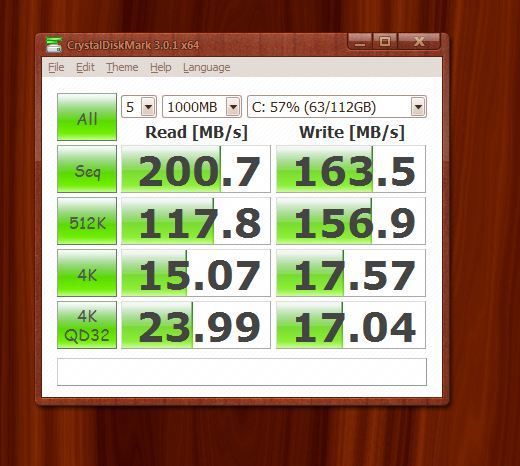
I'll start by saying I have an OCZ Vertex Plus 120 GB.  Sata II on a Sata II Mobo.


Currently, I get the following stats when testing. I wonder how this compares with yours and if it can be tweaked.
 

396,572 views 126 replies
Reply #76 Top

Quoting Wizard1956, reply 68
Who puts a 60, 90 or 120 GB drive in anything any more? A 256 GB SSD would be my minimum capacity. I've waited this long, I can wait until I can afford a properly sized SSD.
End of Wizard1956's quote

Mine's a 60 ..... it'll likely be replaced soonish with something around the 256 mark.....I need to get my FSX onto one....and it's probably just as sensible to make it the OS drive..... but then my FSX is probably over 100gig by now....;p

Reply #77 Top

Quoting Jafo, reply 76
.....I need to get my FSX onto one....
End of Jafo's quote

And then watch it fly! (pun intended) ;)

Reply #78 Top

Quoting RedneckDude, reply 75
Over your head?
End of RedneckDude's quote


Yeah.......drowning in bullshit isn't on my bucket list. ;P

Reply #80 Top

Quoting Jafo, reply 76
Mine's a 60 ..... it'll likely be replaced soonish with something around the 256 mark.....I need to get my FSX onto one....and it's probably just as sensible to make it the OS drive..... but then my FSX is probably over 100gig by now...
End of Jafo's quote

You could always keep both installed.... use the 256gb for the OS, most used apps and FSX, then use the 60 for your lesser used apps and games, etc.  That's what I did, only I have 2 128gb's.

Reply #81 Top

Experiment:


This is a Corsair GT connected to a plain jane Intel controller (SATA 3).  I'll try it again later connected to a SATA 6 controller to see what difference it makes.


Reply #82 Top

Quoting starkers, reply 80
You could always keep both installed....
End of starkers's quote

I'll probably chuck the 60 onto my laptop....give it a boost...;)

Reply #83 Top

Quoting Jafo, reply 82
I'll probably chuck the 60 onto my laptop....give it a boost..
End of Jafo's quote

Well there you go.... waste not want not.  Thing is, it'd make the lappy considerably zippier, so why not.

Reply #84 Top

My 120 will no doubt end up in my lappy. I'll be wanting a bigger one for the main rig.    Now, what do we do about the prefetch and superfetch?


Off or on?


Reply #85 Top

Quoting RedneckDude, reply 84
Now, what do we do about the prefetch and superfetch?

Off or on?
End of RedneckDude's quote

Off, Stumphumper

Reply #86 Top

Quoting yrag, reply 85
Quoting RedneckDude, reply 84Now, what do we do about the prefetch and superfetch?

Off or on?

Off, Stumphumper
End of yrag's quote


Wow....the hick got one right!

Reply #87 Top

Quoting RedneckDude, reply 86
Wow....the hick got one right!
End of RedneckDude's quote


One out of a million....congratulations dumbass.

Reply #89 Top

Just checked my SSD again with 'SSDLife free'...

Been powered up for 2 years, 6 months and 2 days 12 hours....

Powered on 74 times....

Health 98%

Estimated TEC - May 28, 2020.   [it's an OCZ Summit 64gig.]...;)

Reply #90 Top

Can we get any compiled tips added to the op?  I looked through the thread and found some links to tweak guides (from 2010), but I'm not sure if they are good or what.  I have a nice setup, but I'd love to know I have everything configured well.  Thanks to anyone posting tweak guides, suggestions, etc. 

Reply #91 Top

@pacov - As far as I know*, the tech behind SSD's hasn't changed enough to warrant any tips or tweaks that haven't already been discussed or linked to in this thread. The only ones that I can think of that are really necessary are enabling AHCI and making sure that TRIM is on. Beyond that, it's all personal preference. If you're on Win 7 then you should be pretty much good to go once those last two things are done.

*If anyone knows better then I'll happily stand corrected.

+1 Loading…
Reply #92 Top

ty star - karma for you. 

Reply #93 Top

I thought you might like a platter to compare to. Western Digital Caviar Black 640GB

I pulled my SSD because it had a unrecoverable bootsector that I thought was due to a bad disk. Turns out uninstalling VMLite is what did it (repeated it's performance on a platter) So I'll be re-installing in a couple hours.


Reply #94 Top

Next one looks like it'll be an OCZ Vertex 3 240gig.....looks like reasonable bang per buck...;)

Reply #96 Top

Quoting Jafo, reply 94
Next one looks like it'll be an OCZ Vertex 3 240gig.....looks like reasonable bang per buck...
End of Jafo's quote

Yup, that'll be my next one as well... my first SSD was a 120gig OCZ Vertex 2 and I like the brand.

Reply #97 Top

Quoting Alexander8100, reply 97
Great sharing...

Thanks for sharing this...
End of Alexander8100's quote

thx alex - I'm sure we won't be seeing a spam post from you soon, bro. 

Reply #99 Top

heya, kind of unrelated


but has anyone tried moving their pagefile to a RAM drive? like ppl with more than 8gb since SINS can't use more than 4gb? if so what was the performance difference?


I ran sins on a 4.6ghz 2500k the other day and got 15fps late game. Considering either setting up a RAM drive or a 240gb SSD with the pagefile on it.

Reply #100 Top

I think the best place for a pagefile will be the OS drive...on a SSD.   Anything else should see a performance loss....;)