HiDPI on MacOS X

Fun with high resolution

I have MacOS X Lion running on a 30 inch Cinema Display.  If you have the latest Xcode, you can use Quartz Debugger to enable it.  What it does is allow you to run in a sort of retinal display.  In my case, it turns my 2560x1440 to 1280x720 but with very high DPI. It looks absolutely gorgeous and is exactly what I think most people have wanted out of their high resolution displays all along.

Apparently, new Macs coming out this year are going to have screens that do crazy high resolution (2880 x 2400 for instance) so that users can run them like they would at 1440x1200 except for having everything be super sharp.

I have to say, it is a really great experience to see text and the UI this clear. In fact, it's going to be hard to go back to any other type of display.

49,603 views 22 replies
Reply #1 Top

Have you a link who explain how these miracle is done...

DPI mean dots per inch... and to my knowledge, it is a fixed value... if a screen is able to have 2560 pixel ( dots ), nothing change when you use a lower resolution... the screen itself have always 2560 pixel ( dots )... the amount of DPI remain the same...

By example, my little 20.6 monitor have a have a DPI of 96 ( http://www.infobyip.com/detectmonitordpi.php )... that the monitor run at 1680x1050 or any lower resolution, DPI remain 96...

Reply #2 Top

http://osxdaily.com/2012/01/12/enable-hidpi-mode-in-mac-os-x-lion/

Reply #3 Top

Thoumsin ...I think you'll find that what you're getting is 4 pixels per pixel....that's 4 pixels of 'screen resolution' to each pixel of system 'painting'.....in other words [as Brad mentioned] the system display resolution is exactly half of the hardware resolution...and thus twice the clarity/sharpness.

That makes it a step beyond 'native resolution' where system res is identical to screen res... 1 pixel per pixel ... and obviously better than non-default resolutions where the physical pixels 'fudge' [blur] the data displayed....particularly an issue with LCDs ...;)

Reply #4 Top

Well, it seem to be only a 2x zoom...

For a real increase of DPI, you new to change the screen itself...

Record ( 2008 ) is from Kopin with a 2272 dpi screen ( http://optics.org/article/32411 )...

Since non aided human eye cannot differentiate detail over 300 dpi, we can somehow say that screen need to have at least 300 dpi for be called a "retinal" screen... this was reach in 2007, with the mobile phone Toshiba G900... but for a 15 inch screen, you need at least a resolution WQUXGA ( 3840x2400 ) for "retinal" resolution around 300 dpi...

By the way, first WQUXGA screen was made by IBM in 2001... followed by ViewSonic, Iiyama, ADTX, etc ... since 2007, all was discontinued due to refresh rate problem ( max 48 hz with 4 DVI/HDMI interface ) and some high pricing... yes, static text and UI is more clear but the 48hz is was a problem for movies or games ( same if your graphic card was able to generate a huge amount of frame by second, the monitor was only able to show 48 frames second )...

As for apple cinema display :

the new Cinema Displays also give uses a modest bump in terms of pixel density.Pixel density is essentially the number of pixels spanning a display within a given length. The older 30-inch Cinema Display monitors offered customers just under 101 pixels per inch (diagonally) while the new 27-inch models, with the new 2560x1440 resolution, offer 109. It means that from the same distance, the new displays should look ever so slightly sharper than the older models.

Sure it is better that my own cheap monitor who is only 96dpi... but it is less that some old monitor : 204 dpi in 2002 ( http://www.viewsonic.com/company/news/vs_press_release_7179.htm ), in 2003 ( http://news.thomasnet.com/fullstory/Color-Monitor-offers-22-2-in-viewable-image-area-25978 ), etc...


Reply #5 Top

Quoting Jafo, reply 3
Thoumsin ...I think you'll find that what you're getting is 4 pixels per pixel....that's 4 pixels of 'screen resolution' to each pixel of system 'painting'.....in other words [as Brad mentioned] the system display resolution is exactly half of the hardware resolution...and thus twice the clarity/sharpness.
End of Jafo's quote

What is see is that frame is rendered at lower resolution ( graphic card ) and send to a high resolution monitor where several pixel ( 4 in this case ) will render the same thing...

when is setup my windows OS to 800x600, my monitor remain at 1650x1050... everything become bigger on the screen, more physical pixel are used for render a single software pixel... but this don't increase the dpi...

It is only improving a little if your system is using old bipmap font or icon... but with the advent of vector graphics and fonts in place of bitmap graphics and fonts at the end of the last century, it decrease the antiliasing quality...

When i look at the video http://www.youtube.com/watch?v=jS-hBRqS4Tk , it seem to me that it is nothing more that a zoom feature... have the same effect on windows when i switch from 96 dpi to 120 dpi font/icon... everything become bigger on screen...

Well, until there is a real explanation about what really happen... i will simply consider it like a Apple marketing plot dusting some 10 year old technology, call it new and say that they have invented it...

Reply #6 Top

Agreed. As long as the physical pixel density remains low HiDPI mode is essentially useless. It is forward thinking by apple to include it but everyone believing to gain something from it now is just decaiving themselves. Wait for the new macBooks with highres screens (hopefully) and then turn on hiDPI mode. It still is just a zoom but makes sense since everything woul be too small to read otherwise

Reply #7 Top

Quoting Thoumsin, reply 5
What is see is that frame is rendered at lower resolution ( graphic card ) and send to a high resolution monitor where several pixel ( 4 in this case ) will render the same thing...
End of Thoumsin's quote

No...4 pixels are available to render what one would at 96dpi...so there is a potential for 4 times the data/information to be displayed..... not 4 pixels with the same information....that's just magnification and thus pointless.

Reply #8 Top

30 inch Cinema Display
End of quote

*drools*


Reply #10 Top

Retina display on iPhone works the same way. It looks awesome.

Reply #11 Top

Quoting Island, reply 8

30 inch Cinema Display

*drools*
End of Island's quote

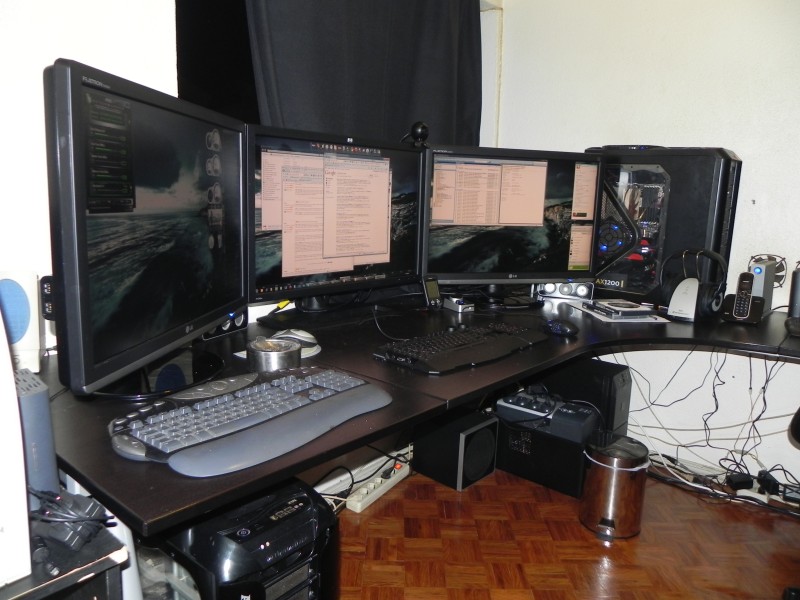
 Drool some more. 3 x 30" displays. |-)

Thoumsin, I was having a hard time understanding this too, but I think I got it (?): zoom simply pixelates the result (i.e.; a single pixel becomes a 4 pixel bulky square), but here each 4x4 pixel is 'worked some more' - a bit like the difference between normal text vs. anti-aliased text.

Reply #12 Top

Jorge ..... I'm officially jealous, you know that ......three 30 inch screens.


I'm gonna go sulk!   X(

Reply #13 Top

Quoting Jafo, reply 9
http://www.cambridgeincolour.com/tutorials/image-interpolation.htm 

Possibly that explains what I mean.....
End of Jafo's quote

Well, in fact, it perfectly explain what I mean...

Even the most advanced non-adaptive interpolators always have to increase or decrease one of the above artifacts at the expense of the other two — therefore at least one will be visible...Adaptive interpolators may or may not produce the above artifacts, however they can also induce non-image textures or strange pixels at small-scales...

Let sat that you have a monitor at 2560x1440...

In place of render a high quality frame at 2560x1440, the HiDPI render a lower quality frame at 1280x720 who is interpolated at 2560x1440 by software...

A original frame at 2560x1440 will always be more sharp and have more detail that one at 1280x720 who is interpolated at 2560x1440...

As one of your inhouse modeler/texturer how he will work for the best quality... let say that we need a 2048x2048 texture for a soase capitalship... what is the best way :

- make a 4096x4096 texture who is downsampled at 2048x2048 at the end

- make a 1024x1024 texture who is upsampled at 2048x2048 at the end ( HiDPI way )

Wish one do you thing will have the best quality with the more detail...

Quoting Frogboy, reply 10
Retina display on iPhone works the same way. It looks awesome.
End of Frogboy's quote

Well, it cannot be other... the iphone 4 screen is 640x960 for a 3.25 inch size... this give us 326 dpi ... who is more detailed that human eyes can see... same if some artifact is created during resampling, the artifact will be so small that a human eyes don't see them...

But for the same trick work on a 32.5 inch size, you will need a basic resolution at 6400x9600 for keep the same 326 dpi...

Well, there is nothing wrong with HiDPI in itself... will become very useful in a near future when home desktop will be UHDTV ready ( http://en.wikipedia.org/wiki/Ultra_High_Definition_Television )... more monitor is near the physical 300 dpi limit of human eyes, the trick work the best... and when it is over 300 dpi, it really improve the final result because the trick allow to use the extra dpi ( these over 300 ) that human eyes cannot see... more, the 300 dpi eyes limit is true in case of very good eyes ( 20/20 )... for people with not so good eyes, the dpi level drop down... for some people, the HiDPI trick can already lead to better quality at 200 dpi...

As for true retinal display, there is a good article here : http://prometheus.med.utah.edu/~bwjones/2010/06/apple-retina-display/  :

So, if a normal human eye can discriminate two points separated by 1 arcminute/cycle at a distance of a foot, we should be able to discriminate two points 89 micrometers apart which would work out to about 287 pixels per inch.  Since the iPhone 4G display is comfortably higher than that measure at 326 pixels per inch, I’d find Apple’s claims stand up to what the human eye can perceive.

Reply #14 Top

Quoting JcRabbit, reply 11
Drool some more. 3 x 30" displays.
End of JcRabbit's quote

Well, i dream of the tomorrow TV who use UHDTV format ( http://www.engadget.com/2011/05/19/sharp-shows-off-the-worlds-first-super-hi-vision-lcd-with-16x-m/  )... first broadcast is planned for the 2012 London's Olympics game ( http://www.guardian.co.uk/media/2011/aug/28/bbc-3d-vision-london-olympics )

Playing soase with a screen like this will be like being in space itself... well, pretty sure that the day i can pay for one of these UHDTV baby, there will be somedy else who have 3 of them on his desktop ( like Uvah, i am jealous )...

Reply #15 Top

Well obviously it doesn't increase the real DPI of the monitor.

But what it does do is use the 2560x1440 to grow everythign to what it would look like at 1280x720 but with a clarity that is unreal.

Reply #16 Top

Quoting JcRabbit, reply 11
3 x 30" displays.
End of JcRabbit's quote

Hey Jorge, what monitors are those, what's the resolution and what graphics cards are you using? I think I may have asked you those questions before, but I have a memory like a sieve these days.

Reply #17 Top

Quoting Frogboy, reply 15
Well obviously it doesn't increase the real DPI of the monitor.
End of Frogboy's quote

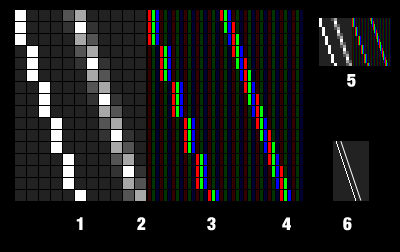
Well, some render engine use the subpixel rendering who can somehow triple the horizontal resolution...

1 white line on grayscale monitor

2 white line on grayscale monitor with antiliasing

3 white line on color monitor

4 white line on color monitor with chroma subpixel

5 same that 1 to 4 with less zoom


If i wrote about these subpixel thing, it is because it is somehow used by SubLCD ( http://www.oyhus.no/SubLCD.html )... and the SubLCD method look very similar to these new Apple HiDPI method :

The picture goes through SubLCD first, which shrinks it to half the size, but double the resolution.

Well, nothing wrong there... seem that Apple have invent the method 25 year ago, Microsoft have "stole" it ( 1998 ) and patent it until 2019... SubLCD ( 2007 ) have found a way for similar result without patent conflict... Apple make HiDPI... seem like a full circle...

It is how i think that HiDPI work... i can be wrong since until now, i have not find any article who explain how it really work at the technic level...

Will not surprise me that it was implemented in new MAC OS in planning of future desktop retina screen who have 300 dpi or more... when these screen hit the market, these HiDPI thing will reach his full potential...


Reply #18 Top

Quoting Starcandy, reply 16
Hey Jorge, what monitors are those, what's the resolution and what graphics cards are you using? I think I may have asked you those questions before, but I have a memory like a sieve these days.
End of Starcandy's quote

Sorry, don't want to hijack the thread, but here goes:

Two LG W3000H (DVI-D input only) and one HP ZR30w (DVI-D + native DisplayPort). Resolution of each monitor is 2560x1600. Graphic cards are one HD Radeon 5970 (dual GPU) and one 5870, in (tri)Crossfire.

The original idea was to run Eyefinity in 3x30" monitors, but I found out that pushing 7680x1600 pixels running Crysis at high settings was too much even for those cards (it is said that the crossfire + eyefinity issue has to do with the crossfire bridge not being able to support the bandwidth needed to output high resolutions - also, the cards only have 1 GB memory for each GPU, which impacts stuff such as 2xAA).

Note that we are talking 3D games here at very high resolutions, for normal Windows desktop usage a single 5870 is more than enough and totally unnecessary.

Now I'm waiting for Intel's Ivybridge and the Radeon 7990 (dual GPU) to get a new system. Having a single dual GPU card, *in my experience*, is much less troublesome than having two or more single GPU cards in Crossfire. And from the benchmarks of the 7970 I have seen so far, the 7990 should put my 5970+5870 tri-crossfire system to shame. :-)

Reply #20 Top

Quoting Thoumsin, reply 13
In place of render a high quality frame at 2560x1440, the HiDPI render a lower quality frame at 1280x720 who is interpolated at 2560x1440 by software...

A original frame at 2560x1440 will always be more sharp and have more detail that one at 1280x720 who is interpolated at 2560x1440...
End of Thoumsin's quote

Didn't completely understand what you meant there. Apples HiDPI are just the GUI images remade from scratch at double the resolution (as with the iPhone Retina) to be rendered at double the pixel density.

Reply #21 Top

Quoting TobiWahn_Kenobi, reply 20

Quoting Thoumsin, reply 13In place of render a high quality frame at 2560x1440, the HiDPI render a lower quality frame at 1280x720 who is interpolated at 2560x1440 by software...

A original frame at 2560x1440 will always be more sharp and have more detail that one at 1280x720 who is interpolated at 2560x1440...

Didn't completely understand what you meant there. Apples HiDPI are just the GUI images remade from scratch at double the resolution the resolution (as with the iPhone Retina) to be rendered at double the screen resolution.
End of TobiWahn_Kenobi's quote

Reply #22 Top

Quoting TobiWahn_Kenobi, reply 21

Quoting TobiWahn_Kenobi, reply 20
Quoting Thoumsin, reply 13In place of render a high quality frame at 2560x1440, the HiDPI render a lower quality frame at 1280x720 who is interpolated at 2560x1440 by software...

A original frame at 2560x1440 will always be more sharp and have more detail that one at 1280x720 who is interpolated at 2560x1440...
End of TobiWahn_Kenobi's quote


Didn't completely understand what you meant there. Apples HiDPI are just the GUI images remade from scratch at double the resolution the resolution (as with the iPhone Retina) to be rendered at double the screen resolution.