Mobile HomeScreen Shots

Why should PC's have all the fun?

So yeah, why should PC's have all the screen shot fun?

  • Windows Mobile
  • iOS
  • Android
  • RIM
  • webOS
Both phones and tablets. I think it would be fun to see what people are sporting on their mobile devices.

Please try to keep it 'clean' and it might be helpful to include links to apps and widgets you use.
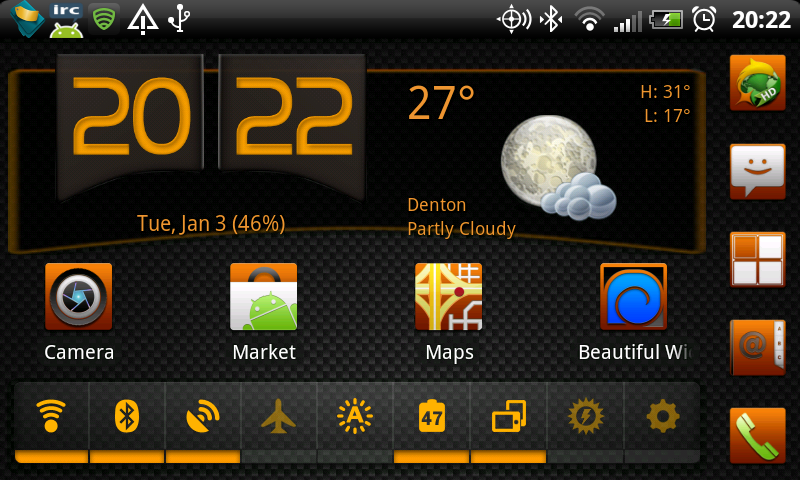
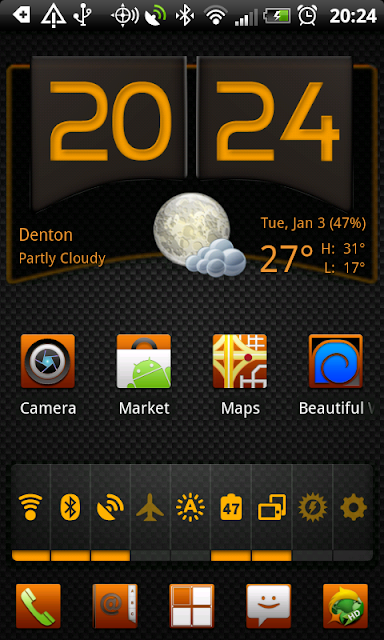


The Background is Android Stock
Clock Widget is Fancy Widgets
The launcher is LauncherPro
The control widget is SwitchPro Widget
The icons are from Tha Icon Ultimate

So let's see what you got! :D
151,770 views 70 replies
Reply #2 Top

I think it would be fun to see what people are sporting on their mobile devices.

I absolutely agree. I think it should be expanded to include all mobile devices, as well.  :thumbsup:

Reply #3 Top

Haha! Thats good RND! 5*

Reply #4 Top

Redneck retirement home ;P

Reply #5 Top

Mine is standard HTC Sense ATM


Wallpaper found here: [URL removed by Stardock per the websites' request]


Reply #6 Top

This was my favorite theme when I had a Blackberry Storm.


Reply #7 Top

Nothing too fancy.


Reply #8 Top

Samsung Galaxy S II, with GO Launcher XE (skinnable)

Blux AS:

Cyanogen

Windows 7

Glass (My current favorite)

And off course....

Reply #9 Top

Nice Stuff! 5*

Reply #10 Top

I must ask, how are you guys taking these screenshots?


Reply #11 Top

If you're running android you can connect via usb cable in usb debugging mode use the ddms tool while connected to your computer then on the menu click device > screen capture. If your smartphone is rooted there are apps that do it for you such as "ShootMe" available on the market. On some devices you can hold the power button and press the home button it will save the current screen to your gallery.

Reply #12 Top

Quoting roflmfaoo, reply 11
On some devices you can hold the power button and press the home button it will save the current screen to your gallery.

That works for me (HTC)

Reply #13 Top

Quoting 2of3, reply 12

Quoting roflmfaoo, reply 11On some devices you can hold the power button and press the home button it will save the current screen to your gallery.
That works for me (HTC)

Same here.

Reply #14 Top

Not working here. LG Optimus V.    Not rooted. Bricked the last one I rooted...lol.

Reply #16 Top

Quoting 2of3, reply 15
http://www.knowyourcell.com/lg/lg-optimus-v/optimus-v-guides/790159/how_to_take_screenshots_on_the_lg_optimus_v.html


From What I understand this is universal for all androids. It takes a few minutes to set up, but after getting it going, screenshots are a breeze.

Reply #17 Top

Thanks, I'll have a look. And maybe I can figure out how to theme my phone. Rooting isn't an option as I have bricked one already.

And I had "easy' instructions.

Reply #18 Top

Quoting RedneckDude, reply 17
And I had "easy' instructions.

There's your problem. You needed simple instructions. ;P

Reply #19 Top

WebOS on a HP TouchPad:

Reply #20 Top

Instructions Zub, please....hehe

Reply #22 Top

OK, guys. Do you have to root your phones to get these awesome themes?

Reply #23 Top

Quoting RedneckDude, reply 22
OK, guys. Do you have to root your phones to get these awesome themes?

Nope.
We use/install skinnable applications (apps), just like we do on the PC.

Elvee is using the ADWLauncher EX.
I use GO Launcher EX.

Just enter the Market and search for 'launcher', and take your pick. =)

Reply #24 Top

I switch between LauncherPro Plus, ADWLauncher EX and Go Launcher EX. They are all good in there own way.

I prefer LauncherPro Plus. To me it seems to run smoother than the other two. Go Launcher feels like it bogs my phone down a little and ADW Sometimes force closes.

+1 Loading…
Reply #25 Top

Too lazy to post a pic, but I have the Pipboy 3000 skin.
