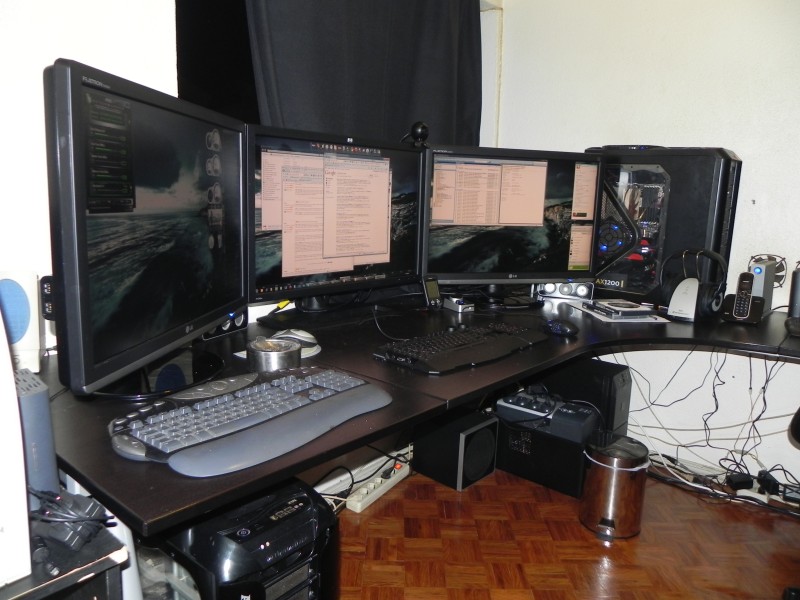
Love / Hate relationship with state of the art PC hardware

I used to get a new PC every year. But we’ve so long been in diminishing returns of noticeable performance that I’ve stopped doing that.

So first off, my new monster machine has a 240GB OCZ SSD and a traditional 1TB Seagate drive. I ordered a SATA 6G controller with the machine. Naturally, they had hooked the non-SSD to that (ack).

Second, the machine supports the new AHCI standard which, when enabled, gives about a 20% boost to write performance on any drive. However, it MUST be enabled in bios before installing. If you do it after, you have to reinstall Windows 7 and it's not on by default as I discovered.

Third, while Windows 7 works like a champ out of the box, it turns out that the generic drivers are pretty conservative and if you want to eek out max (and measurable) performance, you need to download drivers for system components like the Intel AHCI Controller (or better yet, an nVidia one), as well as a JMicron controller and of course you'll need the Marvell controller driver if you want to actually access that 6G speed (otherwise it's 3G).

Fourth, Windows 7 still doesn't come (even in SP1) with USB 3 drivers so you have to install them separately.

Fifth, since I ordered a custom system from Cyberpower, the front case USB 3 connectors do nothing because...the motherboard doesn't have any connectors to it, only ones on the back. So I'd need to get a separate USB 3 PCIe card, put it in, tear apart the case to connect those things on the front. Unbelieveable.

Sixth, once you get into looking into updating drivers, you realize that there’s a ton of obscure stuff that can be updated/improved…the network card works out of the box and I would have not realized how much better the specific driver was if I wasn't already diving around for drivers anyway. The difference is how fast they connect on bootup (very noticeable now that I've seen it).

Don’t get me wrong, I'm loving the machine's speed. It's sick fast. 12 cores (well, really 6 but hyperthreaded). That'll make compile speeds insane. And "real world" copy from drive A to drive B on here is about 600 MEGABYTES per second (which doesn't come up often but if you're moving a lot of video around, it's very nice).

And one piece of advice for those of you looking to get a custom PC: Get the quiet components. This thing is quieter than my Mac book Pro.

71,080 views 32 replies
Reply #1 Top

Well, look on the bright side, I'd kill for all your 'hate' issues, to recieve the loved ones.

Sounds like a great rig, when all has been said and done.. for.. sure.

Reply #2 Top

I know it's sacrilegious to say around IT shops, but I've long been ready for the whole upgrade cycle to slow down substantially.

Unless you do things like compiling massive code assemblies regularly, daily video editing, or shameless wallowing in bleeding-edge game performance, five-year-old rigs still work very well as long as they've been decently maintained. 

My current rig is in the target market for Mikey's latest TV ad campaign, but I'm more interested in a rig that's built with a ten-year lifespan in mind.

Reply #3 Top

I actually do daily video editing, and a 5 year old rig that hasn't been treated all that well still does the job. Sadly, in order to get it to function with video files of higher quality, ones that I can edit in real time, I have to recode the video at a lower quality, edit it, and then replace it with the original. So in about a year and a half, I'll be switching to my fifth PC. I really hope I won't have the same headaches with drivers that Brad has had. I'll do my best to keep things simple, just a six cored beast with 16-24 GB of ram and over 2TB of HDD space. No complicated stuff.

Although that last bit has been bothering me. So far, I've only had one HDD fail on me, after about 4 years of constant use, and it was already used when I got it. Now, everywhere I look in the comments for an HDD, all I see is "had bad sectors, returned it, other one was broken as well". All I can think of now is "what would happen if the whole archive goes dead over night". I've had nightmares about stuff like this in the past, ever since I accidentally deleted a week's worth of shows, and had to redo them all in one day.

 For a while I thought of going the SSD route, but the price on one is just ridiculous right now. But maybe in 1.5 years they'll drop to something I can manage on a budget. This is certainly going to be the most expensive PC/thing I ever bought, but hell, unless they invent something with higher definition than 1080 HD, and make it the new standard, I'll be safe for another couple of years. I just wish my favorite hardware store hadn't gone out of business. Ordering components on-line around here can yield surprising results.

At least I'll finally be able to see what this Windows 7 hubbub is all about, although by then, Windows 9 will probably be in production already. Although, then I'd have to change the software, and that's going to cost a lot as well.

I don't really mind the computer being loud, as long as the noise means it's doing it's job and working fine. Ever since my old 8800Ultra video card went up in flames, I want to hear the fans running, just to make sure they're not dead or on fire. Also, to prevent stuff like that in the future, I actually stuck a room fan to the case of this PC. So far, it hasn't spontaneously combusted.

I hope your new rig treats you well, without giving you any more problems and without needing upgrades anytime soon. It sounds like a beast of a machine, so unless you plan on building SkyNet, it should handle a lot.


PS: Please, don't built SkyNet. 


Reply #5 Top

Yes.  With regards to not doing backups, there are two types of people: those who have lost data, and those who will lose data.

Best regards,
Steven.

Reply #6 Top

First: If you do much with the GPU, you might want to look into a software-based fan controller. I've had two cards go out on me because the fools that put them together set the fans to run at 30% and apparently never go higher. When I finally realized the problem and tested my new card, it was well past 70C and still at 30% fan speed.


Second: There any sellers you recommend?

My Dell has had excellent performance for the price I paid, but diving into it to replace the power supply has reminded me why I prefer to just buy a whole system. I had to remove the CPU heatsink...


Third: Can I have your old rig? O:)


:fox:

Reply #7 Top

Quoting unacomn, reply 3
Although that last bit has been bothering me. So far, I've only had one HDD fail on me, after about 4 years of constant use, and it was already used when I got it. Now, everywhere I look in the comments for an HDD, all I see is "had bad sectors, returned it, other one was broken as well". All I can think of now is "what would happen if the whole archive goes dead over night". I've had nightmares about stuff like this in the past, ever since I accidentally deleted a week's worth of shows, and had to redo them all in one day.

For a while I thought of going the SSD route, but the price on one is just ridiculous right now. But maybe in 1.5 years they'll drop to something I can manage on a budget.
End of unacomn's quote

If continuously backing up does not work well for you, consider Raid 1 (or if you mean the backup drive when you say archive then consider getting a external RAID box for backing up to).

Reply #8 Top
The problem isn't the hardware lately, it's the lack of dedicated machine pushing PC exclusive games.
Reply #9 Top

Second, the machine supports the new AHCI standard which, when enabled, gives about a 20% boost to write performance on any drive.
End of quote

New ??? Well, my 5 year old computer have SAS/AHCI/SATA/IDE !!!

However, it MUST be enabled in bios before installing. If you do it after, you have to reinstall Windows 7 and it's not on by default as I discovered.
End of quote

Well, dissable AHCI in the bios, reboot, open your brower and go to http://go.microsoft.com/?linkid=9741862 ( Microsoft Fix it 50470 ) and run the file... it will modify 2 register key... reboot, enable AHCI in the bios, boot and only "love" remain :p

Reply #10 Top

I understand -  I hate when the tech gets ahead of the OS.  I also don't understand why it takes so long to get the latest stuff directly integrated into windows 7. 

It's like I buy windows 7, all my stuff works.  I buy anything cool over the next 2 years, and I have to direct install drivers to get the desired performance.  I don't mind installing drivers, I just think things like USB 3 should be included.

Oh - and I still upgrade very often.  It's all a matter of what you do.  I'm really big into gaming, so if my rig can't handle anything at top settings (eg not 100% smooth), I start thinking about upgrading.  I don't immediately, ofc, but I start getting that itch.

Reply #11 Top

Looking at your specs I officially hate you. Can I has your old computer? 

Reply #12 Top

USB 3.0 is pretty new, and when new controllers started coming out with it they hadn't yet agreed on a standard for the internal motherboard USB 3.0 headers. As a result, the only way most new case's USB 3.0 ports can connect to a USB 3.0 header is via the I/O backplate. Pretty lame.

Intel's chipsets won't offer integrated USB 3.0 support until Ivy Bridge (expected to be available in the first half of 2012), so motherboards offering USB 3.0 support these days must do so via 3rd party controllers.

Also, note that the Marvell SATA 6Gb controller's performance is a lot slower than the integrated Intel's SATA 6Gb controller in Sandy Bridge generation motherboards. Unfortunately, both Sandy Bridge and Ivy Bridge generations only support two SATA 6Gb ports, the rest being SATA 3Gb ports (grrr, there goes my dream of setting up three SATA 6Gb SSDs in RAID 0).

Currently having a two year old system with a X58 motherboard, three Intel X25-M G2 80GB SSDs in RAID 0 (about 700 MB/s read transfer rate), a i7 920 overclocked to 4 GHz, and 12 GB RAM, I will be skipping Sandy Bridge and waiting for Ivy Bridge, with the Z77 chipset featuring native USB 3.0 as well as PCI-Express 3.0 support. By then I'll also replace my SSDs with something newer and faster (and hopefully more stable than the current generation of SSDs, which are lightning fast but have been riddled with problems, unlike the generation before it).

Skipping a generation will hopefully ensure I do feel a noticeable increase in performance. :)

Reply #13 Top

Quoting JcRabbit, reply 12
Currently having a two year old system with a X58 motherboard, three Intel X25-M G2 80GB SSDs in RAID 0 (about 700 MB/s read transfer rate), a i7 920 overclocked to 4 GHz, and 12 GB RAM, I will be skipping Sandy Bridge and waiting for Ivy Bridge, with the Z77 chipset featuring native USB 3.0 as well as PCI-Express 3.0 support. By then I'll also replace my SSDs with something newer and faster (and hopefully more stable than the current generation of SSDs, which are lightning fast but have been riddled with problems, unlike the generation before it).

Skipping a generation will hopefully ensure I do feel a noticeable increase in performance.
End of JcRabbit's quote

Ditto...;)  [tho just the one SSD and no overclocking]

Reply #14 Top

Tanks Thoumsin for  advice on AHCI  as  you  adviced   and  it  worked, saved  a lot  of  time now I  can  Hot Plug my 2 Terra Hatachi  Drive .

Reply #15 Top

Tanks Thoumsin for  advice on AHCI  as  you  adviced   and  it  worked, saved  a lot  of  time now I  can  Hot Plug my 2 Terra Hatachi  Drive .How do I Unplug  it I  understand  you  just cant  take  it  out ,it  has  to  be unmounted in Linux Fedora 15 I can do  that  there  must  be a  simple  Command on Windows  7 that  is  the  System  I  am  running  right  now

Reply #16 Top

I dunno, Brad, I get myself a more than decent setup [fully booted in 21 secs] and you go reach the sky with yours... not that I'm jealous or anything.

Well maybe just a bit.  I'd like your 240gb SSD... and maybe your CPU, though mine's no slouch, either.   I have an AMD Phenom II x6 1100T, though not hyperthreading it is still pretty quick.

My rig supports USB3, but as I do not have any USB3 devices as yet it's not that important as yet.  The mobo also supports SATA 6GB in two of the ports, which is great for the 2 connected drives {transfer rates in the 100's], but the 4 remaining ports operate at just 3gb, which is a pain when 2 of the connected drives hold my Acronis backups.  I had considered moving my backup drive to the 6GB port for faster writes, but then I lose the higher speeds on my next most frequently used drive after the OS HDD.   Thing is, my mobo is toward the lower end of the new 990FX chipset series, so I guess that's to be expected, and an upgrade to one higher would likely resolve these issues.

Anyway, all the best with your new rig... not that I'm green with envy or anything. ;)

Reply #17 Top

That's a nice sounding rig, Brad. I don't really have the budget to go Intel so, like Starkers, I've gone AMD for my CPU. I'm in the process of buying my next rig bit by bit, and so far I have:

Phenom II x6 1090t, which I'll overclock to 3.8/4.0 GHz

8GB Crucial Valueram @1333, which I'll overclock to 1600

Crucial M4 64GB SSD for OS and programs

Crucial C300 128GB for Steam and games

Seasonic X650 Gold PSU

Asus 6870 DirectCU GPU

Lamptron FC5 v2 Fan Controller

Asus Xonar DG Sound Card (will probably end up changing to Xonar DX when I get a second 6870 for Crossfire)

I still have all sorts of stuff to buy. 2 HDD's for data and backup, Mummyboard, a monster CPU heatsink and a metric f**kton of braiding for all the cabling. I'm not sure whether to go USB 3 or eSata 6Gb for backing up. The board I'm buying supports both but I've read there can be connectivity issues with eSata.

I'm also modding the case so it will be in keeping with the rigs name: The Killing Joke (it's a Batman graphic novel written by Alan Moore.) Being a nerd is so much fun!

Hopefully I won't need to upgrade for a while after that.

Reply #18 Top

I was wrong... just checked and my mobo supports up to 6 x 6gb SATA devices, so it's not that.  I only have 2 drives [C; and D:] capable of the higher transfer rates [the SSD and a newish WD Black Caviar 10,000rpm].  The other 2 [regular WD 500gbers] are quite dated, meeaning I'd have to update them if I wish to achieve greater speeds.

Quoting Starcandy, reply 17
Phenom II x6 1090t, which I'll overclock to 3.8/4.0 GHz
End of Starcandy's quote

You won't be disappointed if my 1100T is anything to go by.... though I have no need/intention of overclocking it.  With 'power boost' taking it up to 3.6 as required, there is no need to overclock.  Same with RAM.  I have 16 gigs of 1300 and I've seen no reason to overclock, given current performance levels.  I do a bit of video editing/conversion and the Gigabyte GTX 560OC I have in conjunction with the CPU and RAM performs more than adequately to meet my expectations.

I was going to go with a Asus Xonar DX soundcard for my last upgrade, but in the end I settled for the basic Creative XF.FI Soundblaster Titanium PCIe.  I have the Creative Inspire 5.1 Digital 5600 setup with its own amplifier and processor, and that kicks butt, so I saved money as I really had no need for a high end soundcard

:)

Reply #19 Top

The main reason I'll have to upgrade to a Xonar DX is because when I go Crossfire the PCI slot will be covered over. I'll probably have to go Crossfire sometime next year because I'll be buying a 27" IPS panel monitor that runs at 2650 x 1440 (native res), so one 6870 probably won't be able to play my games with all the eye candy at max. Though from what I've read you can sacrifice the anti-aliasing a little because of the resolution and how squished together the pixels will be. I'm going to have to get an IPS panel monitor because I want to create a lot more of my artwork digitally, and the viewing angles and colours on a TN panel won't be sufficient, especially if I'm going to have them printed out professionally. Plus I'll be creating icons (and maybe other stuff) for on here. ;)

To be honest, ever since I found out how shitty the viewing angles are on my monitor, it's fair been doing my chump in. #:(

Reply #20 Top

That actually reminds me, I should get a dedicated sound card for the next build. I'm going to keep clear of Creative this time, since I discovered that the Soudlbaster Audigy that the current PC came with has lower recording performance than a century old integrated Realtek audio adapter from the back-up PC. The Xonar series looks interesting. How well would you say it handles audio input?

Reply #21 Top

Quoting unacomn, reply 20
How well would you say it handles audio input?
End of unacomn's quote

I'm sorry but I don't use my card for recording. At the moment I'm using a Xonar DS, and I'm more than happy with how things sound on my Sennheiser HD 202's. The Xonar DX seems to be their middle-of-the-road offering and it got decent reviews when it was released. The DS model that I'm using is slightly scaled down from the DX, which in turn is a lesser version of the Xonar D2X. It all depends on your budget and what you want from the card. My advice would be to try Newegg first to get an idea of prices and capabilities (I always take Newegg reviews with a pinch of salt) and then break out the Google-Fu for tech site reviews of the card you're interested in.

Hope that helps. :)


Reply #22 Top

Quoting Starcandy, reply 19
The main reason I'll have to upgrade to a Xonar DX is because when I go Crossfire the PCI slot will be covered over. I'll probably have to go Crossfire sometime next year because I'll be buying a 27" IPS panel monitor that runs at 2650 x 1440 (native res), so one 6870 probably won't be able to play my games with all the eye candy at max.
End of Starcandy's quote

Oh, let's not aim high and go all big....  like a 27" monitor is almost theatrical in proprtion. 

Still, I have no need to be jealous just yet, do I?   You haven't actually got it, have you?.  So, how far into next year is it that I"ll probably turn a shade or two of green?  Just askin' so's I can be ready with a supply of makeup or something to disguise it, that's all.

I have a pair of ViewSonic VA2226w's that have decent displays and serve my needs more than adequately, so I'm not really looking to upgrade monitor-wise anyway.  Besides, I'd have to remodel my desk again to accommodate anything bigger.  The pigeon hole for my monitors wouldn't house anything bigger than a pair off 22's as it is.  I'd have to remove a shelf and a cupboard if I wanted to go larger, and at this time in my PC life I don't see a need to.

Quoting unacomn, reply 20
That actually reminds me, I should get a dedicated sound card for the next build. I'm going to keep clear of Creative this time, since I discovered that the Soudlbaster Audigy that the current PC came with has lower recording performance than a century old integrated
End of unacomn's quote

No, the Soundblaster Audigy wasn't the best card, not by a long shot.  Put it this way, on advice I went straight from the basic Soundlaster Live card to a X.Fi Fatality Champion PCI card to avoid the major disappointment of the Audigy series... which when I last looked, is history and not supported in Vista or Win 7, driver-wise.  To be honest, I found the Fatality card to be more than adequate for all my musical requirements... both playback and recording.

Seriously, theX-Fi Titanium Fatality Pro and X-Fi Titanium Fatality Champion are worth a look.  You might just find that they suit your needs.  As for the Audigy... not even a sound card by comparison

Oh, and the only reason I sort of downgraded to the lesser X.Fi Titanium card is because I didn't need higher [as stated above] and my new mobo has just the one PCI slot, which is required for my PCI TV tuner card, otherwise I would have stayed with my X.Fi Fataily Champion card

Reply #23 Top

Quoting starkers, reply 22
Oh, let's not aim high and go all big....  like a 27" monitor is almost theatrical in proprtion.
End of starkers's quote

Wonder what you call 3x30" then. :grin:

Sorry... couldn't resist showing off... I tried, I swear I did. O:)

Reply #24 Top

Quoting JcRabbit, reply 23
Sorry... couldn't resist showing off... I tried, I swear I did.
End of JcRabbit's quote

I'm sure you did *cough*bollocks*cough* :rofl:

Are those Dells you have there, Jorge? Very nice! Glad I could help you buy them by purchasing your software.

Reply #25 Top

Quoting JcRabbit, reply 23
Wonder what you call 3x30" then
End of JcRabbit's quote

Indulgent, to say the least.... and oh how I'd like to be able to indulge so luxuriously.  In fact, two would do me just nicely... having found the required space if I knock out the shelf and cupboard on my desk.

Nah, I'm quite happy with my monitor setup... they sit side by side quite nicely in their pigeon hole, and 22" is just about the right size for me, given the distance I sit from them... about 4 1/2 - 5 feet, depending.

I suppose, though, I could get quite accustomed to a couple of 30's... if somebody were to kindly donate them. O:)