What file opens

Hi

I want to modify my DX theme by replacing an icon with one that will open the window that shows you all your drives.

You get to it by click on Start then Computer (just so you know what I mean).

What I want is the file (path) for the Computer button so when I click on the icon it will give me that window.

I am running Win7 pro(64)


Thanx

15,496 views 17 replies
Reply #1 Top

OK..... follow these instructions......

First, choose an icon that you want to use to open "My Computer". Make sure it is a Desktop X object.

Right click the icon and choose "Properties" from the menu.

A new window will open, and it will already be on the "General" tab.

Where it says "Object Type", click the "change" button.

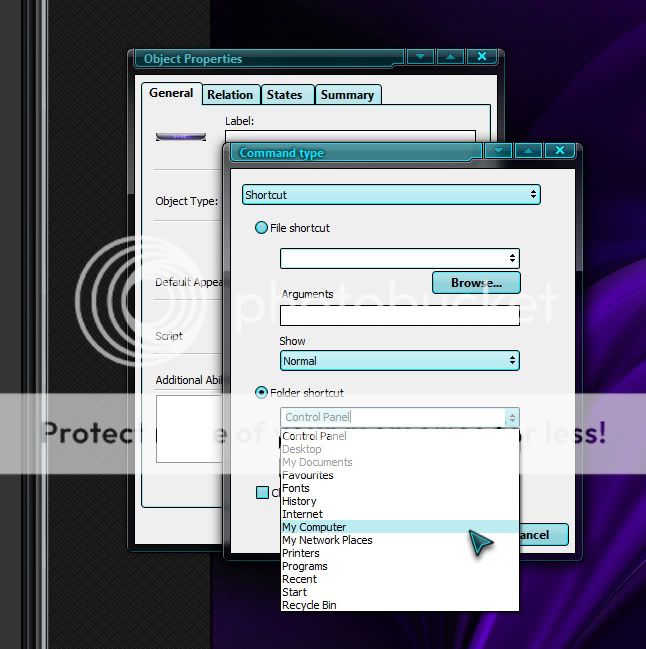
Another window will open. In the dropdown box, choose "Shortcut". Check the box that says "Folder Shortcut", and then, from the dropdown menu at the side of that, look for My Computer. (Do NOT check the box that says "open as pop up menu).

You are done, and your object/icon should now open your My Computer window.

Have Fun!! B[]

Reply #2 Top

OK..... follow these instructions......

First, choose an icon that you want to use to open "My Computer". Make sure it is a Desktop X object.

Right click the icon and choose "Properties" from the menu.

A new window will open, and it will already be on the "General" tab.

Where it says "Object Type", click the "change" button.

Another window will open. In the dropdown box, choose "Shortcut". Check the box that says "Folder Shortcut", and then, from the dropdown menu at the side of that, look for My Computer. (Do NOT check the box that says "open as pop up menu).

You are done, and your object/icon should now open your My Computer window.

Have Fun!! B[]

Reply #3 Top

Unexplained double post....... stupid fat hobbitses........ we hates them.

Reply #4 Top

Boxxi - plenty of options but My Computer is not one of them.

Any other ideas .

Reply #5 Top

I have just noticed that it has My Documents twice.

I tried using both of them thinking there might have been a typo but they are both linked to My Docs.

Reply #7 Top

Hmmmm.... it shows in MY options. Don't know why it doesn't in yours. B[]

Oh well, as long as you found it in the end. :)

Reply #8 Top

Boxxi,

What version of DX and OS are you running??

Win7 x64 here and DX 3.5 - same results as OP. I have 2  My Documents, no My Computer or Computer.

Reply #9 Top

Win7 Ultimate 32bit. Latest DX.

Reply #10 Top

Screenshot of how it looks on my system.......

Reply #11 Top

Ahh.. I have DX4 on my work PC which is Win7 64 bit and it does work properly. So it looks like it is an issue with DX 3.5 on 7 64 bit.

Reply #12 Top

I have just paid for the Object Desktop package and installed the DX via impulse.

Does this mean I should be able to get an update to the new version as I have 3.5

Reply #13 Top

open impulse and click the little Tab with the down arrow symbol on it. Check the box that says Show Pre-Release versions. You should be able to see DesktopX 4 on the updates tab then.

Reply #14 Top

Are there any problems with DX 4  , then again I am having a few problems with 3.5 Won't load on start up , error message DX has stopped working  etc..

Reply #15 Top

Quoting aceuk, reply 14
Are there any problems with DX 4

DX in any version is riddled with problems. The key is to know how to get around them..

Reply #16 Top

Do I have to uninstall 3.5 first.

What is the best way to do it.

Reply #17 Top

I don't THINK you have to remove the old.

Try the update method first though.