Turning My Android Into a Hotspot

I Love It!!!

Hey guys, me again. I just want to share how much I love my Optimus S Android phone!

Today I am traveling down a Tennessee interstate highway with my laptop getting an internet connection from my cell phone so I can post this thread. The connection is a tad slow, but a lot better than just using the phone's browser!   Of course, someone else is driving.

I'm using a hotspot widget to attach to my laptop. It's called Hotspot Widget. The phone acts as a hotspot for up to 4 connections, I think.


Totally bitchin' gnarly rockstar stuff.....lol!!   :P :P :P :P :P :P :P

42,392 views 26 replies
Reply #1 Top

I got PDANet for my Droid. It's better than the cable service around here and comparable to most DSL speeds. 2/mbps down, 1 up. One time charge of $30 was worth it.

Reply #2 Top

RnD's turning into a real gizmo geek. Who'da thunkit.

Reply #3 Top

Quoting Tydorius, reply 1
I got PDANet for my Droid. It's better than the cable service around here and comparable to most DSL speeds. 2/mbps down, 1 up. One time charge of $30 was worth it.

Where can I get it?

Reply #4 Top

I just moved into a 3G area...connection is comparable to my home cable connection!!!

Reply #5 Top

Told ya.

Reply #6 Top

Quoting RedneckDude, reply 3

Quoting Tydorius, reply 1I got PDANet for my Droid. It's better than the cable service around here and comparable to most DSL speeds. 2/mbps down, 1 up. One time charge of $30 was worth it.

Where can I get it?
Try this Jim:


http://www.junefabrics.com/android/


Reply #7 Top

Thanks Tom. I'm currently connecting to the phone wirelessly, do I need a USB connection for this, since my laptop has no bluetooth?


Also, what does this mean?

"Note: Once trial expires, you can continue using PdaNet for free. The only difference is that free edition blocks secure web sites."

Reply #8 Top

It means you'll be left wide open to all kinds of not nice stuff a secure site would block.

Reply #9 Top

Quoting RedneckDude, reply 7
Thanks Tom. I'm currently connecting to the phone wirelessly, do I need a USB connection for this, since my laptop has no bluetooth?


Also, what does this mean?

"Note: Once trial expires, you can continue using PdaNet for free. The only difference is that free edition blocks secure web sites."


I have no idea on the USB thing Jim, I just happened to find the software.  I do not have a cell phone that can be used like this. :'(

Reply #10 Top

Quoting Uvah, reply 8
It means you'll be left wide open to all kinds of not nice stuff a secure site would block.


:ninja:  

Reply #11 Top

Quoting Uvah, reply 2
RnD's turning into a real gizmo geek. Who'da thunkit.

Shhhh.....Yrag might hear you!!  :moo:

Reply #12 Top

Oops .... don't see me ... I'm hiding.

Reply #13 Top

Quoting Uvah, reply 8
It means you'll be left wide open to all kinds of not nice stuff a secure site would block.


It actually means that you can't access https sites like logging into Email or Facebook, but you can still access things that you don't have to log in for - i.e. search engines, wikipedia, reading forums (Just can't log in) etc, youtube browsing and streaming.


Also, I have a first generation Android and PDANet works fine with it - I believe there are versions coming out for Blackberry and iPhone platforms in the future, maybe even Windows Mobile, but not certain - Haven't looked at the site in a while.


You just need the USB charger cable to use the tethering. You activate PDANet on the phone, enable USB Debugging, and then hit "Activate USB Tether" - Then you just plug it into the computer and run the program on the computer. It's pretty simple, and once USB debugging is enabled you can leave it toggled.


One note - Depending on your phone's power pull and signal strength in the area, sometimes PDANet uses slightly more power than the USB cord can replenish, so you'll have a slowly dying battery, but I can use my connection for eight hours at a time on some days, and my phone's battery life hasn't suffered for it. It routinely runs for days at a time when I'm not actively calling people, and I've been using PDANet for six months now.


There _is_ an option to enable bluetooth tethering, but you do have to root your phone for that option, or at least on the version I originally started with. Then you can use it as a bluetooth hot spot, depending on if your device is compatible. Again, I have a first gen phone and it's fine, so it should be fine with consecutive versions.

Reply #15 Top

Quoting DrJBHL, reply 14
Just something I read about.... AT&T is the first to do this.... http://lifehacker.com/#!5783440/att-starts-blindly-sending-emails-to-unofficial-tetherers


So what I am gathering by all this is that it is illegal to use your cell phone as a WiFi hot spot then?

Reply #16 Top

Quoting LightStar, reply 15

Quoting DrJBHL, reply 14Just something I read about.... AT&T is the first to do this.... http://lifehacker.com/#!5783440/att-starts-blindly-sending-emails-to-unofficial-tetherers


So what I am gathering by all this is that it is illegal to use your cell phone as a WiFi hot spot then?

If you're paying for a data plan on the phone, no.

Reply #17 Top

If you're paying for a data plan on the phone, no.


Ahhhh, OK.  Thanks Doc!

Reply #18 Top

Quoting Tydorius, reply 13
Quoting Uvah, reply 8It means you'll be left wide open to all kinds of not nice stuff a secure site would block.


It actually means that you can't access https sites like logging into Email or Facebook, but you can still access things that you don't have to log in for - i.e. search engines, wikipedia, reading forums (Just can't log in) etc, youtube browsing and streaming.


Also, I have a first generation Android and PDANet works fine with it - I believe there are versions coming out for Blackberry and iPhone platforms in the future, maybe even Windows Mobile, but not certain - Haven't looked at the site in a while.


You just need the USB charger cable to use the tethering. You activate PDANet on the phone, enable USB Debugging, and then hit "Activate USB Tether" - Then you just plug it into the computer and run the program on the computer. It's pretty simple, and once USB debugging is enabled you can leave it toggled.


One note - Depending on your phone's power pull and signal strength in the area, sometimes PDANet uses slightly more power than the USB cord can replenish, so you'll have a slowly dying battery, but I can use my connection for eight hours at a time on some days, and my phone's battery life hasn't suffered for it. It routinely runs for days at a time when I'm not actively calling people, and I've been using PDANet for six months now.


There _is_ an option to enable bluetooth tethering, but you do have to root your phone for that option, or at least on the version I originally started with. Then you can use it as a bluetooth hot spot, depending on if your device is compatible. Again, I have a first gen phone and it's fine, so it should be fine with consecutive versions.


I like my widget, it allows for WIFI tethering. I like wireless best.

Reply #19 Top

Quoting DrJBHL, reply 16
Quoting LightStar, reply 15
Quoting DrJBHL, reply 14Just something I read about.... AT&T is the first to do this.... http://lifehacker.com/#!5783440/att-starts-blindly-sending-emails-to-unofficial-tetherers


So what I am gathering by all this is that it is illegal to use your cell phone as a WiFi hot spot then?

If you're paying for a data plan on the phone, no.


Correct. Most all smartphones require a data plan anyway.

Reply #20 Top

How long is the PDANet trial period?

Reply #21 Top

BTW, my wife bought me a tablet, gets here tomorrow.  :beer: :beer: :beer: :beer:

Reply #22 Top

OK, Guys. Update time.....

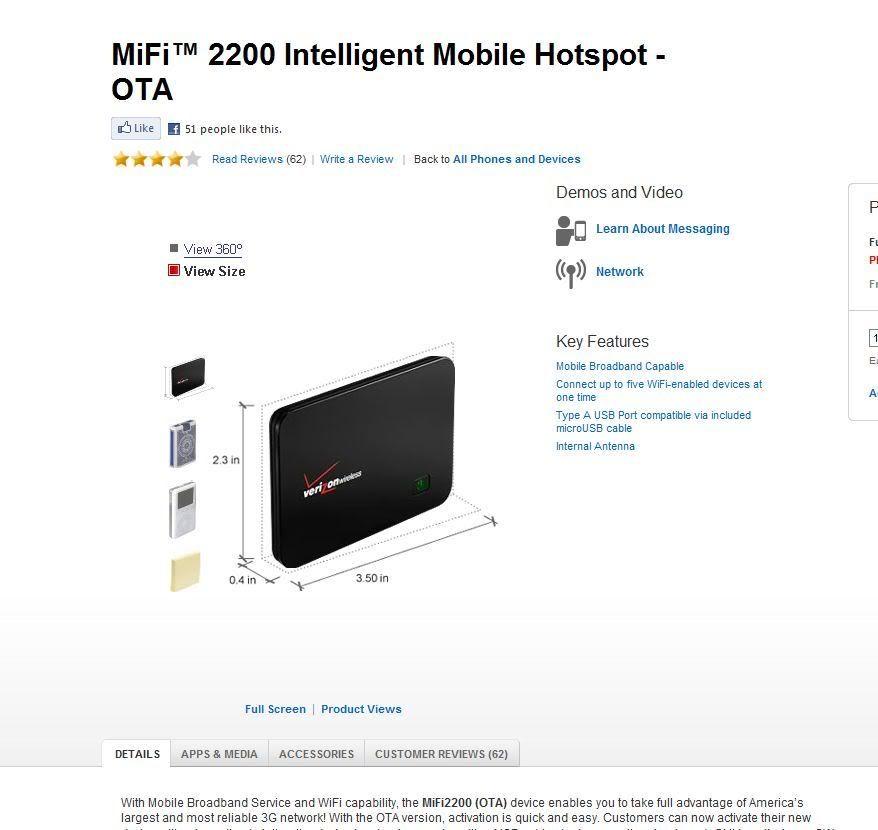
The smartphone didn't work out. Seems that Sprint doesn't offer 3G in my town, so, since my wife got me the tablet, I dropped the smartphone for a wifi hotspot through Verizon! 


So, now I can take my internet with me wherever I go!


And what's even better, I was able to get internet over the last two days when my cable internet connection went out repeatedly!


And it's pretty affordable!

Reply #23 Top

Quoting RedneckDude, reply 22
So, now I can take my internet with me wherever I go!

And what's even better, I was able to get internet over the last two days when my cable internet connection went out repeatedly!


.....you'll fuck it up.................

Reply #24 Top

Quoting yrag, reply 23


Quoting RedneckDude,
reply 22
So, now I can take my internet with me wherever I go!

And what's even better, I was able to get internet over the last two days when my cable internet connection went out repeatedly!


.....you'll fuck it up.................

..l..

Reply #25 Top

So what I am gathering by all this is that it is illegal to use your cell phone as a WiFi hot spot then?

If you're paying for a data plan on the phone, no.

Illegal, no, however it is generally a TOS violation and can get you terminated if you don't have an appropriate plan which allows tethering or hotspot functionality. Some providers prohibit tethering altogether even if you are paying for unlimited data (it makes it much easier to reach "excessive" levels of usage, the consequences of which vary by provider).

Simply having a data plan may or may not include such, so check your TOS before doing this.