Help with desktopX Update 1.99k

Okie...I finally get to use the help forum

When I try to update 1.99i(b) to 1.00k(b) I get this warning
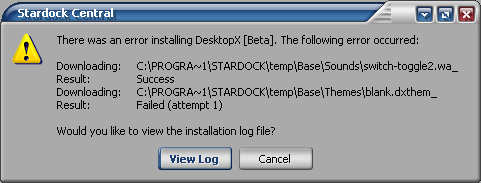
I would post the log but it's so loooooong!
Anyone else having this prob?


[Message Edited]
13,212 views 24 replies
Reply #1 Top
I dunno China, perhaps its something with which server you are downloading from cuz I just updated to 1.99k just fine.

My server is set to US-Atlanta
Reply #2 Top
So is mine. I tried the US California and it does the same thing.

Thanks Hus
Reply #3 Top
Annie- In SDC settings/general check clear temp folder on refresh. Refresh your apps. and restart SDC. Try the install again. It sounds like it's trying to archive your old install...might try and put a check on that archive option and see what that does....


Powered by SkinBrowser!
Reply #4 Top
Okie Doke doing it now
Reply #5 Top
Nope

Thanks Gary
Reply #6 Top
Did you update SDC at the same time?...both updates were available at same time. SDC version should be 1.10d.204


Powered by SkinBrowser!
Reply #7 Top
Yes I did, The funny thing with the SCD update it had me restart my pc....never did that before usually it just restarts SCD

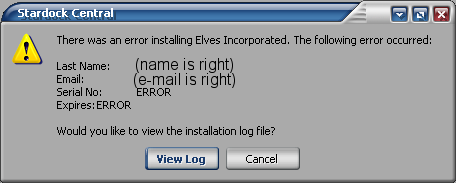
I downloaded XP Augustus with SDC and it went fine. But, when I try to DL Eleves Incorp I get this warning..


Strange
Reply #8 Top
I wonder if I should use SDC to uninstall DTX and try to reinstall it? maybe?


BTW thanks for your help, Gary


[Message Edited]
Reply #9 Top
This SDC install was a re-boot...I don't think SDC installed correctly. The themes d/l would go to established folders while Elves and DX would not. Not sure you shouldn't un-install (re-boot) and re-install SDC (re-boot)....I know it's a pain, but I think your problem is there versus other proggies... You can try the DX un-install route first (save themes and objects folders to temp folder) and delete anything else remaining after un-install. Make sure you uncheck DX 'run on startup' before you do anything and after un-install reboot perform clean install....if it works move saved folders back to DX folder.


Powered by SkinBrowser!
Reply #10 Top
Just what I wanted to do with my Sat night


Thanks for all your help *Smooch*
Reply #11 Top
Hurry up and finish so we can chow down all that tainted food you bought....


Powered by SkinBrowser!
Reply #12 Top


Looks like reinstalling SDC worked!


Thanky


[Message Edited]
Reply #13 Top
....LET"S EAT........


Powered by SkinBrowser!
Reply #14 Top
Beer Is Food Cheers


[Message Edited]
Reply #15 Top


Powered by SkinBrowser!
Reply #16 Top
I spoke to soon when I said it was OK, sorry
when I reinstalled SDC (an old version)...I didn't pay attention to what version of dtx it was installing...It was infact v1.94(b).007

It won't Install the newest v of dtx..
There is definitely something wrong with the new version of SDC for some. >

So I'll just wait till SD fixes it.

Thanks again for your help Gary, Now gimme back that beer
Reply #17 Top
that's a strange last name you have, china
Reply #18 Top
Purrrr... I'am strange!
Reply #19 Top
China : have You tried to clear the C:\Program Files\Stardock\temp folder by hand ? That could lead to success.


Powered by SkinBrowser!
Reply #20 Top
Ok here’s what I did...
I went to SD and did a serial look-up, I downloaded SDC from the link they provided. Installed it, and it said there is a new version of SDC would I like to update, I clicked no. The library loaded and 1.99k was available so I clicked and it downloaded fine ....So it has to be the latest update with SDC

I haven't updated SDC I'm afraid to
Reply #21 Top
I'm afraid to update SDC also......... I've had some weird problems with SDC updates lately, and the "What's New" button on the update prompt is so helpful..... (Data not available)  


Powered by SkinBrowser!
Reply #22 Top
1.10d.204 Build 25
------------------
-Several modifications to text including
Drengin.net tab -> Games, Support toolbar item -> Documentation
(and the item was moved).
-Refresh Application Data -> Check for Application Updates
-Corrected link to sdc version history
-This build does _not_ add the new update prompting features.
-This build will prompt to reboot on installation. We're planning
to change things in the next build so that won't be required as
often in the future. It's due to a locked file.

9/20/03 15:40 221,184 wcfiles.dll
9/20/03 17:43 634,959 sdcentral.exe


Powered by SkinBrowser!
Reply #23 Top
Thanx Gary........... where did you find that info?   /me thinks he'll wait for another update, before he updates.. 


Powered by SkinBrowser!
Reply #24 Top
No problem Randy .SDC/Help/History...I updated SDC and DX2 at same time before I re-booted, so the new DX update installed under old version. From everything I'm hearing this SDC Build is wacked....Hope they update it before there are any other proggie updates. I'm sure Pat will get a handle on it Monday AM


Powered by SkinBrowser!
[Message Edited]