MadDeez MadDeez

Corsair Nova Series SSD

Corsair Nova Series SSD

anyone have one?

I'm seriously considering buying one of these. Anyone out there have one? If yes, what are your impressions and are you happy with it?

131,509 views 44 replies
Reply #26 Top

RAID 0 is the way to go if you don't need redundancy.

Ideally you would use a RAID 0+1 to mirror the data, which could give even higher read performance.

Reply #27 Top

Honestly I would just go for either Raid 1+0 (no, its not same as 0+1), or 5. 5 is better imho.

Reply #28 Top

Windows 7 is about 15Gb and Vista? I'm guessing another 15Gb. Sounds like at a minimum you need 45Gb. Sounds like you can get an SSD with room to grow pretty easily.

No, not by a long shot.

Windows 7 with a typical proggy load [no games though] and 12 gig of ram fills 56 gig [169,944 files].

The root alone is 22.5gig [pagefile.sys and hiberfil.sys].

There ain't no room for another OS, not in my 60gig....;)  [the VMs are on another drive]

Reply #29 Top

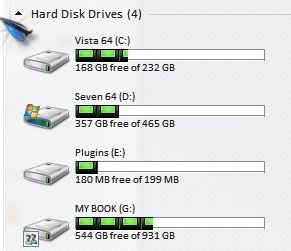
Seven and all that is installed is using 108 GB.

Vista and all that is installed (seperate drive)  using 64 GB.

Reply #30 Top

Quoting Jafo, reply 28

Windows 7 is about 15Gb and Vista? I'm guessing another 15Gb. Sounds like at a minimum you need 45Gb. Sounds like you can get an SSD with room to grow pretty easily.
No, not by a long shot.

Windows 7 with a typical proggy load [no games though] and 12 gig of ram fills 56 gig [169,944 files].

The root alone is 22.5gig [pagefile.sys and hiberfil.sys].

There ain't no room for another OS, not in my 60gig....  [the VMs are on another drive]
I run a 64gb Corsair P64 for my OS drive, but Jafo why the need to hibernate? The biggest speed boost from a ssd comes from boot up times, IMO. Sure PS and games load faster but the real kicker is boot times.

The only thing to remember with a SSD is that writing to the drive will shorten the lifespan, and TRIM or garbage collection is a MUST.

I run just my OS and a few key apps and programs on my ssd the rest goes to one of my Data drives, disableing indexing, hibernate, pagefile.


IDK if I would move to a ssd unless I had windows7 or at least Vista.


RAID0 sucks when you throw a drive though, been there dont that with hdd's. I only RAID1 my Image hdd since there is to much to lose.


Anyway to the OP:


Here is a review of the 128gb Nova from HWC :

http://www.hardwarecanucks.com/forum/hardware-canucks-reviews/30146-corsair-nova-v128-solid-state-drive-review.html

Reply #31 Top

i got the drive but i don't have any use for the pagefile or hibernation bit. those two features of win7 are disabled. if i do decide to use a pagefile, i'll set it up on a wd black drive instead of the ssd. so far, i'm very happy with my ssd. so much so i may get a 128 or 256 ssd as an xmas gift to myself. if i do, it'll have a sandforce controller unless the 128 nova is available at a killer price.

Reply #32 Top

but i don't have any use for the pagefile or hibernation bit. those two features of win7 are disabled. if i do decide to use a pagefile, i'll set it up on a wd black drive instead of the ssd.

Looking into pagefile use and ideal location and you'll find no matter how much ram you have the OS will still 'want' a pagefile...and it's in the root of the OS drive because that's the proper/best place for it.  Disabling and/or moving it won't help your system's function or 'speed'.

but Jafo why the need to hibernate?

My UPS requires it so it can handle controlled shutdowns on blackout....;)

Reply #33 Top

My UPS requires it so it can handle controlled shutdowns on blackout....

Been dancing all around getting one of those for years now. Is it that much of a help?


Reply #34 Top

Been dancing all around getting one of those for years now. Is it that much of a help?

Protects you from spikes.....and WHEN you are in the midst of doing something 'important' and your power goes out....you have a few minutes to sort it out and save what you're doing.

Might not happen often....but once is enough to justify its use. [happened to me more than once]...;)

Reply #35 Top

Been googling and I just can't afford an SSD right now. I would need at least a 128GB minimum for 7, 256 gb preferable. Vista would be ok with it's old drive, since I mainly only test on it.


Also, it seems most SSDs are 2.5.  Why is that? 3.5 is what fits my bays.

Reply #36 Top

Quoting Jafo, reply 32

but i don't have any use for the pagefile or hibernation bit. those two features of win7 are disabled. if i do decide to use a pagefile, i'll set it up on a wd black drive instead of the ssd.
Looking into pagefile use and ideal location and you'll find no matter how much ram you have the OS will still 'want' a pagefile...and it's in the root of the OS drive because that's the proper/best place for it.  Disabling and/or moving it won't help your system's function or 'speed'.


but Jafo why the need to hibernate?
My UPS requires it so it can handle controlled shutdowns on blackout....
Indeed the performance isnt a issue, my issue with pagefile is wear, since it is constantly writing to the drive.


Yeah my UPS just shut's down my system rather than hibernates.

Reply #37 Top

Quoting RedneckDude, reply 33

My UPS requires it so it can handle controlled shutdowns on blackout....

Been dancing all around getting one of those for years now. Is it that much of a help?
 

Like Jafo, saved my bacon more than once! Imagine having a ton of projects open at the same time, which you haven't saved yet for some reason, and the power goes out... Or you are in the middle of a critical BIOS update and the power goes out... or the cleaning lady decides to plug one too many appliances and blows the fuse box. If you're in a rural area with lots of power spikes and brownouts, they're also great to protect your equipment and keep it running smoothly.

It's kind of like an insurance: most of the time an UPS sits there doing nothing, but then, if something happens, you are really glad you have one.

If you decide to get one, go APC, they're the best for UPSs.

Reply #38 Top

Quoting RedneckDude, reply 35
Also, it seems most SSDs are 2.5.  Why is that? 3.5 is what fits my bays.

They're just a PCB with a bunch of chips, so minimum size is not really an issue. Also, laptops use 2.5 hard disks, therefore they can be used on both desktops and laptops.

As far as I know, they also come with 2.5 to 3.5 adapters. At least the Intels did.

Reply #39 Top

or the cleaning lady decides to plug one too many appliances and blows the fuse box.

As if I had a cleaning lady.


Thanks, Jorge.

Reply #40 Top

Also, it seems most SSDs are 2.5. Why is that? 3.5 is what fits my bays.

Form-factor to suit laptop drives...;)

Reply #41 Top

RAID0 sucks when you throw a drive though, been there dont that with hdd's.

all a matter of your setup.  I use raid 0 but backup my data regularly, so if a drive blows out, then that's that.  Obviously, without a good backup strategy, there is risk (even if you aren't using raid 0).  But yeah, always sucks to lose a drive.


Reply #42 Top

Quoting Jafo, reply 40

Also, it seems most SSDs are 2.5. Why is that? 3.5 is what fits my bays.


Form-factor to suit laptop drives...

Right, but it will work in a desktop? Good to know, because there seems to be more of them than 3.5s.

Reply #43 Top

Quoting OMG_pacov, reply 41
RAID0 sucks when you throw a drive though, been there dont that with hdd's.


all a matter of your setup.  I use raid 0 but backup my data regularly, so if a drive blows out, then that's that.  Obviously, without a good backup strategy, there is risk (even if you aren't using raid 0).  But yeah, always sucks to lose a drive.

Unlike hard disk drives, SSDs have no moving parts, just electronics, so they should be an order of magnitude more reliable. Of course, FLASH memory does have one MAJOR drawback: it can only be written to so many times (which is why the controller and algorithms used in an SSD are so important, as they spread write operations, minimizing the number of times a single flash cell is written to during the life of the drive).

On the other hand, from what I read and unlike a hard disk, a SSD at the end of its life will not become inaccessible, causing you to lose data: instead, the data in it will just become read-only.

Either way, as so many people have found out the hard way, regular (automated if possible) full backups are a must. Otherwise it's not a question of IF you lose data, but WHEN. And with the price of external 1 TB hard disk drives being so low, there is no excuse not to backup your data (you can even automate backups and make mirror images of your hard disk(s), so you can be up and running again in the minimum amount of time, using software like Acronis True Image).

Here backups are automatically made to two external hard disk drives in alternate fashion, keeping multiple versions up to 3 months old around, and, once a week, critical data is backed up to an offsite location via FTP. All without me having to worry about a thing (except verify from time to time that backups are indeed being performed as they should).

Reply #44 Top

I have a 256 GB Crucial SSD and I'm quite pleased with it. If you want some sick speeds from your SSD drives, it's better to get several smaller ones (40-60 GB) and merge them in the RAID field. This is where they truly shine. OFC with the number of disks in the RAID increases chance of disk failure and losing ALL the date in those disks. You have some silly extreme tests of it in youtube : http://www.youtube.com/watch?v=96dWOEa4Djs