Uploading Skins/Themes to WinCustomize 2010

The is the next article in user requested tutorials.  With the new site brings some changes to the upload process, so here is a step-by-step guide on how to upload your skin submissions to WinCustomize.

Tips before uploading:

  • Make sure if you have multiple skins or files, to place them in a .zip file.  The .rar type files are not accepted.  If you need a free .zip utility I recommend IZArc.
  • Similar skins such as a slight variation in wallpapers must be bundled into one upload. 
  • Submissions must be completely your own work.  If you are using another authors work you must include permissions in the .zip file. 
  • WinCustomize has a moderated gallery.  Not all works will make it into the public gallery.
  • Please read the Upload Guidelines for more specific rules regarding uploading.

Once your upload is ready for submissions, head over to this link - https://www.wincustomize.com/explore/all/new

8-10-2010 10-15-09 AM

The drop-down menu has every available gallery on WinCustomize.  Just select which gallery you want to upload, hit submit and you will be taken to the next page.

The next screen is where you will enter the information and upload the actual files.  For this example I am uploading to the WindowBlinds gallery.  Start by entering the name of the skin, category, description, and tags.  Depending on which gallery you upload to, there might be additional options.  As an example, in the WB upload window you have the option to check “includes Vista skin elements”, which will indicate the skin is ready for Vista.  These options will be updated soon to reflect Windows 7.

8-10-2010 10-17-40 AM

Next you will want to upload the preview image and the actual skins files.  Preview sizes will vary depending on what type of skin you are uploading.  More information can be found in the Upload Guidelines, but regardless the image cannot exceed 2mb and should be a .jpg file. 

Just hit Browse and a dialog box will come up giving you the ability to select the files for upload.  After uploading the image file, you can choose a region to represent the thumbnail view of the skin.

8-10-2010 10-23-11 AM
After the preview image is selected, you can upload your skin file.  Depending on the gallery you are uploading to, .zip files will always be accepted and each gallery should accept the file extension of the skin being uploaded.  After your files are selected, just read and select the confirmation and hit Submit.

Your skin will now be uploaded, and you should see a confirmation!  Remember that users who are ranked below Journeyman level will have their submissions sent to moderation, which can take several days to be approved.

98,633 views 27 replies
Reply #1 Top

Remember that users who are ranked below Journeyman and below will have their submissions sent to moderation, which can take several days to be approved.

I think this was a very good thing to point out.

Thanks for the tutorial! :thumbsup:

Reply #2 Top

Fixed. :)

Reply #3 Top

I read how it's suppose to work and haven't had luck with adding a link. Sample below is how I think it's suppose to go in the description you write and this is only an example but would like to know if it's the correct way and if now please give an example. I think where I add the link it won't show the link only the word link.


Some new docks for you to enjoy. The wallpaper was made by whoever and can be found here https://www.wincustomize.com/explore/all/new


Is this the correct way?

Reply #4 Top

users who are ranked below Journeyman and below

I'm no Webster to be certain, but that just doesn't look right to me.

Reply #5 Top

Fixed again.  :D

Reply #6 Top

Is this the correct way?
Looks right. Be sure to leave at least one space between the last word of your sentence and the link address.

Just some general info:

If you mess something up in the text, you can always edit it after the upload. As long as you only edit the text, and do not upload any file or screenshot, the change will take effect in less than a minute, and will not have to go through moderation again.

Reply #7 Top

If you mess something up in the text, you can always edit it after the upload. As long as you only edit the text, and do not upload any file or screenshot, the change will take effect in less than a minute, and will not have to go through moderation again.

Unless it's a masterskin.....then you're screwed ;)

Reply #8 Top

It confused me at first because I saw the new one for the first time. The preview or rather thumbnail...the region to represent the image....I expected some thing to happen and when ir didn't I kind of clicked on it more than once. Anyway...got my new wall in and am waiting with baited breath to see what'll happen to it. Whether or not it makes it to the gallery is neither here nor there. It being able to do it again that counts. You guys continue to rock at WC.

Reply #9 Top

Thanks ID. Good tut. 5*

Reply #10 Top

Quoting Xiandi, reply 6
Is this the correct way? Looks right. Be sure to leave at least one space between the last word of your sentence and the link address.

Just some general info:

If you mess something up in the text, you can always edit it after the upload. As long as you only edit the text, and do not upload any file or screenshot, the change will take effect in less than a minute, and will not have to go through moderation again.


Thank You very much


Unless it's a masterskin.....then you're screwed


HaHa. No worries for me Tim.

Reply #11 Top

I'm getting ready to upload and previously have experienced issues using IE8 and have had to use some other browser. I wasn't getting the buttons used to upload the files?

Anybody else?

Reply #12 Top

That button needs to have flash installed and inabled for you to use IE8

Reply #13 Top

Similar skins such as a slight variation in wallpapers must be bundled into one upload.

Please, please PLEASE get this point across to all those silly wankers who clutter up the ObjectDock gallery with 10-20 (or more) icons that SHOULD all be in one upload instead of uploading each one as a separate file.  That goes for the Icon gallery too.  ;P

Reply #14 Top

That button needs to have flash installed and inabled for you to use IE8

next time I will enable flash and close/open IE8, see if that works, thanks.

*edit* it did work, much appreciated.

Reply #15 Top

good tut...it's a pretty friendly process...


Depending on the gallery you are uploading to, .zip files will always be accepted and each gallery should accept the file extension of the skin being uploaded.


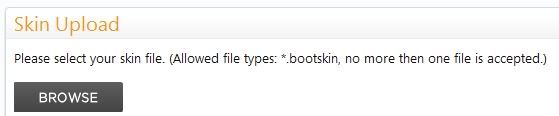
zip files somehow got left out in the new site for XP Bootskins.... and needs to be put back for multiple size boots and diff colours etc... to be uploaded together... I tried a previous suggestion to get around the problem but it didn't work..  need the zip..

while they're at it....they could change the 'then' to 'than' as well... ;P

Reply #16 Top

Similar skins such as a slight variation in wallpapers must be bundled into one upload.

Please, please PLEASE get this point across to all those silly wankers who clutter up the ObjectDock gallery with 10-20 (or more) icons that SHOULD all be in one upload instead of uploading each one as a separate file. That goes for the Icon gallery too.

Been down that road with this requests years ago and it went nowhere.  :\ I also felt that icons/pngs should be in the Misc Icons gallery and the OD gallery should just be backgrounds....that went over like a fart in a windstorm as well. :-"

Reply #17 Top

that went over like a fart in a windstorm as well.

Never heard that one! :rofl: :rofl: :rofl:

Reply #18 Top

Quoting Mirsguy, reply 17

that went over like a fart in a windstorm as well.


Never heard that one!
Try standing downwind next time. o_O 8O :puke:

Reply #19 Top

Try standing downwind next time.

Yeah, then you'll get the full sensory experience. :puke:

Reply #20 Top

I tried to upload already twice, and unfortunately my screenshots was not uploaded.

"Wallpaper needs obscured more" , was the explanation, anybody know what this means?

thx

Reply #21 Top

Quoting PianoArt, reply 20
I tried to upload already twice, and unfortunately my screenshots was not uploaded.

"Wallpaper needs obscured more" , was the explanation, anybody know what this means?

thx

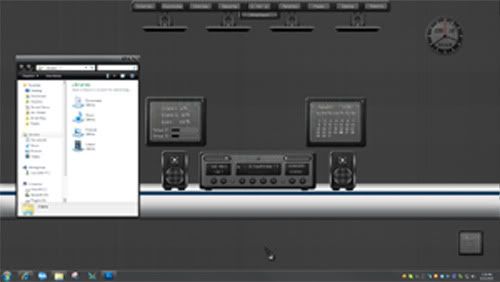
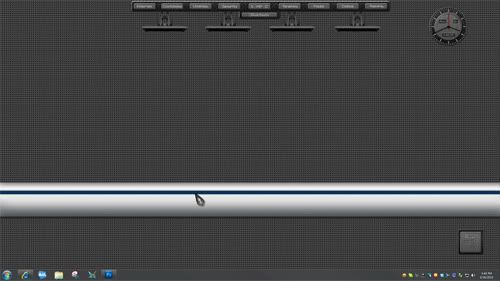
It means you need to "cover" the wallpaper in such a way that it can't be downloaded and used solely as a wallpaper. This protects the rights of the wallpaper author.

Reply #22 Top

Quoting RedneckDude, reply 21

Quoting PianoArt, reply 20I tried to upload already twice, and unfortunately my screenshots was not uploaded.

"Wallpaper needs obscured more" , was the explanation, anybody know what this means?

thx

It means you need to "cover" the wallpaper in such a way that it can't be downloaded and used solely as a wallpaper. This protects the rights of the wallpaper author.

Hm...wallpaper that i used in screenshot can be downloaded on the link that i have wrote in description, and screenshot "cover" whole wallpaper.

Screenshots of my desktop that i wanted to upload (fn+print) was the screenshots not the wallpaper, so i don´t understand what you mean.

Thx for answering me, pls explain me more.

Reply #23 Top

This is "covered".


This isn't.

Reply #24 Top

Aha, ok...... Now it is clear.

Thank you very much RedneckDude for the effort. :thumbsup:

+1 Loading…
Reply #25 Top

Quoting PianoArt, reply 24
Aha, ok...... Now it is clear.

Thank you very much RedneckDude for the effort.

No problem. We are all here for each other, are we not?  :grin:


I believe the idea is to cover enough of the wall so the average user can't download the screenshot, crop it, and use the wall without downloading it from the author.