WinCustomize personal pages have been updated

I have updated the WinCustomize personal pages so that the design matches the new WinCustomize design.  I have also fixed some bugs, increased performance, and all-around cleaned it up. 

FYI, if you do not already have a personal page, you will not be able to create one for the time being.  We are working on a "Settings" page of some kind to handle all of that stuff, which we will release in the near future.

Please report any bugs you may find here or in this forum.  Here is a personal page as an example: http://frogboy.wincustomize.com/

Bara

23,490 views 39 replies
Reply #1 Top

extremely slow response getting there for me. Also tried the link you provided for frogboy's site. very slow to get there.

Reply #2 Top

FYI, if you do not already have a personal page, you will not be able to create one for the time being.

So, for those of us who already have one, can we edit the existing content?

Reply #3 Top

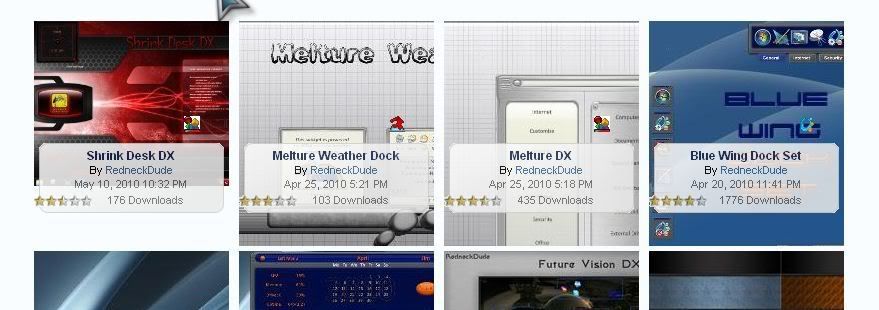
Using the link you provided as an example,in the "Gallery" tab the skin descriptions are partially obscuring the thumbnails and the ratings stars are hanging off of the left edge of the box. Also the filter (View:) is mostly covered by the "page 1 of 12" graphic. It looks the same on my gallery page.

Win7 64 bit and IE8

Reply #4 Top

Looks beeeeeeutiful!!!  Thank you Bara!!!!  B) k6 :beer: :pizza:    ...hope  you like pizza i stole it from HG!!!! :rofl:

Reply #5 Top

Looks nice, but I get this when selecting the photo tab:-


Server Error in '/' Application.

Runtime Error

Description: An application error occurred on the server. The current custom error settings for this application prevent the details of the application error from being viewed remotely (for security reasons). It could, however, be viewed by browsers running on the local server machine.

Details: To enable the details of this specific error message to be viewable on remote machines, please create a <customErrors> tag within a "web.config" configuration file located in the root directory of the current web application. This <customErrors> tag should then have its "mode" attribute set to "Off".

<!-- Web.Config Configuration File -->

<configuration>
<system.web>
<customErrors mode="Off"/>
</system.web>
</configuration>


Notes: The current error page you are seeing can be replaced by a custom error page by modifying the "defaultRedirect" attribute of the application's <customErrors> configuration tag to point to a custom error page URL.

<!-- Web.Config Configuration File -->

<configuration>
<system.web>
<customErrors mode="RemoteOnly" defaultRedirect="mycustompage.htm"/>
</system.web>
</configuration>

Reply #6 Top

All looks well with my personal page.  Thanks for the update.

Is an option being considered that would allow the user to change background colors and text?   

Reply #7 Top

Everything seems ok for me, thank you for this work. 5*

Reply #8 Top

Quoting Phoon, reply 1
extremely slow response getting there for me. Also tried the link you provided for frogboy's site. very slow to get there.

It will be slow for the first few requests, but it should get faster as you click around.  The Activity tab may be very slow due to the amount of querying it's doing.

Quoting fr4nk3nstein, reply 2

quoting postFYI, if you do not already have a personal page, you will not be able to create one for the time being.

So, for those of us who already have one, can we edit the existing content?

Depends, what content are you looking to modify?  There is no "Settings" page yet but it will be coming later.

Quoting Wizard1956, reply 3
Using the link you provided as an example,in the "Gallery" tab the skin descriptions are partially obscuring the thumbnails and the ratings stars are hanging off of the left edge of the box. Also the filter (View:) is mostly covered by the "page 1 of 12" graphic. It looks the same on my gallery page.

Win7 64 bit and IE8

Simple CSS issue, will fix it with the next update.  The descriptions are supposed to obscure the thumbnails partially.  We may update that page again and make it look like the existing WinCustomize gallery pages (eg: https://www.wincustomize.com/explore/windowblinds)

Quoting Philly0381, reply 6
All looks well with my personal page.  Thanks for the update.

Is an option being considered that would allow the user to change background colors and text?   

Probably not.  I'd prefer to keep a consistent look and feel to the site.

Quoting Fuzzy, reply 5
Looks nice, but I get this when selecting the photo tab:-
Server Error in '/' Application.

Runtime Error
Description: An application error occurred on the server. The current custom error settings for this application prevent the details of the application error from being viewed remotely (for security reasons). It could, however, be viewed by browsers running on the local server machine.

Details: To enable the details of this specific error message to be viewable on remote machines, please create a <customErrors> tag within a "web.config" configuration file located in the root directory of the current web application. This <customErrors> tag should then have its "mode" attribute set to "Off".

<!-- Web.Config Configuration File -->

<configuration>
<system.web>
<customErrors mode="Off"/>
</system.web>
</configuration>

Notes: The current error page you are seeing can be replaced by a custom error page by modifying the "defaultRedirect" attribute of the application's <customErrors> configuration tag to point to a custom error page URL.

<!-- Web.Config Configuration File -->

<configuration>
<system.web>
<customErrors mode="RemoteOnly" defaultRedirect="mycustompage.htm"/>
</system.web>
</configuration>

Is anyone else having this problem?

Bara

Reply #9 Top

works great and looks fine. good job, ...but where is the "My Settings" Option??

Reply #10 Top

Not bad work.  fast and looks good.

However . . . 

The top row of menus are not actign like they should though.  On mouseover shouldn't we see a menu?

Video here: http://screencast.com/t/YTA1NmRmYT

Reply #11 Top

Oh well, being able to change from all the white background would be a nice option on the site.  Maybe the next time. :sun:

Reply #12 Top

Quoting Onklifiziert, reply 9
works great and looks fine. good job, ...but where is the "My Settings" Option??

There are no settings yet.  They will be implemented at a later date.

Quoting Zubaz, reply 10
Not bad work.  fast and looks good.

However . . . 

The top row of menus are not actign like they should though.  On mouseover shouldn't we see a menu?

Video here: http://screencast.com/t/YTA1NmRmYT

Hmm... I'm not really sure why that's happening.  I'll dig a little deeper and get back to you.

Bara

Reply #13 Top

the "Gallery" tab the skin descriptions are partially obscuring the thumbnails
    I have this too.

It will be slow for the first few requests, but it should get faster as you click around.
    Still very slow.

but I get this when selecting the photo tab:-
  I also have what Fuzzy has. 


Reply #14 Top

Is anyone else having this problem?

Yes,I get the same error on my site when clicking the Photos tab.

Reply #15 Top

I wonder if the problems might be because of the browser used. 

I'm using IE 8 on Win 7 Home Premium 64 bit and all tabs work. :sun:

Reply #16 Top

OK, My 2 cents.  A slight overlap is not what I'm getting.

The far left shot is too much of an overlap....it covers 1/4 of my preview.

Also, the star rating is hanging off it's background.

Reply #17 Top

I get a photos tab, and it takes me to a photos page, which has no photos and no apparent means to upload any.

Reply #18 Top

log in does not follow you to these sites. You have to log in again.

Reply #19 Top

@Philly

Win7 64 bit and IE8


Reply #20 Top

I wonder if the problems might be because of the browser used.
   I was on FireFox  3.6.3  , now in Internet Explorer 8. The only difference I have is that the pages load faster.  The tabs the same as RedneckDudesand Wiz's.  There is only an error for the photos page.

Reply #21 Top

Quoting Wizard1956, reply 3
Using the link you provided as an example,in the "Gallery" tab the skin descriptions are partially obscuring the thumbnails and the ratings stars are hanging off of the left edge of the box. Also the filter (View:) is mostly covered by the "page 1 of 12" graphic. It looks the same on my gallery page.

Win7 64 bit and IE8

Quoting Fuzzy, reply 5
Looks nice, but I get this when selecting the photo tab:-

Server Error in '/' Application.

Runtime Error
Description: An application error occurred on the server. The current custom error settings for this application prevent the details of the application error from being viewed remotely (for security reasons). It could, however, be viewed by browsers running on the local server machine.

Details: To enable the details of this specific error message to be viewable on remote machines, please create a <customErrors> tag within a "web.config" configuration file located in the root directory of the current web application. This <customErrors> tag should then have its "mode" attribute set to "Off".

<!-- Web.Config Configuration File -->

<configuration>
<system.web>
<customErrors mode="Off"/>
</system.web>
</configuration>

Notes: The current error page you are seeing can be replaced by a custom error page by modifying the "defaultRedirect" attribute of the application's <customErrors> configuration tag to point to a custom error page URL.

<!-- Web.Config Configuration File -->

<configuration>
<system.web>
<customErrors mode="RemoteOnly" defaultRedirect="mycustompage.htm"/>
</system.web>
</configuration>

Quoting Zubaz, reply 10
Not bad work.  fast and looks good.

However . . . 

The top row of menus are not actign like they should though.  On mouseover shouldn't we see a menu?

Video here: http://screencast.com/t/YTA1NmRmYT

Quoting RedneckDude, reply 16
OK, My 2 cents.  A slight overlap is not what I'm getting.

The far left shot is too much of an overlap....it covers 1/4 of my preview.

Also, the star rating is hanging off it's background.

Reduced 68%Original 879 x 310

Fixed :)

Quoting RedneckDude, reply 17
I get a photos tab, and it takes me to a photos page, which has no photos and no apparent means to upload any.

I'm not sure what we're going to do with the Photos tab.  If we develop adding photos in the settings pages, we'll keep the tab up.  Otherwise we'll likely just remove it.

Quoting Phoon, reply 18
log in does not follow you to these sites. You have to log in again.

Hmm... You may have to clear your cookies in order for them all to be shared properly.

Bara

+1 Loading…
Reply #22 Top

Everything working well here. proper job, thanks.

Reply #23 Top

Thank you so much for this lovely update. I have missed my personal page soooooooo much. Great job!:meow: <3 5* |-)

Reply #24 Top

Quoting Wizard1956, reply 19
@Philly


Win7 64 bit and IE8


As mentioned above you might try clearing out cookies and browser histroy and see if that helps.  Shouldn't have to reboot but you could try that also.

Reply #25 Top

Quoting Buttr_fly, reply 25
Really beautifull, Nice work.  Looks simple and fonctional. 

But there is one thing, Impulse does not recognize my Wincusomise nor my Stardock subscription no. nor the serial for Object Desktop Ultimate which starts with ODxxxxxxxxxx?

I don't know if there is a link to this page, was just ondering, oh and me also it is really slow! but I know you will fix it soon.  just wanted to answer your question about it.

Please contact support at [email protected] for help with your issue.

Bara

+1 Loading…