
I.R. Brainiac I.R. Brainiac

XP back in Vista and 7 II

XP back in Vista and 7 II

take that b***h...

A followup to my wildly popular <_< Put some XP back in Vista and Win7 post  https://forums.wincustomize.com/378472/page/1/#replies

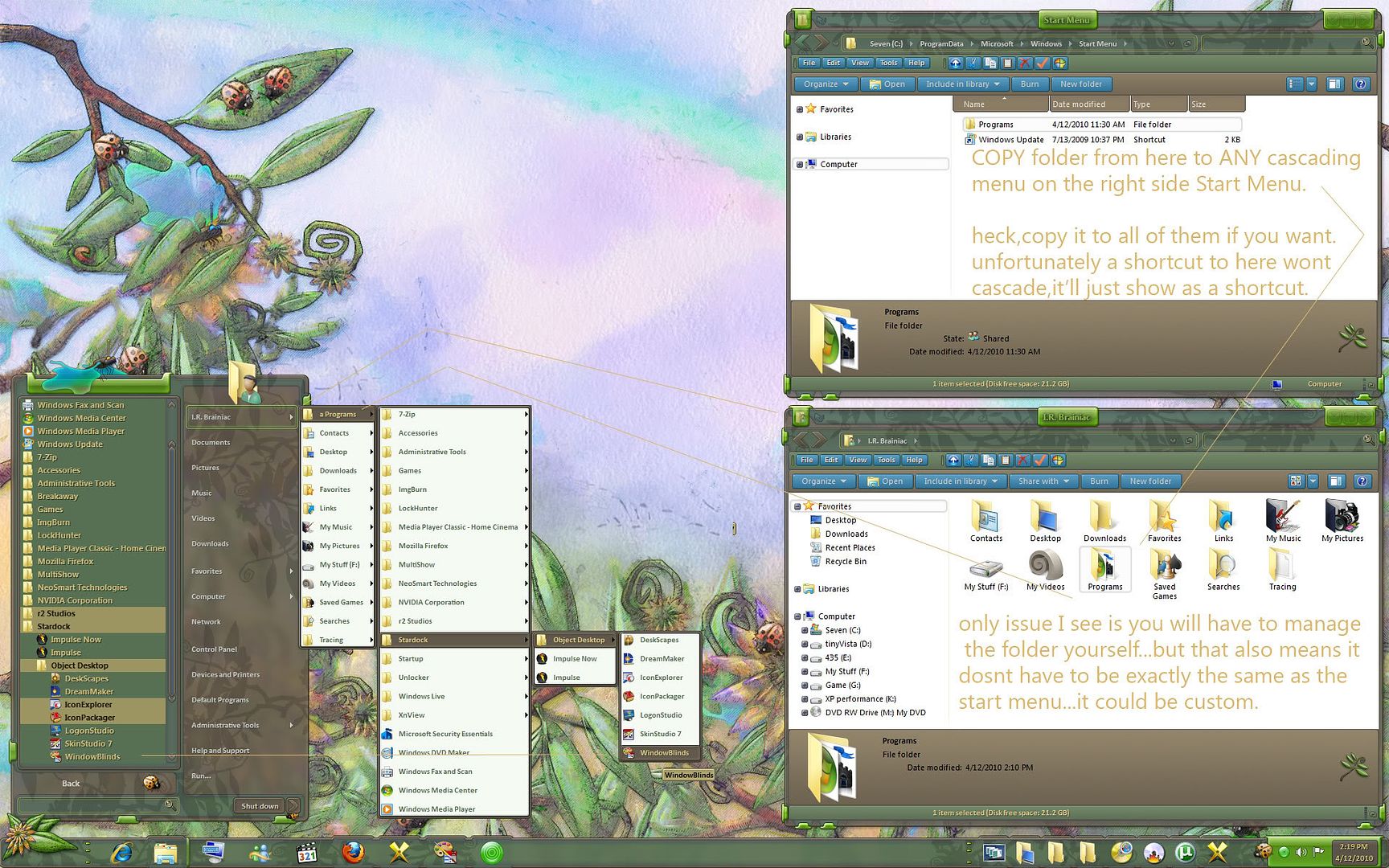
Here is another cute one regarding cascading all programs menu like in XP.

Some of us miss that in Vista and Win7...tho I've gotten used to a scrolling all programs menu I dont necessarily like it.

So look at the picture,its pretty simple to do...only requires one cascading menu on the right side of the start menu.Administrative tools will do as well as what I picked.

The folder has to be COPIED...not just linked to or shortcutted...or it wont cascade open.(unless I did something wrong...maybe you can get a shortcut/link version to cascade...if you do,let us know)

Thats the only problem...the copied one will not change as you install or uninstall programs...tho I bet there is a way to make that happen. The plus part of that is only the programs you want to see could be in there and ALL of them in the actual more programs.

I renamed mine to 'a Programs' to get it to sort to the top of the menu. 
 

Of course some nimrod will come along to say how much better the new way is...but thats not the point is it?I aint telling you that you have to do it this way...I just wanted to show you it COULD be done. :grin:

144,766 views 28 replies
Reply #26 Top

Quoting I.R., reply 23
I dont think thats the kind of move he meant but tweaks is tweaks.

I've used that tweak before,adding move and copy to into my right-click menus...but me and some others had some problem with it...slowed system or something I cant remember.

I ended up just putting those buttons on the toolbar.(plus in XP there are in the taskpane already)

Not saying dont try it,but be warned it might...cause an issue...that I cant remember...haha.

Dont let me stop you from posting more tricks Wizard...or would they be SPELLS?


Dunno if that was the "move" he meant, but here is one that I promise won't slow your system down or cause any problems. It too, like Wiz's suggestion, adds send to-to your context menu, but this one is programmable and you can add fixed destinations, you can copy to, or move to, and there are other tweaks, all relating to moving or copying files and folders. The other program has various unreated tweaks, and the version I used worked some, then didn't. And some of the tweaks didn't work at all. Like the one that allows 32 bit OS to use 4GB of ram...yeah, right...lol.


Anyway, I have used this on xp, vista and 7, and have used it for years with no ill effects.

It is called.....wait for it......


Send to 1.6. And it is the handiest free program I have ever used.  It's like the default send to command on steroids! :D


http://www.trogsoft.com/downloads/get.php?6

Reply #27 Top

Note: all Links I give will open in a new window  for me a new tab you too if you have it the same way..


I've used that tweak before,adding move and copy to into my right-click menus...but me and some others had some problem with it...slowed system or something I cant remember.

I like the move to / Copy to reg hack I had in XP so I tried it when I got Vista and then 7 and it works

here it is if anyone is entreated in it. 

Windows Registry Editor Version 5.00

[HKEY_CLASSES_ROOT\AllFilesystemObjects\shellex\ContextMenuHandlers]

[HKEY_CLASSES_ROOT\AllFilesystemObjects\shellex\ContextMenuHandlers\Copy To]
@="{C2FBB630-2971-11D1-A18C-00C04FD75D13}"

[HKEY_CLASSES_ROOT\AllFilesystemObjects\shellex\ContextMenuHandlers\Move To]
@="{C2FBB631-2971-11D1-A18C-00C04FD75D13}"

[HKEY_CLASSES_ROOT\AllFilesystemObjects\shellex\ContextMenuHandlers\Send To]
@="{7BA4C740-9E81-11CF-99D3-00AA004AE837}"

Note just open a text doc like note pad and copy all from bold to bold then save it as a .reg

then click on it to add to reg

I can also tell you how to do it Manually to  

Thats some good detective work there DC...feels good to take back another piece of control from MS.

yes it dose MS says 7 is my way so I try too make it my way .. now if I could find a way to get the SEND button back in MSN Messenger

with out taking my hand off the mouse the hit ENTER


command bar

I tried to find some info on it but all I find is what I already know as to adding or removing items from it 

I.R I did find this don't know if that is even close to what you want

http://www.microeye.com/resources/itemsCB.htm


I.R this might help with the Links or steer you in the direction you want

The Favorites bar, previously known as the Links toolbar,

http://social.answers.microsoft.com/Forums/en-US/InternetExplorer/thread/03dd441d-1cac-4d11-8e5a-ec85bc519c91 


@ Wizard1956

thanks for the info But I.R is right .. thank for helping none the less


Reply #28 Top

I'll probably give Send To a try...sounds good.

now if I could find a way to get the SEND button back in MSN Messenger
Yeah,nobody EVER used that...right? X|


The Favorites bar, previously known as the Links toolbar,
I meant the explorer toolbar in Vista and 7...I finally find a use for LINKS and a way to manage the button size...and its no longer in the OS.(bet it is somewhere tho)