Graphics card - Snap crackle

I just installed an EVGA 9800GT and its giving me some snap, crackle, pop on the sound. Its not an extreme case, but its definitely there, and its definitely because of the card. Its also annoying. :)

When I tested the problem on a fresh install of Win 7 64-Bit, the video card driver wasn't listed in Windows upgrade like it was with my old card, so I went and downloaded it from the NVidia website cause I wanted to get the latest one. Right after the install, the pop and crackling began.

I'm not all that sure what it is yet. If anyone has any ideas that might fix it I'm all ears.

 
72,680 views 24 replies
Reply #1 Top

Services/ Disable: Nvidia Stereoscopic 3D

Reboot

Reply #2 Top

It could also be a resource conflict, such as the video card sharing the same IRQ with the sound card.

If you have a PCI sound card, perhaps switching slots would clear the problem - if yrag's suggestion doesn't help.

Reply #3 Top

- if yrag's suggestion doesn't help.

That'd likely be a first....;)

Reply #4 Top

Hey.

There's always a first time. No one's perfect.

I was just chiming in from my own experiences.:blush:

Reply #5 Top

Yrag, thanks for the suggestion... it sounded promising, but no luck, still crackling and popping. I'm using the boards integrated sound and it doesnt start acting up until I install the NVIDIA Driver, so I'm not sure. I was thinking of trying a dedicated soundcard.

Reply #6 Top

What board are you using?

Reply #7 Top

nforce 4 chipset? If so, go to Realtek and get the latest 64 bit sound card drivers.

It worked for me.

Reply #8 Top

motherboard is a FoxConn, G33M (I think). The chipset is Intel G33 Express "Bearlake" (ICH9). That came stock with this Dell Vostro 200 Mini Tower. I never did install the Realtek audio drivers in this install, but I thought those were optional, and only if you wanted 5.1 sound. The last time I tried installing the 32-bit Realtek driver in Win 7 64-bit it didnt work out so well.

Reply #9 Top

Realtek has a 64 bit version also

Reply #10 Top

Realtek  drivers- http://tinyurl.com/4t4b7p

That's not the problem.


Control Panel/ System/ Advanced System Settings/ Hardware/ Device Installation Settings - check 'No'.

Turn off Windows Update Auto install.


Nvidia- http://tinyurl.com/kocrp7 download 186.18.

Uninstall 190.38. Reboot


Install: 186.18. Reboot


Open Windows Update, check for Updates and Hide Nvidia Update.

Change the Update and Auto installation back to their original settings. 

http://www.evga.com/precision/  Download (create an account) and install. You'll have to trust me on this one..... you'll like it. 

+1 Loading…
Reply #11 Top

Yrags right about uninstalling 190.38, they suck.

I spent last weekend trying to repair the damage they did to my Vista Ultimate system. I was getting continual BSODs until I finally got them uninstalled.

I also agree on the EVGA precision control panel. I like to crank the fan up to the max to aid in cooling my card.


Control Panel/ System/ Advanced System Settings/ Hardware/ Device Installation Settings - check 'No'.

Turn off Windows Update Auto install.

I wish I knew about this last weekend. I bet this one step would have saved me the trouble of getting rid of the nvcpl.dll missing error.

Reply #12 Top

Alright, :) I rolled back the Nvidia driver to the older 186.18 version as suggested and then I managed to find a working Realtek driver for my onboard ALC888 HD Audio.

http://www.esoft.web.id/drivers/realtek-high-definition-audio-driver-2-20-now-compatible-windows-7.html

It took a little voodoo to find and install the Realtek driver, but its in now and i have 5.1 sound. It's definitley a whole lot better sounding, but i'm not sure if the pop is totally gone. If it isn't its definitley much better. I'll have to use it for a while to know for sure. :) One weird thing about this is Windows Update.. It never suggests any updates for this card as it did with my older card.

Reply #13 Top

Try a BIOs update? See if you can force IRQs to change in the BIOS.

Reply #14 Top

Try a BIOS update? See if you can force IRQs to change in the BIOS.

Reply #15 Top

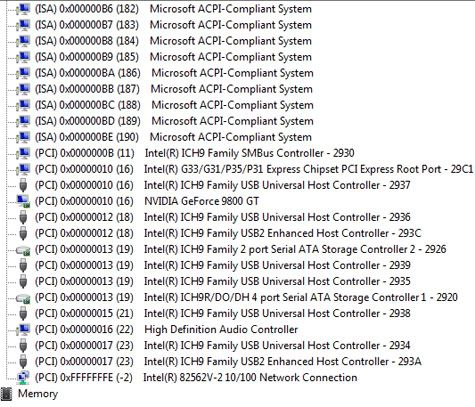
Drat, its a very subtle case, but its still there. Every once and a while, the sound will stutter. I ordered a dedicated sound card from newegg and when it comes on Teusday I will disable the built-in sound and try it in both PCI slots. if that doesnt clear it up I will try a BIOS upgrade. I'm not seeing any conflicts in the IRQ but I'm not an expert in it. This is what it looks like in the device manager.

-

Reply #16 Top

Few things to try:

Lower your volume in the Windows volume control.

Lower the bass/treble settings in the Advanced part of the volume control.

Reason being, if your audio volume is multiplied by the Windows volume and multiplied at specific frequencies for the bass and treble boost, the audio can be distorted sufficiently for glitches to be introduced into the output.  These glitches therefore sound like snaps or pops.  It's also possible for the software to introduce these glitches by not mixing the source sounds properly, or mixing too many sounds at once.


Reply #17 Top

It's an APCI system.... IRQ's are irrelevant.

This is a 2 year old system...if the sound problem just started, it has nothing to do with the bios.
 
I gave the link to the correct Realtek drivers in #10....I have no idea why you went on a search and destroy mission for the wrong drivers (not that I think it matters as it pertains to your problem).

Getting rid of the 190.38 drivers is a plus for anyone's system, but it runs off the Northbridge, so I never thought  that it was the cause and cure (other than you said it started after their installation).My bigger concern was that 300w PSU you undoubtedly have.That alone could be the 'bacio della morte'.

The PCI card you ordered will be running off the same bridge as the HD chip (as well as LAN, USB and ATA...the 'problem' could be in any of them). Unless the Realtek chip is defective, your chances of encountering the same problem are relatively good. The chances of a defective Realtek chip are close to non-existent. The chances of an under-powered system are as close to obvious as one can get.

That said, my original thoughts were that it was a 'simple' setting (thus my #1 post). At this point, a more likely scenario is electrical interference via the boards VRM's in response to the new card's power pull. The bad news is there's not much you can do about it with the present setup. The good news is the PCI card will likely work..... if it doesn't suck the life out of your PSU.....

....hang on to the receipt.

Reply #18 Top

LOL... sorry about the missing info yrag, :)  I put in a 500 watt PSU before the card. Its a Dell Compatible PC Power and Cooling "Silencer" and it went in without any problems. It was working great for like a week and I didnt notice any sound glitches until I put in the 9800GT. The original 300w PSU from China didnt even have a pcie connector for the 9800GT... so it would have been more than just a power issue. I looked at that link you left me for the realtek drivers and i couldnt get in there... let me check again. I could always uninstall this driver and put in that one in. Thanks a lot for all the suggestions and help. :)

Reply #19 Top

ok I got in there... it was just a little bit of confusion. I'm thinking I should probably freshly install Win 7 after all this in and out driver business. Win 7 is able to take a pretty good beating but it would probably be better if I started from a fresh install with all the right drivers.

Reply #20 Top

If you just installed Win7, than yes, a re-install would be a good idea. Short of using a driver cleaner in safe mode, Nvidia and Realtek will leave 'stuff' behind. One being those Stereoscopic drivers.

The  PSU you have is excellent. Keep in mind that the VRM's could still be the problem (OS re-install or not) and as already stated, there's not much you can do about it. Since the PSU is no longer an issue, the PCI card should work fine.
 
If the Realtek chip 'sound' is more of a crackle then an actual stutter (noise vs. action) then you can cut down the board EMF by 'Enable Spread Spectrum' in the bios.

Other than that, Tuesday isn't that far away............

Reply #21 Top

I ran a fresh install of Win 7 with those 186.18 and R230 drivers and so far so good. If theres any popping or crackling I have yet to hear it. Ive listened to lots of different stuff... Smashing Pumpkins, the Eagles, Dire Straits, Squeeze, REM, Annie Lennox, and even Franz Schubert, and no noises. The more I listen, the more I'd have to say this computer has never sounded better. It must have been that 190.62 driver causing all the rukus after all. That R230 driver really boosted the sound quality too.  Hooray! I'm listening to Jeff Beck - Wired and it sounds really crisp.  Thanks a lot for the help Yrag. :)

Reply #22 Top

I was getting continual BSODs until I finally got them uninstalled.

Wow, fancy telling me how to do that? XD

Reply #23 Top

Wow, fancy telling me how to do that?

follow yrag's instructions in reply # 10

I actually had to start in safemode to uninstall them and use driver cleaner pro to get rid of all traces.

Then I installed 186.18. Systems fine now.

Reply #24 Top

Wow, fancy telling me how to do that?


follow yrag's instructions in reply # 10

I actually had to start in safemode to uninstall them and use driver cleaner pro to get rid of all traces.

Then I installed 186.18. Systems fine now.

Lol, just reading back over this thread, and noticed this gem. I was actually playing with the meaning of the sentence and pointing out it really read

'I was getting BSODs but then I uninstalled them' with the them refering to the BSOD's rather than the Drivers.