
TobiWahn_Kenobi TobiWahn_Kenobi

[v0.54.2]Babylon 5 - Sins of the Younger Races Remastered {Rebellion 1.95+} *UPDATE 16.05.2023*

[v0.54.2]Babylon 5 - Sins of the Younger Races Remastered {Rebellion 1.95+} *UPDATE 16.05.2023*

Babylon 5 mod effort for Sins of a Solar Empire Rebellion

This is the story of the last of the Babylon 5 mod-efforts. It's goal, to prevent another failure, by creating a place to solve our problems collaboratively. Its a port of call, home away from home, for modelers, texturers, programmers and sound engineers. 


Babylon 5 - Sins of the Younger Races

 
Disclaimer:
The authors are not responsible for any damage that may arise from using this mod. This mod may not be sold under any circumstances. It may be downloaded, as long as it does not violate the laws of the state/country you live in. This disclaimer must always be distributed with the mod. For other used please contact me personally.

Thanks to the TEAM:
2D Artist: Tobias Liebhart (TobiWahn_Kenobi), SteinerX
Bughunters: Rob Cummings, cybertx, Darvroth, Peter1x9, ZombiesRus5
Coders: Ronie Albesa (zRazor), Rob Cummings (NewHorizons), Davroth, EvilTesla-RG, Rodney Jenkings (HotRod), Tobias Liebhart, Zvezdochets
Model Templates: Amras-Arfeiniel, James Newman (Firehawk)
Modelers: Ronie Albesa, Amras-Arfeiniel, Fileosoft, Johan Klaver, Koobalt, Tobias Liebhart, Stefan May, Timmaigh, Pauli Valkeejärvi (Hawkwall), Zvezdochets
Musician: Pauli Valkeejärvi
Research: Rob Cummings, Darvroth, Rodney Jenkins
PR: Darvroth, SteinerX
Sounds: Rob Cummings, Pauli Valkeejärvi, Zvezdochets
Texturers:  Tobias Liebhart, SteinerX, TFL_BigBangTheory, Timmaigh, Pauli Valkeejärvi, ZombiesRus5
Moderation: Blake00


Additional support: boshimi336, Lavo_2, myfist0, Gürol Salk (Geopard)

And to
MysticAngel for the Automated Fighter docking ability
The Babylon 5 X3TC team


And thanks to all those modelers whose work is a inspiration and a template for creating ingame assets

If I forgot anyone, please contact me so I can give proper credit. (There seem to be so many decent people involved at the moment)


Release 0.54.1 Full Download for Rebellion 1.95+
& Patch 0.54.2

Sins Of The Younger Races Remastered

NEW - Balvarin Carrier and Minor Factions fix!


Installation Guide:

  1. Download the latest Sins Remastered mod from here:
    https://www.moddb.com/mods/sinsre
  2. Extract the archive into a 'SinsRemastered' folder in your 'C:\Users\%username%\Documents\My Games\Ironclad Games\Sins of a Solar Empire Rebellion\Mods-Rebellion v1.85' folder.
  3. Download the latest Babylon 5 Sins of the Younger Races mod from here:
    https://www.moddb.com/mods/sins-of-the-younger-races
  4. Extract the archive into your root 'Mods-Rebellion v1.85' folder instead of a new mod folder as the archive ALREADY contains a premade 'SotyrRemastered' folder inside of it (so if you're not careful you'll end up with a mod folder inside of a mod folder and it won't work lol).
  5. Start Sins and go to 'Options', then 'Mods', and you should see the mods you've installed.
  6. Enable 'SotyrRemastered' and then enable 'SinsRemastered' too. Make sure that the load order is SotyrRemastered first/top and then SinsRemastered second/bottom.
  7. Restart Sins and you should be good to go!

Sometimes the in-game mod loader can be a bit funky so if you can't see the mods you've installed or something isn't working then enabling the mods via the 'EnabledMods.txt' file in your 'Mods-Rebellion v1.85' folder where you installed the mods to is the other alternative. It should look like this to work:


TXT2
SinsArchiveVersion 194
Version 0
enabledModNameCount 2
enabledModName "SotyrRemastered"
enabledModName "SinsRemastered-v0.95b"


DISCORD:

https://discord.gg/9AwgByEEKn


Old Blog with screenshots and infos maintained by SteinerX can be found here (*OUT OF DATE*)
http://babylon5ins.blogspot.com/


Yours TobiWahn_Kenobi


14,153,861 views 5,473 replies
Reply #951 Top

Great work on the update, I will be testing it out later in the week! I just got home and will soon be heading back up to school. I hope to get a lot of work done on the tech tree and get one finilized next weekend when I am back up at school again.

Also I was looking over the posts from when I was gone and saw someting about the other foums where a lot of this mods info was stored is down. I have forms on a VPS that you can use if you want. This month I am upgrading it to the new vb4 version so if you want I can create an entire section for this mod and provide what ever the team needs to help push the mod along including hosting the beta downlaods ect. (yes the server is very fast)

Reply #952 Top

Tobi, thanks for update my model, but i find an error in your version: red circle show it's, Wings mark it in blue. That's error i have on model from sketchup and so far i correct this by deleting the part and making a new one. I make only prtsc of top, on the bottom there is the same error in the same place.

Reply #953 Top

I make only prtsc of top, on the bottom there is the same error in the same place.

Dont understand prtsc. Could you correct it? Thanks and hope there are no more errors. I think the UV now allows for really good details. Your model is wonderful!

Reply #955 Top

Quoting SteinerX, reply 954

Interesting - how many modders work on this mod ?}:) If we (<5 modders) work half year ...
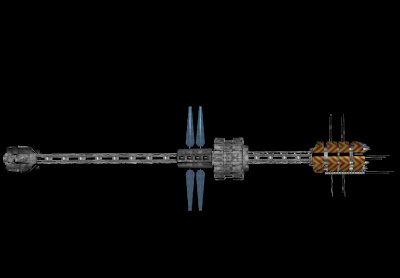
Especially nice all EA ships [and few - 'fictional" with EFNI site, battleships

Like this "LUPO-class" frigate

But our [SteinerX & Koobalt] "Saggitarius" better then their.

Reply #956 Top

Quoting TobiWahn_Kenobi, reply 953

Dont understand prtsc.

You can find "prtsc" on your keyboard... it mean print screen... usual have sysreq on the same button...

Reply #957 Top

Quoting koobalt, reply 952
... i find an error in your version: red circle show it's, Wings mark it in blue. That's error i have on model from sketchup and so far i correct this by deleting the part and making a new one.

What Wings3d show in blue is a transparent surface... it is the material called "hole" in wings3D... and it is very bad news for sins... since it is not a real hole, it will not add poly at the inner surface but you will see trough the model...

For correct it, select the blue surface in surface mode, right click, material>default, right click, tessalate>triangulate... it is repair... the bad news is that transparent piece was not on the UV map... so, it is needed to unfold everything again and remake the UV optimisation...

Reply #958 Top

@ Tobi - Can you correct the "Explorer" appearing on the inner side ... or ... I'll have to leave the name off ...

... and it's just a lighting effect on the front (dark areas) NOT a problem with the model...

Reply #960 Top

@SteinerX
Will correct it at home. Will not be easy though, but I will find a way (hopefully). How do you like the UV? Is it ok to work with?

The other mod looks nice, but I think our models look way better.


@Fileosoft
The part should be on the UV, since I see it on my version. I wil check at home and then open it with wings to see if the error persists. What commands do I need to call again to check for the errors?


Reply #961 Top

Dont understand prtsc

print screen

Could you correct it?

yes, but this will take time, and i find two more of this errors in mine body, i seperate the ship, correct only the parts with errors, unfold them and combined with rest, now I have to scale them and place in the way as you. I have only unfold and project normal so some parts especially the weapons won't be so clear like your.


edit:

and two more, now i see 6 errors on both site of ship. (3 per site)


Reply #962 Top

Thanks Koobalt! I did overoptimise it a little it seems. Nothing gets in your way as much as good intentions. X|  

Reply #963 Top

Quoting TobiWahn_Kenobi, reply 960

@Fileosoft
The part should be on the UV, since I see it on my version. I wil check at home and then open it with wings to see if the error persists. What commands do I need to call again to check for the errors?

It is not really errors but surface who are with transparent material... sins work like Wings3d... something transparent don't need to be on the UV map... you don't need any command for check this... only open the model and seek any blue surface...

In fact, it is very easy to resolve... select the full model, windows>UV editor windows ... on the model, select all blue faces in face mode... right click > material > xxx-auv ... the xxx is the name show at the left top of your windows of the uv editor... right click > UV mapping > force segment keep previous > continue > unfolding ... new piece will appear on the UV windows... scale and position them...

If the other forum was up, i have can make a long tutorial post with a lot of picture for illustrate it but now, here, you have only the words !!!

In fact, don't need to remodel the pieces, don't need to remake all the UV optimisation, simply change the material to the UV map ( not the default material ) and unfold the previous blue piece... you will have a piece for each previous blue surface that you can scale and put at the right position... once done, maybe triangulate the model again since some of the new surfaces can have more that 4 edges...

You wee these surface in your Cinema4D like i see them in Poser, 3Dmax and lightwave... reason is simple, all these pro software use texture for transparency... texture define the level of transparency ( gray scale, more or less transparent )... sins and wings3D are not so complex... it is fully transparant or not ( it is why it is called "hole" material in wings3d ), so it don't need a texture or be on the UV map...

Have already corrected similar problem for other mod in the past... this can be interesting for spare poly too... all hidden surface can be set to the "hole" material... so, you don't have them anymore on your UV map and can spare a little more room... and they are poly that the game engine never use ( more fast for calculate if a poly need to be show on screen of not )... and it resolve the problem when two surface are using the same plan on the model, no conflict/klipping of textures...

It is not without reason that i have choice Wings3D for sins... both the software and the game engine have similar limits, default, quality... for a other game, i will certainly choose a other software... in fact, i have learn to use wings3d only for sins... have never use it before sins, and never for something other that sins modding !!!

By the way, planning for 2010 and future, from September 2010, i will not more be able to help you... i go back to school ( evening school ) for a term of 4 years... i will begin a graduat to 3D modeling... main software who will be used is your Cinema4D !!! This will be maybe followed by 4 more year for the CCNA network and data communication from Cisco... the first is what i like, the second is a secure job... will be good for after my 50 year old since my actual job become more and more heavy with the year ( have not more the strengh body of a 25 yo guy )...

Reply #964 Top

thanks File, i make like you write, and it's work  :D

I correct all errors that I found, here the update file:

http://www.mediafire.com/?2mtjmzzemuw


but Tobi check yourself to, maybe I miss something.

+1 Loading…
Reply #965 Top

Thanks fileosoft and Koobalt!


Hope you enjoy learning in the evenings! It should be easy enough with your skills!


Cheers

Reply #966 Top

@SteinerX
Will correct it at home. Will not be easy though, but I will find a way (hopefully). How do you like the UV? Is it ok to work with?

The other mod looks nice, but I think our models look way better.

Great! Thanks ... early days with UV but looking great ... so much work to do on it ... but should be worth it!

Yes! Other mod looks nice ... and YES! OUR models are very impressive in comparison ... GREAT WORK B5 team!

But it's nice to see the full line-up of ships ...


Reply #967 Top

@SteinerX
Have put the explorer mesh in the mod folder (dropbox) for you yesterday, so you can test your texture ingame (and please put it on dropbox, in psd, for me to see as well :')  )

Reply #968 Top

@SteinerX
Have put the explorer mesh in the mod folder (dropbox) for you yesterday, so you can test your texture ingame (and please put it on dropbox, in psd, for me to see as well )

WOW! the Explorer looks ... Amazing, ingame!

Wonderful model - Koobalt!

Excellent rotating effect once again Tobiwahn

.psd still very far from finished ... a lot more details to add and adjustments to make (thanks for fixing the problem:

@ Tobi - Can you correct the "Explorer" appearing on the inner side ... or ... I'll have to leave the name off ...

looks excellent now:)

I'd like to get the .cl finished ... (or at least near completion before I drop it in ... want it to look great) then I'll do the .da and have a go at the .nm

It's great to see it ingame ... am able to make adjustments visually better, THANKS Tobi!

+1 Loading…
Reply #969 Top

Quoting koobalt, reply 964
thanks File, i make like you write, and it's work 

Of course it work... i have test it before make the post :p

And it is not a error... remember what i have wrote before... Wings3D and the sins engine share the same quality and default... a other example is the crossing UV from your jupiter... work in Wings3D and in Sins... but in XSI, all crossing part or the UV will be marked in red !!!

The work of Tobi have not create real hole... the poly was there but with a other material texture... so, it is better no speak about error when the job was done correctly... it is simply a incompatibility between Cinema4D and the Sins Engine that Wings3D allow to detect and correct in a very easy way...

+1 Loading…
Reply #970 Top

I dropped the explorer cl/nm(revised) .dds in ... will change "Explorer name size/colour"

I'm happy with base tex. but will have to adjust in certain areas ...

Again lots to do ...:) but happy to do it!

Reply #971 Top

TobiWahn_Kenobi - forgive me for my question, but may you add image yours "Apollo" ? I know he not finished - but very interesting.

SteinerX - what EA ship you want see ingame from http://efni.org/ ? If you speak about them ...:X  And in future i want make ISA "Liandra" cutter.


Reply #973 Top

@Zvezdochets
I am now starting to work on the Apollo, had no time before. Lets see what this will be like :moo:

Reply #974 Top

Quoting TobiWahn_Kenobi, reply 973
@Zvezdochets
I am now starting to work on the Apollo, had no time before. Lets see what this will be like

About time - i am fully agree with you! My "Delphi" not finished too ... rest flak batteries and antennas. In my final version this ship have five turret x 4 guns, slightly changed because this ship similiars on "Oracle". Now - 3.8k tri.

P.S: "Explorer" very impressive ship! SteinerX and TobiWahn - yours combined work impressive! Model may use in 3d film!

Reply #975 Top

Quoting Zvezdochets, reply 974
P.S: "Explorer" very impressive ship! SteinerX and TobiWahn - yours combined work impressive! Model may use in 3d film!

In fact, several model are the combined work of Koobalt, SteinerX and Tobi with sometime a touch of me ( correction, some pieces, support, optimisation, etc... )...

Same thing with your own models, you make it, Tobi optimize the UV, Steiner make the Cl, Tobi use Steiner Cl for nm map, etc...

Fact is that everybody work together in these mod, at the best of their capacity... and the result is a visual with a quality that i have not think that it was possible in sins...

And it is true... when i compare the original B5 serie and what i see in sins, quality is almost equal...

These quality is mainlly due to Tobi being a difficult boss... he don't accept model or texture who are not realistic enough... go worker can only reach their full potential with a good boss...