TobiWahn_Kenobi TobiWahn_Kenobi

[v0.54.2]Babylon 5 - Sins of the Younger Races Remastered {Rebellion 1.95+} *UPDATE 16.05.2023*

[v0.54.2]Babylon 5 - Sins of the Younger Races Remastered {Rebellion 1.95+} *UPDATE 16.05.2023*

Babylon 5 mod effort for Sins of a Solar Empire Rebellion

This is the story of the last of the Babylon 5 mod-efforts. It's goal, to prevent another failure, by creating a place to solve our problems collaboratively. Its a port of call, home away from home, for modelers, texturers, programmers and sound engineers. 


Babylon 5 - Sins of the Younger Races

 
Disclaimer:
The authors are not responsible for any damage that may arise from using this mod. This mod may not be sold under any circumstances. It may be downloaded, as long as it does not violate the laws of the state/country you live in. This disclaimer must always be distributed with the mod. For other used please contact me personally.

Thanks to the TEAM:
2D Artist: Tobias Liebhart (TobiWahn_Kenobi), SteinerX
Bughunters: Rob Cummings, cybertx, Darvroth, Peter1x9, ZombiesRus5
Coders: Ronie Albesa (zRazor), Rob Cummings (NewHorizons), Davroth, EvilTesla-RG, Rodney Jenkings (HotRod), Tobias Liebhart, Zvezdochets
Model Templates: Amras-Arfeiniel, James Newman (Firehawk)
Modelers: Ronie Albesa, Amras-Arfeiniel, Fileosoft, Johan Klaver, Koobalt, Tobias Liebhart, Stefan May, Timmaigh, Pauli Valkeejärvi (Hawkwall), Zvezdochets
Musician: Pauli Valkeejärvi
Research: Rob Cummings, Darvroth, Rodney Jenkins
PR: Darvroth, SteinerX
Sounds: Rob Cummings, Pauli Valkeejärvi, Zvezdochets
Texturers:  Tobias Liebhart, SteinerX, TFL_BigBangTheory, Timmaigh, Pauli Valkeejärvi, ZombiesRus5
Moderation: Blake00


Additional support: boshimi336, Lavo_2, myfist0, Gürol Salk (Geopard)

And to
MysticAngel for the Automated Fighter docking ability
The Babylon 5 X3TC team


And thanks to all those modelers whose work is a inspiration and a template for creating ingame assets

If I forgot anyone, please contact me so I can give proper credit. (There seem to be so many decent people involved at the moment)


Release 0.54.1 Full Download for Rebellion 1.95+
& Patch 0.54.2

Sins Of The Younger Races Remastered

NEW - Balvarin Carrier and Minor Factions fix!


Installation Guide:

  1. Download the latest Sins Remastered mod from here:
    https://www.moddb.com/mods/sinsre
  2. Extract the archive into a 'SinsRemastered' folder in your 'C:\Users\%username%\Documents\My Games\Ironclad Games\Sins of a Solar Empire Rebellion\Mods-Rebellion v1.85' folder.
  3. Download the latest Babylon 5 Sins of the Younger Races mod from here:
    https://www.moddb.com/mods/sins-of-the-younger-races
  4. Extract the archive into your root 'Mods-Rebellion v1.85' folder instead of a new mod folder as the archive ALREADY contains a premade 'SotyrRemastered' folder inside of it (so if you're not careful you'll end up with a mod folder inside of a mod folder and it won't work lol).
  5. Start Sins and go to 'Options', then 'Mods', and you should see the mods you've installed.
  6. Enable 'SotyrRemastered' and then enable 'SinsRemastered' too. Make sure that the load order is SotyrRemastered first/top and then SinsRemastered second/bottom.
  7. Restart Sins and you should be good to go!

Sometimes the in-game mod loader can be a bit funky so if you can't see the mods you've installed or something isn't working then enabling the mods via the 'EnabledMods.txt' file in your 'Mods-Rebellion v1.85' folder where you installed the mods to is the other alternative. It should look like this to work:


TXT2
SinsArchiveVersion 194
Version 0
enabledModNameCount 2
enabledModName "SotyrRemastered"
enabledModName "SinsRemastered-v0.95b"


DISCORD:

https://discord.gg/9AwgByEEKn


Old Blog with screenshots and infos maintained by SteinerX can be found here (*OUT OF DATE*)
http://babylon5ins.blogspot.com/


Yours TobiWahn_Kenobi


14,160,142 views 5,473 replies
Reply #851 Top

OK. So this mod looked awesome. But I seriously would like some questions answered. What's with the insanely expensive ships?!?!?! And 1% maximum shield mitigations. And 14000 hull points taken down in less than a pinutes by a couple of light frigates. And the research. And the cruisers. I am sorry, but this mod is in its current state a failure in my eyes.

I know games are supposed to be realistic, but I don't think that's ever been the point of Sins of a Solar Empire or any of its mods. Am I wrong?? Ships in real life aren't and shouyldn't be very strong, and this realistically makes that senario, but come on, I can't even play this mod.


Ok, as said before, this is a pre alpha. As for the ships being destroyed easily, if you have ever watched B5, you would have noticed that battles do not last long and are mostly devastating! And it is not about remaking sins of a solar empire, but have a mod that makes this game feel like babylon 5. And, by the way, we will not force you to play it!

@Tobiwahn - I think that there are some files missing from the Mod 0.35 (in the dropbox) - .dds compared to the public release - not an issue just an observation:)

Have added the files, thaks. Particles were missing too!


Not so fast after all... yesterday, i have try a new "old game"... Rome total war with the two expension pack... so, i have not work anymore on the model...

Today, i have begin the UV... almost done... i have can reach a optimisation of surface with a ratio of 225% ( it is already 5 time more surface for paint that the usual UV )... have can be better if there was not a rotating part... or more poly for cut...

About speed... it is not a problem with model that i have build... i know where are my vertices, edges, surfaces... and some pieces are pre-segmented... any pieces that i will repeat more that a few time is first segmented before duplicate it... when i duplicate, it keep the segmentation... For UV opt, you have a similar speed that me...

Our main problem is not the speed but the limited free time... if i was able to use the same time for model that for my work, i will be able to make a ship each 2 days...

One hours more work on it tomorrow evening, maybe add a 1/2 hours for ready the package and you will have it...


Enjoy playing games as well, we need some spare time for us now and then or we won't have the power to work on the mod after work. Thanks for helping us so much!

Reply #853 Top

@SteinerX
Thanks! Now, for the first time in sins ever I see the building progress clearly! (Couldn't even see it in vanilla sins)

Reply #854 Top

Quoting TobiWahn_Kenobi, reply 853
@SteinerX
Thanks! Now, for the first time in sins ever I see the building progress clearly! (Couldn't even see it in vanilla sins)

YES! A defininate improvement!

Reply #858 Top

here is it:

http://www.mediafire.com/?zmanivmkiqq


tell me what you think, i don't know maybe it should be a little longer?? Still WIP

Reply #860 Top

If I had any skills with that sort of thing (modeling) i would gladly devote some time to it.

Question ... I know they dont appear in the series (at least i dont think) but do  you guys plan on making a Bin'Tak for the Narn? According to source that is one of their premiere dreadnoughts, something an admiral might use.

http://archive.firstones.com/tp2b/narn_bintak.html

Anyways I think the model would be somewhat similar from the picture I saw of one. who knows.

Cheers guys, keep up the good work, I like the Vorchan you guys snuck in too! wasnt expecting to see that one. Wondered why the Centauri were playable :)

Big

Reply #861 Top

If I had any skills with that sort of thing (modeling) i would gladly devote some time to it

Wings3d - easy software for low-poly model with many tutorials on youtube, all my models for sins was made with it.


Question ... I know they dont appear in the series (at least i dont think) but do you guys plan on making a Bin'Tak for the Narn? According to source that is one of their premiere dreadnoughts, something an admiral might use.

If it wasn't in series I doubt it will be in this mod.


Reply #862 Top

Alright i got this software you mentioned, I will try my hand at it, the instruction manual PDF seems to be detailed so i will give it a whirl.... if i can help when i figure out what I am doing I will definately try :)


Biggie


Reply #863 Top

Hey Tobi

My laptop is giveing me a stink about loading Milkshape and when I try to refresh myself on photoshop it crashes, so my display of talents will need to wait untill after my new desktop arives, some where around the 18th.

Reply #864 Top

Hey guys first of all I wish a happy new year to all of you! :grin:

...and I have to say that the Narn ship looks very great

Reply #865 Top

Message from File'o'soft:

DUE TO PROBLEM WITH STARDOCK SERVER, THE FORUM GO "BOOM" EACH TIME THAT I TRY 
TO POST MORE THAT A FEW LINE !!!


Quoting TobiWahn_Kenobi, reply 851
Enjoy playing games as well, we need some spare time
for us now and then or we won't have the power to work on the mod after work. Thanks for helping us so much!


Sorry for the delay... was able to finish the work between cooking time ( have a few guest at home these evening )...


Package can be download at http://www.love-from-russia.be/Asimov.zip ... inside, you have obj for the full asimov,
for the fixed part and for the mobile part ... and a 2048x2048 template... i always make my template the double
of the final size... more easy for work... if the texturer use it, don't forget to resize it at 1024x1024 at the end...

On the screenshot below, you can see the UV and the model... The black arrow show the same section on the UV
and model... when paint, better paint a little more, like show with the blue arrow... if paint only the right section,
when it will rotate, some part will not be paint because the spherical part are not perfect ( a sphere is never perfect
since it is made of numerous flat surface )... the green arrow show a section that i call "trashcan"... just paint it in
black... all the piece there are not visible but some have common edges with visible pieces... making them black
is the best thing...

http://www.love-from-russia.be/info_UV.jpg


Now, i will work on a model for the Star War Empire mod from Scratch... once the texturing is almost done on the
numerous model that you have already, contact me and i will finish the UV optimisation of the Sharlin, so you will
not remain without work...

About the model i work on for Scratch, i have a technical question... and since you are the expert in rotating pieces...
 the starbase below ( based on the "king" model from Koobalt ) have numerous rotating part... model is far to be
finish but i need to know if you can make hardpoint on rotating part and have them follow the rotation... between
the doors at front and the mini sun at the center, i have a ring with 4 hangar and a bunch of turret not yet made...
i wish to make rotate these section... do you think it is possible with the hardpoint ? By the way, these section wil
only appear once the starbase is upgrade with hangar...

http://www.love-from-russia.be/340.jpg


Reply #867 Top

Quoting SteinerX, reply 865

Message from File'o'soft:

Thank... and sorry to have use your blog... point is that i have promise the Asimov before new year to Tobi and it was the only way to make it... was able to read these forum but any action ( reply to post or PM ) have lead to a page with "boom" or with something about "pigeons"...

Excellent! Koobalt!

Yes, good work.... and one more model for you to texture :p

Reply #868 Top

Quoting Bigstink357, reply 862
Alright i got this software you mentioned, I will try my hand at it, the instruction manual PDF seems to be detailed so i will give it a whirl.... if i can help when i figure out what I am doing I will definately try
 

It is not a difficult software to use... in fact, by default, it is in "simple" mode... later, when you will have some control of it, you can enable the extended menu ( magnet are great for curved organic form )...

Koobalt have learn to use it in only 2 week... and he make now wonder with it...

Later, if you wish continue with modeling but will try the next level, try "Art of Illussion"... http://en.wikipedia.org/wiki/Art_of_Illusion ... more complex, with a lot of function very similar to 3Dmax, main difference is that AOI is a free software...

For check a model, correct hole, calculate weighted normal, etc ... you have meshlab ... http://en.wikipedia.org/wiki/Meshlab ... again something free ... and perfect for clean/inspect/correct a model...

For texture, you can use the well know GIMP... almost so good that photoshop and again free software...

Reply #869 Top

Thank... and sorry to have use your blog... point is that i have promise the Asimov before new year to Tobi and it was the only way to make it... was able to read these forum but any action ( reply to post or PM ) have lead to a page with "boom" or with something about "pigeons"...

No problem:)

Yes, good work.... and one more model for you to texture

Yes! The list grows longer!

It is not a difficult software to use... in fact, by default, it is in "simple" mode... later, when you will have some control of it, you can enable the extended menu ( magnet are great for curved organic form )...

Koobalt have learn to use it in only 2 week... and he make now wonder with it...

Later, if you wish continue with modeling but will try the next level, try "Art of Illussion"... http://en.wikipedia.org/wiki/Art_of_Illusion ... more complex, with a lot of function very similar to 3Dmax, main difference is that AOI is a free software...

For check a model, correct hole, calculate weighted normal, etc ... you have meshlab ... http://en.wikipedia.org/wiki/Meshlab ... again something free ... and perfect for clean/inspect/correct a model...

For texture, you can use the well know GIMP... almost so good that photoshop and again free software...

Very interesting stuff! Got 3d wings just to have a play ...

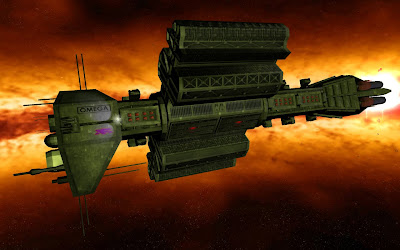
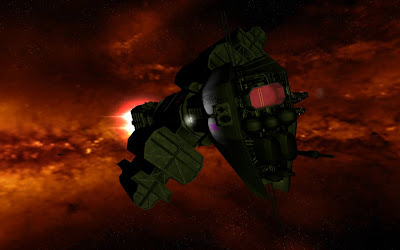
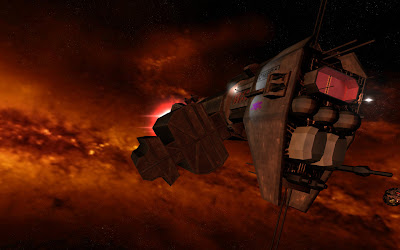
Update: B5 skybox + Omega

Reply #870 Top

@Tobiwahn - dropped the B5 skybox in - let me know what you think - early stages and my first attempt

Reply #871 Top

Quoting SteinerX, reply 869

Update: B5 skybox + Omega

In your screen shoot, was the sun a green sun ? Is it possible with coding to associate a skybox with a type of sun ? Your new skybox will be wonderful with a red sun !!!

Reply #872 Top

In your screen shoot, was the sun a green sun ? Is it possible with coding to associate a skybox with a type of sun ? Your new skybox will be wonderful with a red sun !!!

To get the skybox ingame I replaced skybox 4 ... which was indeed a green one! ... I wasn't aware that there was coding for this ... but see your point ... perhaps it's in the color.file that we used to change the colour of the ship progress bar ...


I'll look into it and appreciate your suggestion!THANKS!

Reply #873 Top

Look in the GameInfo file for the individual star files, you will see something like this:


coloredSkyboxMeshNameCount 8
meshName "SkyboxBackdrop2"
meshName "SkyboxBackdrop3"
meshName "SkyboxBackdrop4"
meshName "SkyboxBackdrop5"
meshName "SkyboxBackdrop6"
meshName "SkyboxBackdrop8"
meshName "SkyboxBackdrop1DistantStars"
meshName "SkyboxBackdrop2DistantStars"
deepSpaceSkyboxMeshNameCount 1
meshName "SkyboxBackdrop7"


You can customized what skybox shows up with what star.


Also you might wanna checkout the SkyboxProperty file also in the GameInfo. You can tweak lightsource colors a bit.

Reply #874 Top

But it was strange to have a redish skybox but having the Omega illuminate with green light...

In fact, you don't need to replace a existing skybox by yours... simply give a new number to it... and change the code in STAR_"color".entity ...

A little table :

Sun type     ColoredSkybox    DeepSpaceSkybox

RED            2,6                    7

BLUE           2,4,5,6              7

YELLOW      2,4,5,6               7

GREEN         2,4,6                 7


So, you can call your ColoredSkybox "8" and change in the STAR_red.entity

coloredSkyboxMeshNameCount 2

meshName "SkyboxBackdrop2"

meshName "SkyboxBackdrop6"

by

coloredSkyboxMeshNameCount 3

meshName "SkyboxBackdrop2"

meshName "SkyboxBackdrop6"

meshName "SkyboxBackdrop8"

You will need to add a entry in SkyBoxProperties.skyboxbackdropdata too... it is there that you control the diffuse, ambient, specular, dust, galaxy color texture, etc...

By the way, i was not aware of it too... have just check the code now... it is your render who have make me think that skybox can be related to star type... and since almost everything can be found in entity file...

In fact, you can create a purple star if you wish and associate your own Skybox with it ... Sins is really great... it have some limit but almost everything can be fine tune... and code is always easy to understand... problem is mainly find the right file between the few thousand...

Remember, i am not a coder... so, maybe other file are involved too...

EDIT : Ue_Carbon was faster that me !!!

Reply #875 Top

Look in the GameInfo file for the individual star files, you will see something like this:


coloredSkyboxMeshNameCount 8
meshName "SkyboxBackdrop2"
meshName "SkyboxBackdrop3"
meshName "SkyboxBackdrop4"
meshName "SkyboxBackdrop5"
meshName "SkyboxBackdrop6"
meshName "SkyboxBackdrop8"
meshName "SkyboxBackdrop1DistantStars"
meshName "SkyboxBackdrop2DistantStars"
deepSpaceSkyboxMeshNameCount 1
meshName "SkyboxBackdrop7"


You can customized what skybox shows up with what star.


Also you might wanna checkout the SkyboxProperty file also in the GameInfo. You can tweak lightsource colors a bit.

In fact, you don't need to replace a existing skybox by yours... simply give a new number to it... and change the code in STAR_"color".entity ...

Thanks both of you!

Yes, I know I didn't need to change an existing Skybox ... but didn't like the green one ... and wasn't sure what coding needed to be done until now ...

So with the replacement method I used (replacing Skybox 4) had to alter both red/green star.entity files and the SkyboxProperty file ... to add the red light effects,etc ...

@Ue_Carbon thanks for the detailed info yet again!

@File'o'soft thanks for your great eye for detail!