Why can't I export anything with DesktopX?

Am I doing something wrong?

I have been a DesktopX user for some time now and have had a lot of success with designing objects and even themes but everytime I try to export anything it fails without exception.  Saved objects work fine but gadgets do not.  The worst part is that when I try to import what I have exported it says "this does not appear to be a DesktopX gadget", of all the lousy cottin' pickin' things to say!  It came from DX and DX doesn't recognize it.  This has happened with every single gadget I try to export.  No matter how simple or complex.  I have reinstalled DesktopX several times and still have no luck.  Am I doing something wrong?  I even tried giving every object a common widget property but to no avail.  I need this information badly because I am already starting to develop for others.  Please help me.  I have posted before about the lack of abililty to make Vista gadgets but now I am realizing that nothing works at all.  I have got to get to the bottom of this.

6,245 views 7 replies
Reply #1 Top

Do you have Desktopx Pro?

From the Product Guide

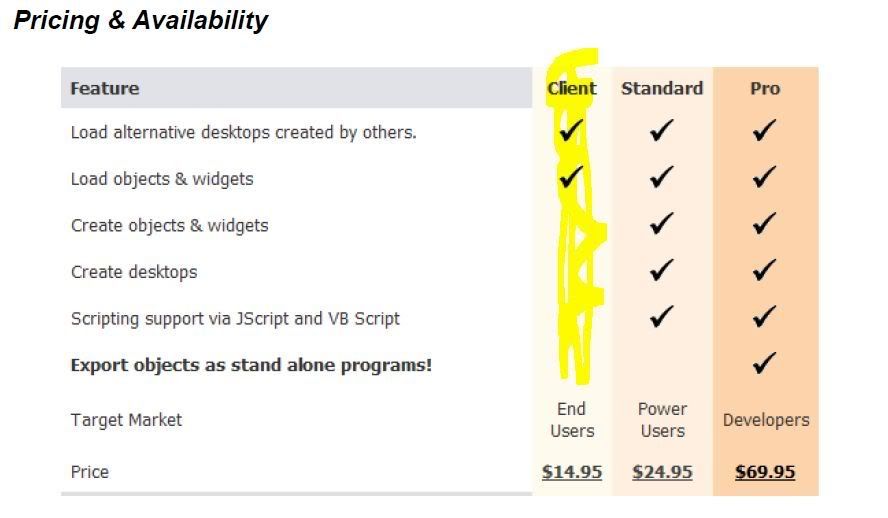
DesktopX Pro adds the ability to export widgets as “gadgets”.

Reply #2 Top

You also can't import gadgets into DesktopX, only widgets and objects.

Is this happening with widgets, too?

What version are you using?

Reply #3 Top

I misspoke when I said gadgets I was trying to make widgets.  I have the regular version 3.5 and I can import widgets just fine but when I try to export them and and use them again it doesn't recognize the file as DX.  I just tried tonight with one that someone else created instead of my own and it happened with theirs too.

X(

Reply #4 Top

I am seriously considering purchasing pro but I have yet to see standard version work correctly in the nearly six months I've had it.

Reply #5 Top

I will continue to check this thread for input but I have also taken this issue up with Stardock.  Thank you.

Reply #6 Top

Are you using the highlighted version? If so, it won't export widgets.

Reply #7 Top

OK guys!  And to anyone who picks up this thread.  The situation has been resolved.  It seems that Impulse has been installing DesktopX incorrectly every time I rebuilt my computer.  I don't understand how but the only way I was able to fix it was to use a specific file from Stardock which is used to do a perfect uninstall of their software.  After the uninstall, Impulse was able to install it correctly.  I am as puzzled about this as I am happy to finally see the program working right for the first time.

Even though I had Object Desktop it must have been installing the client version only.  My guess is it must have been a messed up registration from earlier version of Impulse which could only be resolved after annihilating any prior evidence, and using the newer version of Impulse to register it.  Although it is still curious why the "reset data" feature of Impulse was unable to fix it.