Mirsguy Mirsguy

Miricla & Tinted: WIP

Miricla & Tinted: WIP

His 'n Hers Blinds

I recently began work on a new WindowBlind I am calling 'Miricla.' This is a skin that I am making specifically for my wife, Brysgirl. She has not been able to find that 'perfect skin' yet, so I am creating it for her.

It is primarily blue in color and quite glassy. I chose the blue color because I just couldn't bring myself to work with pink. This skin is a recolorers dream, and looks good however you set the color slider in the config settings.

When I complete Miricla, I will begin work on 'Tinted,' which will be essentially identical in most ways to Miricla, just with dark glass rather than blue. Also, the Tinted WB will be made to match the ObjectDock backgrounds I have already created of the same name.

410,196 views 242 replies
Reply #51 Top

Quoting RedneckDude, reply 25
Yes, Honey, they look friggin awesome!!! 

Jim...just stick to the DX...ok?    :-" ;)

Reply #52 Top

Jim...just stick to the DX...ok?

Yeah, good idea. LOL...Actually, a redneckdude blind cometh soon!

Reply #53 Top

Jim...just stick to the DX...ok?

Yeah, I'm thinking some widgets and a theme are in order, if someone's up to it. :-"

Reply #54 Top

Yeah, I'm thinking some widgets and a theme are in order, if someone's up to it

Hook me up, I know you didn't mean me, but I just happened to be here.... :D

Reply #55 Top

I know you didn't mean me, but I just happened to be here....

:rofl: I'll hook you up soon... *_*

Reply #56 Top

I'm making progress. It's slow, but going well.

I'm having one problem, though. I'm getting a gap between the maximized window frames and the contents below it. I can't seem to figure it out. Any ideas?

Reply #57 Top

Edit per pixel frames-Caption-Extra- OS caption height....play with the numbers....often impost the half of height of your max caption image but all depend of your misures:-)

Reply #58 Top

Edit per pixel frames-Caption-Extra- OS caption height....play with the numbers....often impost the half of height of your max caption image but all depend of your misures

I have tried this. All it seems to do is bring the top down, but the gap between the bottom of the "top-max" and the top of the menubar remains X( .

Reply #59 Top

Quoting Mirsguy, reply 8

Edit per pixel frames-Caption-Extra- OS caption height....play with the numbers....often impost the half of height of your max caption image but all depend of your misures


I have tried this. All it seems to do is bring the top down, but the gap between the bottom of the "top-max" and the top of the menubar remains .

Strange...perhaps you can check the painting margins for the text and you can try to check if menubar images and pixel button have a too much size transparent...they are only suggestion...many times these errors appear for banal causes (I know this very well) :-)

Anyway seems a blur effect that appear for something of transparent

Reply #60 Top

To me it looks like you haven't assigned an image to the maxed caption.


I would have to see the blind to know for sure (hint, hint send it to me?)

Reply #61 Top

To me it looks like you haven't assigned an image to the maxed caption.

Mine is doing the same, and I have assigned an image to maxed caption.


Reply #62 Top

perhaps you can check the painting margins for the text and you can try to check if menubar images and pixel button have a too much size transparent

All check out well.

To me it looks like you haven't assigned an image to the maxed caption.

I have.

I would have to see the blind to know for sure (hint, hint send it to me?)

Tim, e-mail me; mirsguy at gmail dot com.

Reply #63 Top

There is a 4 pixel difference in height between the maxxed perpixel and standard bitmapped frames.Maxxed perpixel will display 4 less.Image size of the maxxed image isnt important unless it is less than that amount...all other sizes will be cut off on top.

best is to make maxxed image 4 less than bitmapped size.(not the perpixel titlebar)

If caption height is 26...maxxed perpixel will be 22.

Reply #64 Top

If that dosnt fix it...check trans settings and sizing margins for maxxed image...looks like something is wrong...Is it supposed to be black?

Why are you not using your perpixel image from perpixel frames?

Reply #65 Top

There is a 4 pixel difference in height between the maxxed perpixel and standard bitmapped frames.Maxxed perpixel will display 4 less.Image size of the maxxed image isnt important unless it is less than that amount...all other sizes will be cut off on top.

best is to make maxxed image 4 less than bitmapped size.(not the perpixel titlebar)

If caption height is 26...maxxed perpixel will be 22.
Why are you not using your perpixel image from perpixel frames?

I feel stupid. I didn't realize there was a correlation between the two. I thought that the settings were just independent of each other.

I ended up taking my caption pp border image and using it to create my maximized caption image. Problem solved.

Thanks everyone for your input! :thumbsup:

Reply #66 Top

I thought that the settings were just independent of each other.
As did we all...heheheheheh. 8|

Reply #67 Top

Gettin' my blues on :w00t:

Projected finish date: August 1.

Reply #68 Top

Quoting I.R., reply 16
I thought that the settings were just independent of each other.As did we all...heheheheheh.

Which is why Zubaz's idea about a Master Skinner adopting a promising artist to show him/her the tricks and both become better by doing so was so great. (LINK).  k6  to the Zu!

Reply #69 Top


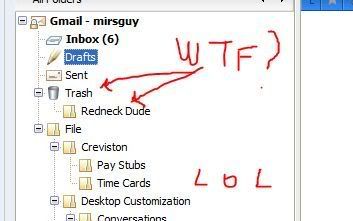
Trashing me, huh?  ;)


Reply #70 Top

Holy cannoli! This is downright phenomenal! I absolutely can't wait. :drool:

Reply #71 Top

Holy cannoli! This is downright phenomenal! I absolutely can't wait.

Sad to say but you'll have to (a little). I've been really busy lately, and the *fun* work obviously has to take a back seat.

Practically speaking though, it's almost done. :P

Trashing me, huh?

:rofl: Yeah; who needs ya? :rofl:

Actually, that's an empty folder, so no true trashing was done. However, I'm sure if "Fred" was around, that we could change that...

Reply #72 Top

Finalized Windows, Combo box buttons, and Spin controls.

Reply #74 Top

Honey,

You do great work!
:blush: :D