
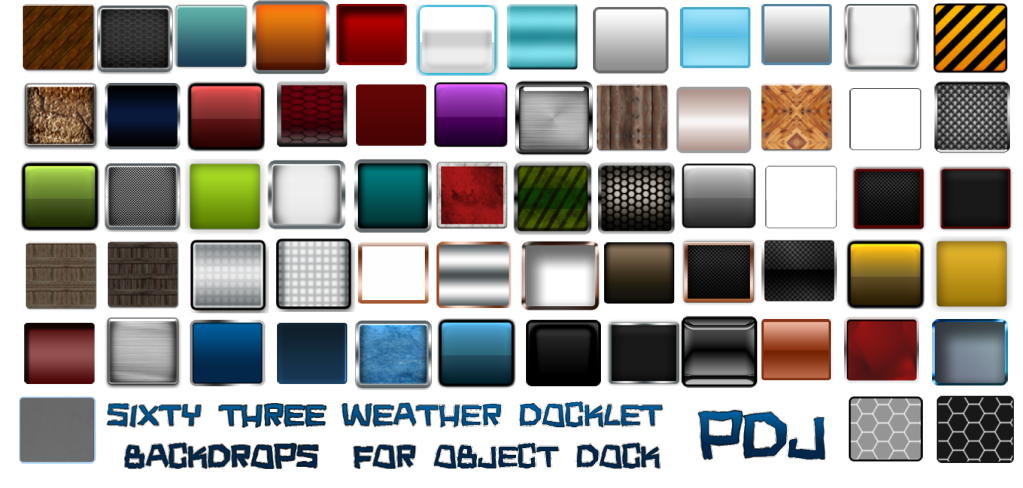
63 Docklet Backdrops

For Object Dock Weather Docklet

http://www.skinning.net/nexus/download.php?view.1661

Guys, I just uploaded these docklet backgrounds!


http://www.skinning.net/nexus/download.php?view.1661

Here are 63 backdrops for the Object Dock weather docklet. Just unzip these and go to your stardock directory in program files. Object Dock/docklets/weather. Find the image called backdrop.png.Add a .bak to the end of it. Then copy one of my 63 into the folder, rename it backdrop.png. Just repeat this whenever you want to change backdrops. I hope you enjoy!

19,903 views 20 replies
Reply #1 Top

Great set.If you can't find one you like here,well,use the blank one,lol.

Reply #2 Top

Too bad there isn't a way for ObjecDock to handle this like you change the backgrounds of the docks.  It would make it so much easier that having to go in and find a file, then an image, change an extenstion, then copy in a new background and rename it.  Sounds like an accident waitng to happen, if you know what I mean. :-"

I haven't tried it yet, too scared. :rofl:

+1 Loading…
Reply #3 Top

I haven't tried it yet, too scared.

Nothing to be scrared of, Philly.Worst case scenario: a blank docklet....no biggie.  :grin:

Reply #4 Top

I haven't tried it yet, too scared
Jump right in Philly. If I can do it(and I do it more often than you'd think) anyone can.

+1 Loading…
Reply #5 Top

Too bad there isn't a way for ObjecDock to handle this like you change the backgrounds of the docks

I totally agree since now that this feature has slowly become a standard and collecting this virtual library of backdrops from Jim, there needs to be an easier way to sort and change them.

I haven't tried it yet, too scared

Don't listen to them Philly.  The Boogie Man is in there waiting for you!:rofl:

(kidding)

Nah, not only is it easy, the process if need be can be reversed just as easily.

:thumbsup:  

Thanks for all the wonderful weather back drops PDJ!

Cp

:star:  


+1 Loading…
Reply #6 Top

Awesome work, great collection to have!

+1 Loading…
Reply #7 Top

Philly...it's real easy. If you want to use any of these backdrops...in your "My Documents" folder create a "Backdrops" folder and just name them 1 thru whatever...then when you want to change the backdrop....copy & paste any one of them to the same folder...rename it backdrop.png and send it to the weather folder in OD...done. It's a no brainer! ;)

+1 Loading…
Reply #8 Top

And I would love to be able to skin the stack docklet's backdrop...anyone know a way? Does anyone know where the default graphic is stored?

Reply #9 Top

Thanks for all the wonderful weather back drops PDJ!

You are very welcome. They are easy, just make a png file at 130x112, at least that is the default, sizes may vary a little. Then you have made your own. If you want none, make a blank png file and use it. Name it backdrop.png and place it in the weather docklet folder.  :grin:


+1 Loading…
Reply #10 Top

And I would love to be able to skin the stack docklet's backdrop...anyone know a way? Does anyone know where the default graphic is stored?

It seems to be a hard coded item.  I've looked.  And looked, and I even looked some more but it ain't there.  Too bad because I've wanted to skin it myself to match dock sets I've made.  oh well, black always looks good...

+1 Loading…
Reply #11 Top

It seems to be a hard coded item. I've looked. And looked, and I even looked some more but it ain't there. Too bad because I've wanted to skin it myself to match dock sets I've made. oh well, black always looks good...

Bummer...look some more!!  lol  :grin:

Reply #12 Top

Wow. Alot of those would work as dock backgrounds too... Get to it dude!! ;)


Reply #13 Top

Okay folks, figured out and everyone is correct, it isn't that hard to do. :blush:

What really would be nice though is that there was a llink somehow in ObjectDock that when you changed the dock background it change the weather docket backdrops to match.  How cool would that be?:-"

Reply #14 Top

 k1 That would be very cool, Philly. An additional Weather Backdrops tab in OD+ would be a good thing to have.

Reply #15 Top

i've tried this, and it doesn't seem to be working for me :S 

the danm dock stays the same hideously black colour. a little help pleaseee n thank you :)

Reply #16 Top

To use these for the weather flyout image you have to rename the image you want to use to "backdrop.png" for it to work. And before doing that you should copy the default one...if you want to have it for later use...and rename it to something else. But whenever you want to change images for the weather flyout it must be named "backdrop.png." ;)

Reply #17 Top

Quoting WebGizmos, reply 16
To use these for the weather flyout image you have to rename the image you want to use to "backdrop.png" for it to work. And before doing that you should copy the default one...if you want to have it for later use...and rename it to something else. But whenever you want to change images for the weather flyout it must be named "backdrop.png."

This is correct, and it needs to be copied then to the docklet folder.

If I'm not mistaken, instructions were included with the images, and I think on the download page.

If more help is needed, please email me from my site.

Reply #18 Top

Hey RedneckDude, have you come up with so new backgrounds yet?   Just asking. :sun:

Reply #19 Top

I thought these pretty covered anything...lol.

Reply #20 Top

I should point out that many ObjectDock  background zips will also contain weather backdrops, it depends on the backgrounds creator(s). (You know who you are);)   If you have been simply unzipping your backgrounds to your library or program files you need to browse there and move the weather backdrops to the weather docklet folder in prog files. Just create a backdrops subfolder and put them there for use later.:)
