Island Dog Island Dog

Post Your Fences!

Post Your Fences!

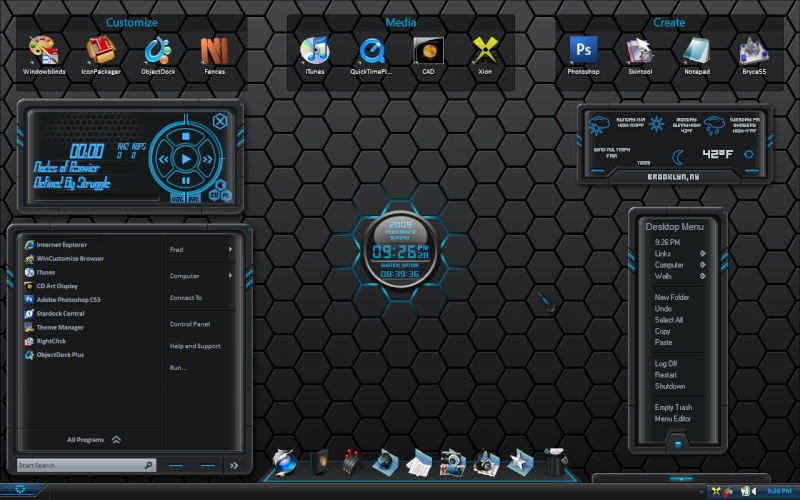
Lets see how you are using Stardock Fences

https://www.stardock.com/products/fences/

Fences is really taking off, and I wanted to see how some of you are configuring your desktops.  This is my current simple setup, but I’m going to get more detailed later on.

Lets see your Fences!

99,081 views 37 replies
Reply #27 Top
happycamper88, you can exclude the Right Click by pressing Ctrl key. Fantasic innovative software! Congratulations Stardock!
Thank you StephanA!  :D 
Reply #29 Top
Yeah, I too gave up on desktop icons along time ago. Ever since I've been using Objectdock, the desktop icons are useless. But this looks like a pretty good tool for keeping them together nicely.
Reply #33 Top
Here is my dual-monitor approach...it turns out to be cool and flexible with little strain on resources...even if at first sight it's quite busy. I use the left moniter to monitor resources or to use WMP while working on the right monitor. NOTE: this set-up uses UltraMon which is a software approach to using two monitors for one monitor. Otherwise I also use Stardock's Multiplicity Pro for another setup using 1 monitor and 1 keyboard for 2 computers.
Reply #34 Top
 :CONGRAT: I simply LOVE this software!! Now my icons stay exactly where I put them and in alpha order too!!! Thank you Stardock!!!  :CONGRAT:  (I'd post a pic too, but I don't know how.... Duh)
Reply #36 Top

efreak . .  where are the Fences?

Reply #37 Top