Can I get a few people to critique this WB?

think I might be finished with my Mardi Gras WB.  My noob eyes can't see anything else that needs to be done.  It's just for XP presently.  It can be downloaded here:  http://www.mediafire.com/?td2zomtouch
I've re-tooled a lot of parts from the last time I posted.

60,248 views 35 replies
Reply #1 Top

I would if i had XP.... :\

Reply #2 Top

Start Menu looking a bit out on my PC XP 3 should the icons be over to the right more off green border.

Reply #3 Top

Quoting voidcore, reply 1
I would if i had XP....


I'm working on one after this one that I'm putting a Vista substyle, that's more for everyday.  I just don't think I could get a Vista substyle in on this one early enough to make it out by February 15, which is when the Carnival/Mardi Gras season starts to crank up in full non-stop party mode.

Reply #4 Top

Quoting RickJP, reply 2
Start Menu looking a bit out on my PC XP 3 should the icons be over to the right more off green border.


WTH?  How do I go about fixing THAT?  This is what mine looks like:


Reply #5 Top

Content \ Text margins, you need to line them up just inside the inner panel.

Might also want to adjust the logoff panel text margins upwards too as your buttons are not centered in the panel there either.

Reply #6 Top

Was hoping you would pop by |-)

Reply #7 Top

Set your left panel text margins to 5

                                                   3

                                                   17

                                                   2

+1 Loading…
Reply #8 Top

l text margins upwards too as your buttons are not centered in the panel there


Ooooohhh.  O.K. Thanks vStyler.  I had not idea fonts could be such a pain.

AWESOME...I set them to your specs and it's all lovely and aligned.   \o/   

vStyler...you're the man!

Reply #9 Top

You have to set sizing margins for every element in a WB, in many you have to set Content margins.


SIzing margins determine whaich parts of the image are stretched or tiled.


Text \ 'Content' margins typically determine usually how far over, and up or down the fonts are displayed. This will sometimes result in the button used for that section actually moving under the text. ( this is the case with logoff buttons)


A good example of where you need to adjust your sizing margins are your pushbuttons. a good rule of thumb for sizing margins is set them all at 4 and adjust as needed from there.


Lastly, and this is a preference, I understand you want a fancy font used but the current font is too thick and dark to really use effectively as a WB font. Finding good fonts is usually time consuming but always worth it in the end.


I typically stay with what 'works' thesedays as most 3rd party, non-microsoft fonts usually end up causing issues somewhere in WB.

Reply #10 Top

Quoting vStyler, reply 9

Lastly, and this is a preference, I understand you want a fancy font used but the current font is too thick and dark to really use effectively as a WB font.


Maybe I should just keep the fancy font for the task bar buttons?  Do you think that would work?

Reply #11 Top

Sure, maybe a size smaller?

Reply #12 Top

Can't give you technical help, Karen...but can sy I like it...especially the colors...novel start button too. :thumbsup:

Reply #13 Top

WHAT IS THIS?!?!?!  How can this be happeinging without a WIP area?!!!?


LOL

Great job everyone!  5*

Reply #14 Top

Quoting DrJBHL, reply 12
Can't give you technical help, Karen...but can sy I like it...especially the colors...novel start button too.


I wouldn't want to have it installed every day all the time, but the whole point to Mardi Gras is to lob on the excess, to get it out of a person's system, so they're ready for giving things up for lent.  Not that I'm into the religious aspect of Mardi Gras, but I learned to appreciate the way party-hardy balances into the withdrawal phase afterwards when I lived on the Mississippi Gulf coast.  In my household, it's kind of like Christmas without the presents but falls at a time of the year we can afford to acquire the acoutrements.  And I learned how to make King cake with my bread machine, so....a yearly baked treat is something we've all come to look forward to.

Reply #15 Top

Quoting Zubaz, reply 13
WHAT IS THIS?!?!?!  How can this be happeinging without a WIP area?!!!?


LOL

Great job everyone! 


R-O-F-L-M-A-O!!!

Reply #16 Top

Hi K,


I took a look at yr wb, i found a few things to be changed,

I think the all progs button should be a different green when you mouse over it, try to make it the same green as your proglist menu...that would make it heaps better...

i found the more programs menu to be stretched and very pixelated.  when it comes to those kinds of menus, its not easy to get a background happening,  play with your margins a little, but id be going for a plain colour (just my opinion only)

i would move the taskbarbuttons up 2 pixels, for me they sit too low on the taskbar.

I found the toolbar buttons to be rather a distraction rather then an asset, due to them being the same colour as the rebar, plus having the gold edging...(yet again only my opinion)

I also found the windows background colour to be too distractive....most people prefer white or offwhite.....the tan yellow is too much for my eyes.

on the special shell,and normal shell folders, i found the mouse over button to be a bit rough around the edges when its pressed, not as smooth as the normal button

and i found the font on the special and normal shell folders to be hard to read, purple font on purple just isnt very user friendly. (yet again, only my opinion...)

your font for push buttons is too big, if you right click my computer and choose properties, and choose the advanced tab, you will see that the 'environment variables' has been cut off due to the large font and isnt readable.

I also found the group box top font hard to read also...probably the conflict between green and purple, as they are both secondary colours.

you didnt skin your extra images. its still white dots.

I agree with vstyler about the font..... but its your skin, so its your perrogative (cant spell)

disabled font on drop down menus is impossible to read.....that means you have to work on your *system defined colours*  this one is hard to explain, but basically you have to make sure that your disabled font is readable, so its userfriendly to everyone who uses it.  

(still talking about disabled font here) I always forget, but im pretty sure its button shadow, buttondkshadow,buttonlight, and or button highlight that controls that section of the colour.  if you are not sure, change it to a crazy colour like fluro orange, then apply and see where that colour affects your skin andyour font.....and you can go from there....its pretty easy once you get the hang of it.  but also remember that your menu background colour, and rebar colour and possibly the button face colour all co inside with how the disabled font reacts......so its mindful to remember that.

I also encourage you to do your own toolbaricons for explorer, extra and internet rather than just recolour them, and also animations for downloading ect.........

cant seem to think of anything else for now.........


luve kitty


Reply #17 Top

Thanks Kitty.  I appreciate the feedback.  I'll work on all these things next day off I get.

Reply #18 Top

Wow!  great feedback!


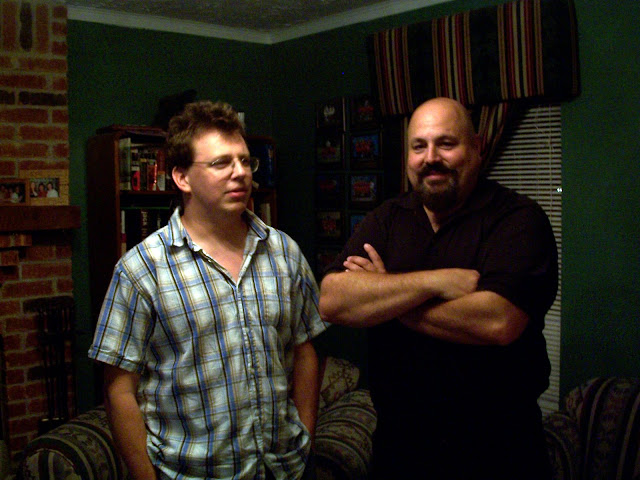
Kitty, vStyler, 2of3, can you critique these skins while you are here?

Reply #19 Top

#18 one word - fugly ;p

Reply #20 Top

Dat you Zu?:grin:  shouldn't there be something 'Zebra' related in there:-"

Reply #21 Top

Quoting Tailsgirl, reply 20
Dat you Zu?  shouldn't there be something 'Zebra' related in there
I'm the good looking one.  And just because you can't see the zebra-wear doesn't mean it's not there.

Reply #22 Top

Quoting Zubaz, reply 21


 And just because you can't see the zebra-wear doesn't mean it's not there.


I see it now ;)

Reply #23 Top

LMAO!  :rofl: :rofl: :rofl: :rofl: :rofl: :dur:

+1 Loading…
Reply #24 Top

zubaz is the cute wolfee fella in the check shirt.....(he took notes when i skinned him last time)


points for zu, and how to change his image in this photo (this is for future meetings with wincustomize peeps)


buy some gel or wax and wolf up yr hair more....your a wolf...let people know it!!

take of them glasses and get contacts if yr as blind as millhouse.

invest in a couple of semi permanent tats...(it tells people you mean business)

change the check shirts for either black or white.....and match it with jeans, the faded worn kind....(killer look)!!!

grow that 3 day growth, people will be facsinated by it.

invite them to your private den where you have a crazy zebra rug on the floor, a pool table, and of course a bar of some sort where you can offer refreshment beverages with umbrellas and such.....

:zoomba:  :-" <3

Reply #25 Top

You skinned Zu?X| that sounds painful:grin:

Yes, he is a cutie:blush:

Re what kitty said on Zu's image, it wouldn't hurt to have OZZY Osbourne sitting on that couch, Al Pacino also works :thumbsup:


Look, go the whole hog mate, and get Jensen Ackles in there too ;)


Edit: Replace that other fellow next to you Zu, with George Clooney!!!*_*