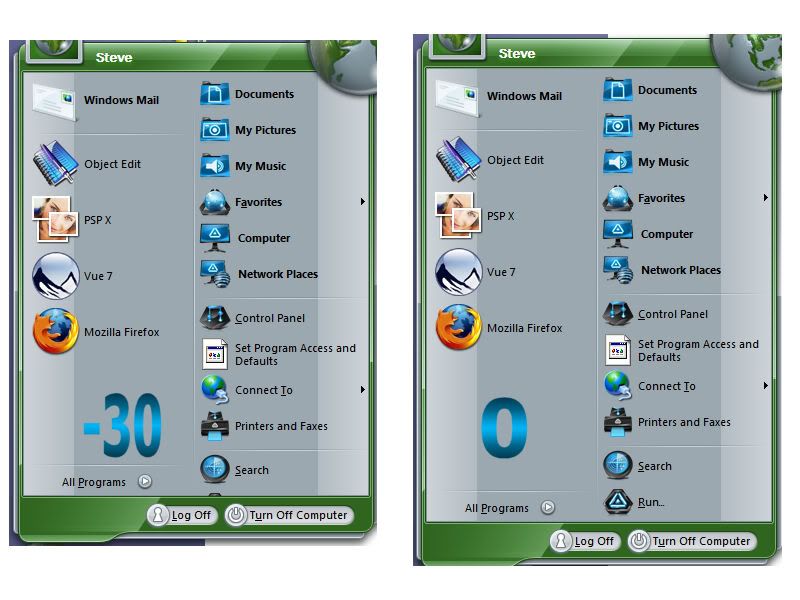
Think Green Theme missing Run... on Start menu

Hi all,

Just noticed that the Think Green theme is missing the Run... command on the start menu.

It ends with Search... if I change to Quest theme it reappears.

Check the Start Menu setup and it is stating that the Run command should be shown... BUT it is NOT.

Please fix ASAP...

Best regards

Peter


2,049 views 4 replies
Reply #1 Top

Which OS are you using?

Also is the startmenu really big?  I.e. is there room for the Run command to show as if there is no room then it gets hidden automatically.

Reply #2 Top

Windows XP Prof (32 bit version)

Just tried to remove some links... the menu does only shrink and NO "Run..." command shows up. Started with 12 menu links... still no "run command" with 8...

Best regards

Peter

Reply #3 Top

Hey Neil, it is a skin issue, the bottom text setting for places side of start menu is set at -30, I changed it to 0 after replicating issue of run being cut off and all is good again.


Reply #4 Top

Hi Neil,

It seems like Cavan1 found a "cure"... but some additional info.

When I restarted the computer this morning the Run... command is showing up. It seems that some of the Skin setting are not read correctly when applying a theme until first reboot or restart of Explorer process.

This fact can and will be highly annoying for skinners who want to test their skins ... not knowing if the chenges they made "need" a reboot or not.

My advise: add rereading the complete "registry"-setting of Start menu settings when applying the theme instead of partial load. 

Best regards

Peter