geminisama geminisama

Windows Explorer STILL crashes all the time when Windows Blinds is installed

Windows Explorer STILL crashes all the time when Windows Blinds is installed

Okay hi. Since the beggining of this year, I've been having a major issue with Windows Blinds. No matter WHAT I do, Windows Explorer crashes FREQUENTLY when I have Windows Blinds on. I tried seeking help around February, but failed to get ANY useful help. For the last year, I've made sure to patch when I could, trying both stable, and beta releases, but Explorer STILL crashes all the time. So today I got fed up with it, after it crashed SEVEN times within 10 minuits. ALL I was doing, was talking on msn, and listening to iTunes. Windows Blinds would make it crash just about every other time I switched between the windows. So after getting pissed off, I removed Windows Blinds, and guess what, it's stable! I tried re-creating the conditions for the crash, and it won't mess up.


So this time, will I get support, or will I try, and have it all cast aside, and ignored?


The system info is here:

Your computer has a Windows Experience Index base score of 3.4
Your Windows Graphics Experience score is 3.4

WindowBlinds version : WindowBlinds 6.3 (build 110 x86 - Vista Edition)

WindowBlinds is installed correctly on this PC
WindowBlinds appears to be activated on this PC
(Generic PnP Monitor) 1 is attached to ATI Radeon X1050 

Wblind.dll      2008/09/22 14:59:20
Wbsrv.dll      2008/09/22 14:59:22
Wbconfig.exe      2008/09/22 14:59:32
Wbload.exe      2008/02/14 12:05:14
Wbhelp.dll      2007/08/27 11:54:07
Tray.dll           2007/09/12 17:58:21
Wbload.dll           2008/04/28 09:34:28
Screen.exe      2008/06/13 11:24:09


Sorry if I sound like a grumpy person, but I'm fed up with this, as I've dealt with it ALLL year, with no help, or change.

33,450 views 58 replies
Reply #26 Top

Ok...let's see if it's really Windows doing this.

Open Administrative Command Prompt as before and type: bcdedit /set nx AlwaysOff

Reboot.


Reply #27 Top

Well, I'm about to go out for a while, so I'm gonna hold back on doing that for NOW, since my friend said, "Don't do that. Because if that's not your precise problem, shit's gonna get worse." Since I won't be here to monitor my comp, I'll do that when I'm back.


I appreciate the help so far.

Reply #28 Top

He doesn’t even know what it is or does and he’s predicting Armageddon??? You might want to consult with someone a bit more optimistic.

After your machine doesn’t self-destruct or turn into shit (in spite of my best efforts), let me know if the crashes stopped……

Reply #29 Top

He knows what it is, you told me to do. But putting that aside, I believe it IS windows fucking up.


Problem signature:
  Problem Event Name:    APPCRASH
  Application Name:    Explorer.EXE
  Application Version:    6.0.6000.16549
  Application Timestamp:    46d230c5
  Fault Module Name:    USER32.dll
  Fault Module Version:    6.0.6000.16438
  Fault Module Timestamp:    45d3dc0e
  Exception Code:    c0000005
  Exception Offset:    00023123
  OS Version:    6.0.6000.2.0.0.256.1
  Locale ID:    1033
  Additional Information 1:    8d13
  Additional Information 2:    cdca9b1d21d12b77d84f02df48e34311
  Additional Information 3:    8d13
  Additional Information 4:    cdca9b1d21d12b77d84f02df48e34311


One minuit it's WB crashing things. Then it's something else, and then something ELSE, repeat. I honestly don't know what to do anymore. I run registry cleaners, nothing gets fixed. I run virus scans, and never find anything. :/


Do you still want me to disable the DEP?


Reply #30 Top

Do you still want me to disable the DEP?

yes.

If it still crashes, re-enable: Command Prompt (Adm)/ type:  bcdedit /set nx OptIn  Reboot.

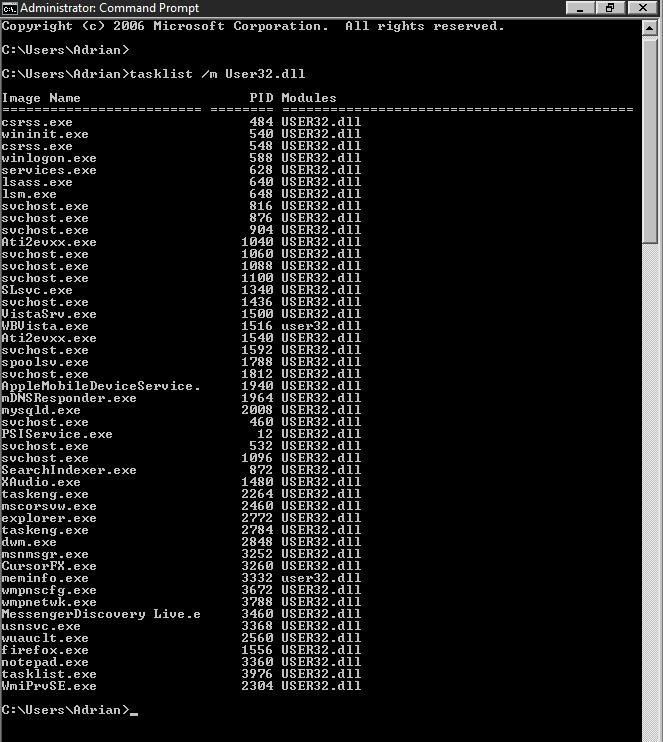
These errors are all over the place, but that last one may give us a clue. Start/ Run/ type: tasklist /m User32.dll   Post the results.

While all these errors are Window system file related, my guess is that all the errors are being caused by something you have installed. It could be as simple as having Avast and Spyware installed, but disabled. Both put shell extensions in Explorer. I will assume the definitions are up to date. That said, let's review: You have no toolbars installed. You have no shell extensions installed (other then the aforementioned). Windows Firewall. UAC and Windows Defender are on with Security Center off. Windows update is current and your hardware drivers are current (with the exception of ATI, which work for you). Avast and Spyware Doctor are disabled and you have no other security apps installed. 'C' is your system drive (Vista 32bit).  Correct me if any of that is wrong.  

You recently formatted/installed Vista, so the question is when, after the format/install, did the crashes start. Something you installed started this.....and yes, I probably wouldn't remember either...but try. All we have to do is find it, instead of it finding you constantly. Short of that, it's a format and then installing one thing at a time until the errors start.

When you post the above user32 info, post Taskmgr Processes (all users). 

Reply #31 Top

Okay, I turned off the DEP. I then did as you said with the Run command, and a dos like box opened, made a list really fast, and then closed. I have no idea how I'm supposed to post those results..or even read what it said. Now about Avast! and Spyware Doctor, I uninstalled both, to be on the safe side. No toolbars in any browser installed, no shell extensions I'm aware of. Windows Defender is on, but the UAC isn't. Windows is fully updated (but now, it's even acting faulty. Sometimes it tells me to install SP1, when it's already installed >_>) Everything else is correct.

Well, the last format wasn't very recent, but according to one of my old topics, the errors started around Feb. 27th (see here: https://forums.wincustomize.com/301630). Around that time, other people were getting WB caused explorer crashes, so thats how I came to realize it HAD to be WB, but NOW I don't think it's causing the issues alone (see here to confirm others getting it: https://forums.wincustomize.com/301628)

I don't know how I'm supposed to post the user32 info, unless it logged somewhere, but here are screenshots of running processes.

http://i57.photobucket.com/albums/g227/geminisama/Processes1.jpg

http://i57.photobucket.com/albums/g227/geminisama/Processes2.jpg


Edit: Haha, thats amusing. After mentioning it being stupid about SP1, and installing todays security update, upon reboot, it's telling me to install SP1.


Reply #32 Top

Open Start -> All Programs -> Accessories -> R-Click Command Prompt -> Choose Administrator

This will open the command prompt window and leave it visible for you.

Reply #34 Top

Problem signature:
  Problem Event Name:    APPCRASH
  Application Name:    Explorer.EXE
  Application Version:    6.0.6000.16549
  Application Timestamp:    46d230c5
  Fault Module Name:    ntdll.dll
  Fault Module Version:    6.0.6000.16386
  Fault Module Timestamp:    4549bdc9
  Exception Code:    c0150014
  Exception Offset:    00077dc2
  OS Version:    6.0.6000.2.0.0.256.1
  Locale ID:    1033
  Additional Information 1:    8d13
  Additional Information 2:    cdca9b1d21d12b77d84f02df48e34311
  Additional Information 3:    8d13
  Additional Information 4:    cdca9b1d21d12b77d84f02df48e34311


Looks like my buddies back. Time to re-enable DEP.


Edit:

Got it again, just 1 or 2 minuits from rebooting after re-enabling the DEP.

Problem signature:
  Problem Event Name:    APPCRASH
  Application Name:    Explorer.EXE
  Application Version:    6.0.6000.16549
  Application Timestamp:    46d230c5
  Fault Module Name:    USER32.dll
  Fault Module Version:    6.0.6000.16438
  Fault Module Timestamp:    45d3dc0e
  Exception Code:    c0000005
  Exception Offset:    00023123
  OS Version:    6.0.6000.2.0.0.256.1
  Locale ID:    1033
  Additional Information 1:    8d13
  Additional Information 2:    cdca9b1d21d12b77d84f02df48e34311
  Additional Information 3:    8d13
  Additional Information 4:    cdca9b1d21d12b77d84f02df48e34311

Reply #35 Top

I see nothing out of the norm in Processes. (never realized itunes was so invasive).....

Here's my take (for what it's worth):

You can work back wards un-installing programs and you might find what's causing this, but even if you did, your system would be so disheveled it would, under the best of circumstance, be perpetually unstable.

The alternative is to format/fresh install Vista, update and install your programs one at a time (creating a Restore Point at each install). You either got a really bad install of Vista the last go around (highly unlikely) or something you are installing is doing it (highly likely). I could give you a list of everything it isn't, but in conjunction with them playing nice with something else installed....who knows. I will say, insofar as all you have installed, I'm leary of that memory monitor app.

Here's where I que up for the backup programs commercial. Get one (there's any number of good one's) and you'll never have to go through this again. End Promo.

For me, doing the fresh install comes down to nothing more then time and effect. It's, of course, your call. After all, I could be wrong...

......shit!!....what am I saying??.....I'm never wrong...............................

Reply #36 Top

Ehh, I've wanted to reformat..but, not enough media to back things up, and with my iPod recently being stolen, there goes that 20G I could of stored shit on. :/


So, theres pretty much nothing I can do?

Reply #37 Top

How many drives (and how big) do you have in your system? How much media do you have you want to save?

Reply #38 Top

1 HDD. A little over 10GB (Docs, pics, saves, music, etc.)


Reply #39 Top

10GB is 3 DVD's ...no big deal. How much free space on your hard drive?

Reply #41 Top

OK.....that's not enough to partition. Is this an OEM machine? If it is, give me make and model. If not, give me the general specs.  

Reply #42 Top

1.5GB RAM

ATI Radeon X1050  256MB

Intel(R) Celeron(R) D CPU 3.33GHz, ~3.3GHz

Reply #43 Top

That's got to be an OEM....who made it?

1.5GB RAM

How is that arrayed?

Reply #44 Top

Not OEM, it's mostly custom. The comp came with 512mb, and a shitty onboard graphics card, I updated the ram some, the graphics card, and got a new DVD burner.


And it's set up: 1 512MB stick, and 1 GB stick. As for computer model, eMachines T3604.

Reply #45 Top

1 512MB stick, and 1 GB stick

That's not a great combo...we'll get back to that.

You have 16GB's free...what is taking up the other 104GB's??

Reply #46 Top

Lol, wellll.. Many games, bunch of mods for various Civ's, docs that were mentioned earlier, Several movies, stuff like that. >.> Could I do something if I freed up some space? I can gladly uninstall some games if so.

Reply #47 Top

If you could get it down to 40/50GB's, you could Partition the 120 in half. C being partition 1 and D being partition 2. All games, mods, etc go to D and operating system to C. Once you save everything you want to D, format partition 1 with the Vista install disc and install it on Partition 1 (it won't touch partition 2). This thing having one Sata port is absurd. That said, I've seen all the crap eMachines install during recovery....you might very well never get a 'clean' install....but at least it will be on it's own partition and your saved 'stuff' will be unscathed.  

Reply #48 Top

I can probably get it down to 40/50~GB. How would I go about partioning the drive into 2?


And your right, the eMachines format is bloated with crap, but I do have a REAL Vista Ultimate disc.

Reply #50 Top

Thanks. If I do so, and something goes wrong, or I decide I only want 1 partition afterwards, can I merge them together again? If so, will I lose the data on "D"?