vStyler vStyler

HUGE Vista Wallpaper bug

HUGE Vista Wallpaper bug

can't believe no one has mentioned this yet.


  Well, I first noticed this while making the Aero Executive wallpapers,  If ANYone can rememdy it I'd love to see\hear it.. But I think I have pretty much found a major flaw in Vista customization.

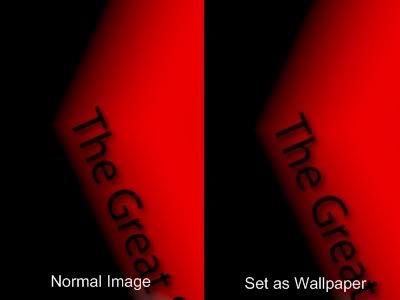
The image speaks for itself... but obviously I'm taking about how faded , bland, lack of quality the image is.  :NOTSURE:

Its not as noticable on Vista type scenic walls but most certainly is in this kind.

To test it on ur system..download the Aero Exec walls.. from https://www.wincustomize.com/skins.aspx?skinid=35315&libid=8 and test the original in an imageviewer, PS or XP and then set it as ur wallpaper in Vista... huge difference  X-( 

   Any ideas anyone?


90,098 views 31 replies
Reply #26 Top
I noticed this within the first week that Vista came out. If you use explorer to set your wallpaper or use any of the options where the wallpaper needs to be resized, Vista will resave the picture as a horribly compressed jpg. I've used WindowBlinds to apply my wallpapers for at least a year now just because of that problem. One major thing about WindowBlinds, though, is that there needs to be an option to add wallpaper directories recursively. I'd like to oraganize my wallpapers into subfolders but then I'd have to add each individual folder which is a pain in the ass.
Reply #27 Top

I am running ATI Radeon Graphics @ 1440x900. I noticed that there is an unbelievable reduction in quality when I set an image as the wallpaper. Take a look:


This is my problem ^^

See how blurry the image is when set as wallpaper?

Reply #28 Top

oh i wondered why my .dreams looked so nice on my media player and yet are suddenly lighter when i use as wallpaper - spoils the effect

Reply #29 Top

oh i wondered why my .dreams looked so nice on my media player and yet are suddenly lighter when i use as wallpaper - spoils the effect

Right click on your desktop and choose the control panel for your videocard and set the video gamma down a little until it's to your liking.

Reply #30 Top

So, I guess we must deduct.. right click > Set as Background.. doesnt work worth a crap in Vista.

I have never used that method to set a wallpaper....they're always altered to jpg format if so done. [not just in Vista].

windows\web\wallpaper\ is where you [should] put all your walls....made full-size to your screen res...and in BMP format.

Always done it that way....probably always will...;)

Reply #31 Top

I always apply thru the Personalization Window...BUT I set mine up different....it's worked well over the years having had several different display sizes. I also save the files in the same format I rec'd them or if i resize/change I go lossless.

MyWallpapers----->

>Fullscreen ---->1024x768, 1152x864, 1280x960, 1600x1200, Others

>Widescreen--->1280x800, 1440,900, 1680x1050, 1920x1200, Others

>Abortions----->1280x1024, Others

>Dualscreen

>Tiles

currently at 2,720 files