CariElf CariElf

Twilight 1.96 Change Log

Twilight 1.96 Change Log

The update to 1.96 should show up on Stardock Central and Impulse shortly.  If it doesn't show up for you, try switching to server US-1 (that's the first one it gets copied to) and refresh your XML data. 

If, after updating with Stardock Central, your titlescreen still says 1.95 or earlier, see below the change log for instructions on how to force it to re-update.

+ NEW: Clicking on Race Logos on the Civ Manager>Timeline>Legend screen will toggle them on/off in the timeline

+ NEW: Added option to change the zoom speed

+ TWEAK: Legend screen only lists the races you know

+ TWEAK: Increased the max value the edge scroll speed could take in the options window

+ FIXED: Arcean planet improvement "Cathedral of Valor" now gives the 33% planetary defense bonus that it mentions in its description. Still working on a solution for the soldiering bonus.

+ FIXED: PlaceAgentWnd: Next and previous buttons should only show planets that you know about (aren't hidden in the FOW)

+ FIXED: We believe that we have fixed the crash when placing a spy but it's hard to reproduce so it may just not have come up during testing.

+ FIXED: Now if a starbase can't install any modules, the starbase details and intel windows say "No modules available" rather than "0/0"

+ FIXED:  Bug that kept the trade route revenue and distance traveled from calculating correctly

+ FIXED: The “auto-attack bug,” where you would have to click on a ship in auto-attack mode after it had won a battle for it to pick another target, also leaving the turn button hidden without proceeding with the turn

+ FIXED: Bug where if an empty string was read from the registry, the function would still return true, which would make it impossible to submit games to the metaverse.

+ FIXED: Bug where some of the functions that create ship nodes were passing in parameters in the wrong order, which could cause crashes and possibly invisible ships, but you might now have funny looking ships if for some reason it fails to find your user designed ship data. Again, we recommend NOT overwriting ship designs.

+ FIXED: Bug where going to the PlaceAgentWnd from the GNN would result in the GNN not coming back

+ FIXED: Disabled AllowMixedVP option as most cards don't seem to handle this well. 

+ FIXED: Invalid Call bug when Alt-Tabbing which was caused by the device not being ready to Reset.  It could still be caused by other things, but it should be much more rare now.

+ FIXED: Bug where improvements that had ManualDestruct set to 0 were still setting it as true, which allowed you to still destroy and rebuild weather control, etc

UPDATE:  We posted another update that fixes the problem with the ship components that you don't have techs for showing up in the ship design screen.  This bug was also the cause of the AI not doing anything and the cause of a crash. 

--------------

If SDC is showing the latest version installed but your titlescreen does not say the correct version, you can either try re-installing or you can edit the registry to force it to re-update.

Here are instructions on how to edit the version string in the registry:

First, close Stardock Central. Go to Start->Run and type in regedit.  On Vista, type it in the search box.  As soon as the registry opens, click on the My Computer icon and choose File->Export to backup the registry.

The install info for GalCiv2 is under HKEY_LOCAL_MACHINE, in the path Software\Stardock\Drengin.net\GalCiv2\Twilight.

Just change the version string to a lower number and when you restart SDC, it should show the update button again.

Here are instructions to make sure that you get the latest version once you've either re-installed or changed the version string in the registry:

Befiore installing the update, go to Tools->Settings and click on Internet.  US-1 is usually the best choice for servers because sometimes we have sync errors with US-2.  Click Refresh XML Data.  Also, if you have the setting turned off to check for updates to Stardock Central, turn it back on and then re-start Stardock Central.  If Stardock Central finds an update, let it update then restart SDC when prompted. 


-------


152,618 views 54 replies | Pinned
Reply #26 Top
+ NEW: Clicking on Race Logos on the Civ Manager>Timeline>Legend screen will toggle them on/off in the timeline


Thank you! Thank you! Thank you! A million times Thank you! ;)
Reply #27 Top
Impulse says this program is not compatible with my operating system. Won't let me update.
Vista64


I had the same problem, right click your shortcut, select properties, go to the compatibility tag and run it in Windows XP compatibility mode. It seems strange since you're already running XP but I figure it must set it to be more like 32 bit XP.
Reply #28 Top
+ FIXED: Bug where if an empty string was read from the registry, the function would still return true, which would make it impossible to submit games to the metaverse.


I had this in my last game - couldn't transmit the result to the Metaverse. Does it mean, that if I had it once I'm likely to have the same problem again in my current game? I don't start suicidal level games any day as they tend to take up quite a lot of my time. But if I can be certain that I can't transmit the result at the end - I think I may better start a new game.
Reply #29 Top
On with those freighters, the trade has been fixed !!! :D
Reply #30 Top
I have been playing with the new patch over the weekend and so far no crashes when using spies so far. Hurrahh!!! Also, thanks for fixing the trade income bug. And especially thanks to CariElf for putting that zip file up that fixed the AI and ship components bug when everyone else went home.
Reply #31 Top
Great update, many thanks :)

Looking forward to 2.0 with a hopeful heart :CONGRAT:
Reply #32 Top
An issue I had noticed while playing that I didn't see fixed was trade routes not disppearing when destroyed. That is to say, if you destroy enough trade ships, a route will stop working, but the track for the route will continue to be displayed until you reload the gme.
Reply #33 Top
An issue I had noticed while playing that I didn't see fixed was trade routes not disppearing when destroyed. That is to say, if you destroy enough trade ships, a route will stop working, but the track for the route will continue to be displayed until you reload the gme.


I have noticed the same thing, but it has been present for quite some time (perhaps in the betas even). I suspect that this is intended. Sometimes the route is destroyed other times it is not. I am not sure why it does it when it does. Maybe the freighter needs to be destroyed several times before the route is considered too dangerous. It would be neat if the number of times was related to your trade rating.
Reply #34 Top
I have noticed the same thing, but it has been present for quite some time (perhaps in the betas even). I suspect that this is intended. Sometimes the route is destroyed other times it is not. I am not sure why it does it when it does. Maybe the freighter needs to be destroyed several times before the route is considered too dangerous. It would be neat if the number of times was related to your trade rating.


It is meant to be destroyed after 3 freighters are destroyed. However, in all race's ability scores, there is an INSANELY high number for Persistent Trade Routes. I'm talking a few million or billion. I think that all races were accidentally (or purposely?) given the ability score that would be pertinent for when the Korx's new wonder would give, making trade routes never close due to freighter destruction.
Reply #35 Top
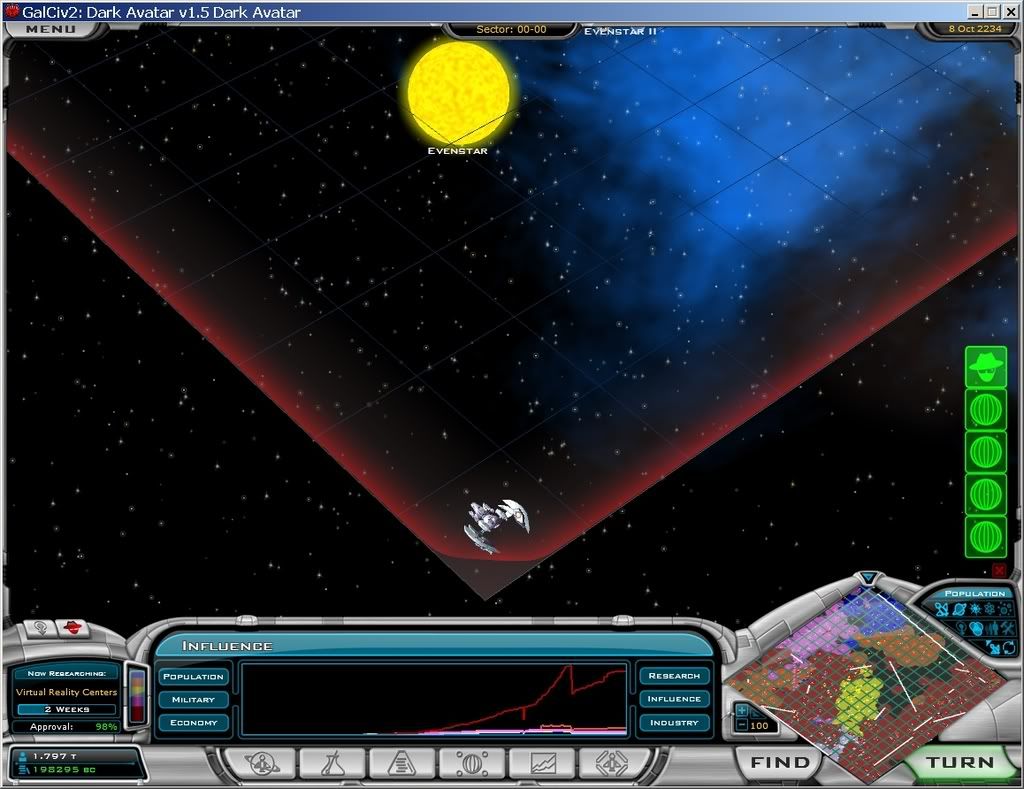
Another update! Excellent! Hey, Cari..I sent you guys a saved game with the issue of having a ship frozen in the lower corner of the screen that seemed to do nothing but occupy the lower corner of the screen. It was not recognized by my cursor. I have also had that issue with Terror Stars (long) after I had fired them. In fact, I had a game where the Terror Star basically became an ornament on the screen after I used it. Even the enemy ships were ignoring it. Did anyone have a chance to check that out?


This probably isn't a new problem; I have a screen capture of exactly that thing happening in a Dark Avatar game from February of 2007; and I could swear I remember people talking about it on the forums at the time:


Reply #36 Top
I could swear I remember people talking about it on the forums at the time:


yeah it has been mention before

Nasty

Reply #37 Top
You know, I'm not a complainer by nature, but it would be nice if it re-saved modified tech tree's, improvments, etc to backup folders instead of just overwriting them. I hate to complain, but I've done a few things myself, and I will now have to spend about four hours doing it all again. I guess i've leared by lesson about backup copies, but it would be nice to at least warn people this would happen.
Reply #38 Top
Mnesthes most your modded files can in need to go in a mod folder to help with this. any main files that have been modded well be over written back to original State.

I know a Dollar short and a Day Late.

Nasty
Reply #39 Top
I was thinking. Isnt it possible to fix the cathedral of valor if you make the building indestructible, and the moment you finish it, it adds a +2 to your race specs EXACTLY like anomaly's?

I ofcourse know nothing about your engine, but it seems to me that if you run into a problem with it not being a superstructure, you might be able to make a trigger that links itself to the anomaly stats.

Just a minor thought.

Cheers
Reply #40 Top

I was thinking. Isnt it possible to fix the cathedral of valor if you make the building indestructible, and the moment you finish it, it adds a +2 to your race specs EXACTLY like anomaly's?I ofcourse know nothing about your engine, but it seems to me that if you run into a problem with it not being a superstructure, you might be able to make a trigger that links itself to the anomaly stats.

Well, the first part of the problem is that it's an ordinary improvement and there is no existing code for handling civ-wide bonuses with ordinary improvements, so we would either have to add it or hardcode something specifically for the Cathedral of Valor.  I'm against hardcoding in general (as much as possible when we don't have a scripting engine) and adding it so that ordinary improvements could affect civ wide abilities would be a lot more troublesome, because you could build a lot more of them, and because you'd have to track more of them. So just making it indestructible wouldn't completely solve the problem.


Reply #41 Top
Duh.... I read that there's a bug in this patch that has something to do with the ship components and a zip file to fix that...
So long it will take to get a patch that doesn't require additional patching?
I'm not going to play game with this patch... And i really wanted to try out TA Torians.
Yes, it's a simple operation to apply the fix but I'm not going to do it... it's a principle.

Good that Torians got the tech tree fix.
...
When was 2.0 supposed to come out? And what will it contain? Better diplomacy (not just simple trading) and better UP?
Reply #42 Top
I read that there's a bug in this patch that has something to do with the ship components and a zip file to fix that...


UPDATE: We posted another update that fixes the problem with the ship components that you don't have techs for showing up in the ship design screen. This bug was also the cause of the AI not doing anything and the cause of a crash.


Make sure you have the latest update from SDC/Impulse and you'll be fine. The manual fix (via downloading a .zip file) has been posted onto SDC. 1.95 had the problem, 1.96 is with it fixed.
Reply #43 Top
Oh ok.
Reply #44 Top
The update you are speaking about is available on either Impulse or SDC. No need to use the zip. That's something CariElf did to get it to us asap.
Reply #45 Top
Actually i'm still having issues with the AI not being able to colonize past their home system. I got the update via SDC and there was no change. I also tried the zip update Cari posted. I did finally get results by deleting my prefs file, and the next game several of the races did expand past 2 planets, however, not all all of them did. And now once more, the last 20 or so games i've tried (through turn 75) none of the AI races are colonizing beyond 2 planets again.

:(
Reply #46 Top
Did SDC actually properly update it? It's been known to not work right at times.
Reply #47 Top
Did SDC actually properly update it? It's been known to not work right at times.


As far as i can tell yes. Version displayed at the startup screen is correct, and the exe and dll in cari's zip where the exact same filesize as the ones SDC created in the update. So i assume it updated. There another way to check?
Reply #48 Top
No, if those both match then it should be it.
Reply #49 Top
Well, LS, there is in fact a way to verify those updating processes (not to contradict Kryo, btw) from your "..SDCentral/Installed" folder by consulting the gc2_Twilight.log file.
All current & previous activities are listed.

In exchange for this sooooo precious detail - i just wanna have your formal take on the TA (or DA) surfacing colors schema principles, only! ;)

Finally got to d/l your HiRes2 from I-Mod and it looks sharp, in fact.
Reply #50 Top
Sorry, may be I am stupid russian? but how can I get this update?

I downloaded and installed impulse (now I really HATE this system), but it find only Dark Avatar and Dread Lords, not Twilight of the Arnor. So, impulse offer me to update DA.

I have legal copy of TA (from our distributor 1C) installed on my PC and I enter serial number in game. Why I can't update TA?