CariElf CariElf

Twilight of the Arnor 1.95 now available

Twilight of the Arnor 1.95 now available

Hey guys, I'm really sorry for the delay, but things have been really crazy around here.  We did manage to squeak in a few more changes.  The update is available on both Impulse and Stardock Central.

(Includes changes from 1.92, the unofficial alpha)

+ NEW: Improved Starport improvement graphics

+ NEW: Zoom to Mouse cursor option

+ NEW: Added ship components for Disruptors IV and Photonic Torpedo III techs

+ NEW: Removed a duplicate entry in the StarbaseModules.xml file.  Also added some starbase modules with "Mining" and "ProductionAssist" abilities to compensate the races that do not have the factory line of techs in their tech trees (Iconians, Thalans, Korath, Yor).  And I didn't just blindly add these, I made a spread sheet of all the starbase modules that each race has access to and filled in a few of the holes with new modules the best way I saw fit.  They are tied to race-specific techs, so no other races will inadvertently be affected.

+ NEW: Clicking on Race Logos on the Civ Manager>Timeline>Legend screen will toggle them on/off in the timeline

+ NEW: Optional realtime clock on the main screen

+ NEW: Clicking on the 'Date' will toggle between current Turn and Date display ('Dec 22, 2943' > 'Turn# 123' )

+ TWEAK: Remove Terror Star techs from Iconians in the final TA mission (otherwise this mission is WAYYYY too easy)

+ TWEAK: Legend screen only lists the races you know

+ TWEAK: Made sure some techs were non-tradable and non-stealable because they now unlock starbase modules that I intend to be race-specific.

+ TWEAK: Fixed a few spelling/grammatical errors in the Yor tech tree.  Specifically, changed "York" to "Yor" and "significant" to "significantly"

+ TWEAK: Fixed a typo in the Thalan tech tree.  Changed "product" to "produce"

+ TWEAK: The research cost penalty has been reduced

+ TWEAK: Removed the description for the Divergent Evolution tech from both the Drath and Altarian tech trees so I could put it in techTree.xml.  The description was exactly the same in the race tech trees including a bunch of misplaced linebreaks, which I fixed.

+ FIXED: A few typos in the descriptions of some ship components.  Namely, when describing the numeric amount of HP or % boost a component gives.

+ FIXED: The Krynn were using the Torian's description for Aquatic World Colonization.  Removed that, so it'll use the default description now

+ FIXED: Added "Space Weapons" and "Space Defense" techs back into the Thalan tech tree in their usual place right before the weapons and defense branches.  I made them cheaper than usual so you can still have a quick research route to those branches of the tree.  The reason I had to add them back in is because they provide starbase modules that are prereqs to other starbase modules that are still being unlocked in the thalan tree.  Without access to the prereq starbase modules however, any modules that depend on them are impossible to use.  Simply adding the two techs back into the tree fixes the issue.

+ FIXED: Bug where you could buy several improvements for the planet on the same turn from the quick build screen.

+ FIXED: Bug where if you bought a ship on a planet, you couldn't buy an improvement that turn

+ FIXED: Bug where the colony management screen didn't always have the most recent data

+ FIXED: Planet height maps that were placing tiles in the 'ocean' parts of the planet images

+ FIXED: Mind Control Center improvement

+ FIXED: Modified plague and disease mega-events to notify a player that they must research antivirus software or firewalls as a robotic race to find the cure, not plague cure or disease cure

+ FIXED: Gravity Accelerators were missing a Special ID, which was causing a crash when they were built

+ FIXED: Now can't trade Ascension starbases

+ FIXED: PlaceAgentWnd: Next and previous buttons should only show planets that you know about (aren't hidden in the FOW)

+ FIXED: Crash that occurred when a terror star was added to a fleet

******EDIT: If you failed to update using Stardock Central (SDC) please read the following.

If SDC is showing the latest version installed but your titlescreen does not say the correct version, or you have missing strings, etc, you can either try re-installing or you can edit the registry to force it to re-update.

Here are instructions on how to edit the version string in the registry:

First, close Stardock Central. Go to Start->Run and type in regedit.  On Vista, type it in the search box.  As soon as the registry opens, click on the My Computer icon and choose File->Export to backup the registry.

The install info for GalCiv2 is under HKEY_LOCAL_MACHINE, in the path Software\Stardock\Drengin.net\GalCiv2\Twilight.

Just change the version string to a lower number and when you restart SDC, it should show the update button again.

Here are instructions to make sure that you get the latest version once you've either re-installed or changed the version string in the registry:

Befiore installing the update, go to Tools->Settings and click on Internet.  US-1 is usually the best choice for servers because sometimes we have sync errors with US-2.  Click Refresh XML Data.  Also, if you have the setting turned off to check for updates to Stardock Central, turn it back on and then re-start Stardock Central.  If Stardock Central finds an update, let it update then restart SDC when prompted. 
 

220,896 views 63 replies
Reply #51 Top
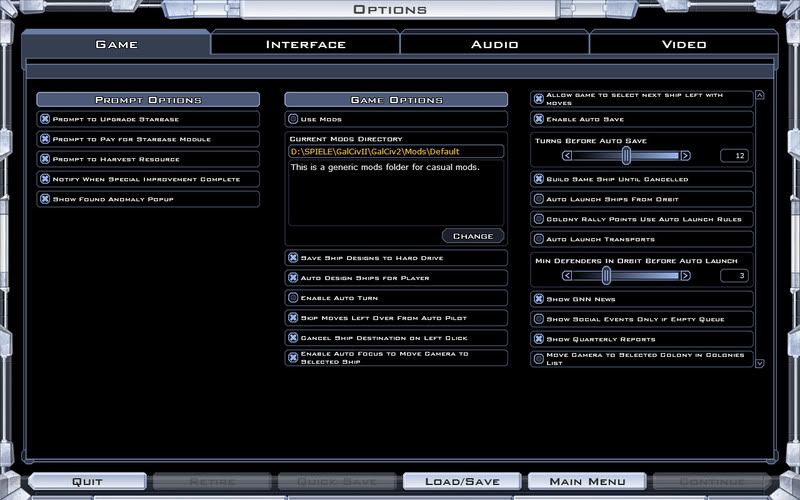
My ToA 1.95 options screen looks completely different from Murteas' above. It does not contain a clock option and I see a lot more options at the right side:


EDIT: I am sorry, did not see the scroll bar at the right side. I have the realtime clock options at the bottom of the right scroll list.
+1 Loading…
Reply #52 Top
According to SDC my game is at version 1.95 but none of the new options i.e. clock, zoom to mouse, etc are available. I checked the version number on the GC2TwilightOfTheArnor.exe file and it is 1.9.1.0, dated 1st May, 2008. Does this mean the update failed?


Same here.

Reply #53 Top
I think the update via SDC does not work. I have done both updates, first via SDC (same problems as above: SDC claims to be 1.95, in-game actually is 1.91 or just fractions of the update), then via Impulse, which was a complete installation of ToA. Only Impulse works for me.
Reply #54 Top
I got 1.95 via SDC and it's working fine.
Reply #55 Top

If you have windows XP64 DO NOT DELETE SDCENTRAL as impulse will not let you download or update TOA saying your operating system is not compatable with this game

Or you could just run it in compatibility mode and skip the melodrama.

I'm going to edit the original post to include these instructions for if you failed to update:

If SDC is showing the latest version installed but your titlescreen does not say the correct version, or you have missing strings, etc, you can either try re-installing or you can edit the registry to force it to re-update.

Here are instructions on how to edit the version string in the registry:

First, close Stardock Central. Go to Start->Run and type in regedit.  On Vista, type it in the search box.  As soon as the registry opens, click on the My Computer icon and choose File->Export to backup the registry.

The install info for GalCiv2 is under HKEY_LOCAL_MACHINE, in the path Software\Stardock\Drengin.net\GalCiv2\Twilight.

Just change the version string to a lower number and when you restart SDC, it should show the update button again.

Here are instructions to make sure that you get the latest version once you've either re-installed or changed the version string in the registry:

Befiore installing the update, go to Tools->Settings and click on Internet.  US-1 is usually the best choice for servers because sometimes we have sync errors with US-2.  Click Refresh XML Data.  Also, if you have the setting turned off to check for updates to Stardock Central, turn it back on and then re-start Stardock Central.  If Stardock Central finds an update, let it update then restart SDC when prompted. 


Reply #56 Top
Any thoughts on the string not found error?
Reply #57 Top
EDIT: I am sorry, did not see the scroll bar at the right side. I have the realtime clock options at the bottom of the right scroll list.


Ah, I was also about to ask this. Thanks for pointing out the scroll bars.
Reply #58 Top
Thanks for the help Cari. It didnt work on the first try, only a few of the files actually downloaded. So, i tried it again and the second time it looks good.
Reply #59 Top
Hello All, I was wondering if there was a way to download the updates and installing them on the computer without using SC Central or any other program. The machine I use to play my games on is completely isolated from the internet. The computer I'm using now is just my old one that I don't mind if hackers get into. If there is a way I would appreciate any help you could provide because I love the game. Peace All Hyphen01


Reply #60 Top
Hello, I have exactly the same problem as Hypen01. I did download the update via Impuls on my wife´s computer, but I have no idea which files I need to transfer to my computer which doesn´t have internet access. The Twilight.exe file looks to be no different from before.

Why can´t you guys at stardock have the update in a zip.file? I´m being forced to download and install Impulse, a program I have no need for, and spend hours downloading it, and then I still don´t have the update. Please just provide a zip.file with the update!
Reply #61 Top
I think what you need to do (I haven't yet had a look at Impulse so the procedure may be different) is archive your updated GalCiv II and/or expansion packs. In Stardock Central these archives would land in the Backups folder in Program Files/Stardock Central/ and so you could copy them from there onto a portable media, which you could take to your actual playing computer and using Restore Archive (from the File menu).

As I say, I haven't seen how Impulse works but if the functionality is in there then the steps will be fairly similar.
Reply #62 Top
Hello Marvin, good thinking - but unfortunately Stardock Central still lists the Twilight game as the old version, even though it was updated and shows the new version number when you start the game. But I will try this nonetheless.
Reply #63 Top


Any thoughts on the string not found error?

It's probably due to Stardock Central not downloading the files completely.  See my previous post or the edited original post for instructions on how to re-download the update.

Hello Marvin, good thinking - but unfortunately Stardock Central still lists the Twilight game as the old version, even though it was updated and shows the new version number when you start the game. But I will try this nonetheless.

hogfather1304, you should try the instructions that I edited to be included in the original post (and my previous reply) and see if that updates it for you.