
Widget Request
from  WinCustomize Forums
WinCustomize Forums
ok, if any of you expert widget makers out there would be willing to make me a very specific widget, let me know. What I'm looking for is this...
An age widget, which simply uses some kind of script to calculate someone's age based on me entering their date of birth or something like that, and displays just their name and age. And the age would change automatically when the person has a birthday. Is that possible? I'm sure one of you amazing widgeteers out there can do this. I've got alot of cousings and nephews and uncles who's age I can never remember. And rather than having to look up birthdays all the time, then figure out their age from that, I'd like my computer to do it for me... Ok, now here's the annoying part. I want it to be pretty simple looking... just a basic white background, with a little shadowing and bevelling on the edges, but not much. The width needs to be 138, (the width of all my other widgets I use) and the height of course would/could expand depending on how many names are on the list... And 8 pt Seogue for the font, in black. And just a simple little button that brings up a dialog to add names and birthdates...
I know I'm being kind of annoying and specific, but hey, if I'm going to request a widget, I might as well take all the guess work out of it, right?
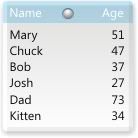
Below is a mock up that I came up with...
Thanks so much ahead of time if anyone decides to give this a go...
An age widget, which simply uses some kind of script to calculate someone's age based on me entering their date of birth or something like that, and displays just their name and age. And the age would change automatically when the person has a birthday. Is that possible? I'm sure one of you amazing widgeteers out there can do this. I've got alot of cousings and nephews and uncles who's age I can never remember. And rather than having to look up birthdays all the time, then figure out their age from that, I'd like my computer to do it for me...
 Ok, now here's the annoying part. I want it to be pretty simple looking... just a basic white background, with a little shadowing and bevelling on the edges, but not much. The width needs to be 138, (the width of all my other widgets I use) and the height of course would/could expand depending on how many names are on the list... And 8 pt Seogue for the font, in black. And just a simple little button that brings up a dialog to add names and birthdates...
I know I'm being kind of annoying and specific, but hey, if I'm going to request a widget, I might as well take all the guess work out of it, right?
Below is a mock up that I came up with...
Thanks so much ahead of time if anyone decides to give this a go...


