Stretched background picture shows ugly white areas on 1680x1050 screen. Solution possible?

I try to apply some existing .logonxp welcome screens  to my computer.


The original backgrounds were designed for a display size of 1280x844  resp. 1280 x 848.

My TFT panel has a size of 1680x1050 so I edited the layout from fixed size to "stretch".

Much to my surprise the preview after apply shows some ugly white areas. I assume that the stretch algorithm calculates the wrong

fill colors for certain parts. How can I prevent these stretch errors?


Can I modify the original background pics in a special way ? Which?

I observed that primarily black areas are wrongly stretched.

However this occurs only in approx 30% of the .logonxp samples.

11,179 views 8 replies
Reply #1 Top
Dont know how to help you,but if you download splash style logons you wont have this problem...they are resolution independant. ;) 
Reply #2 Top
How can I search resp. filter for splash style logons in wincustomize.com?

Where else can I find splash style logons?
Reply #4 Top
Splash logons are pretty easy to spot...they tend to have a nice looking container for the accounts. :) 
Reply #5 Top
after apply shows some ugly white areas.


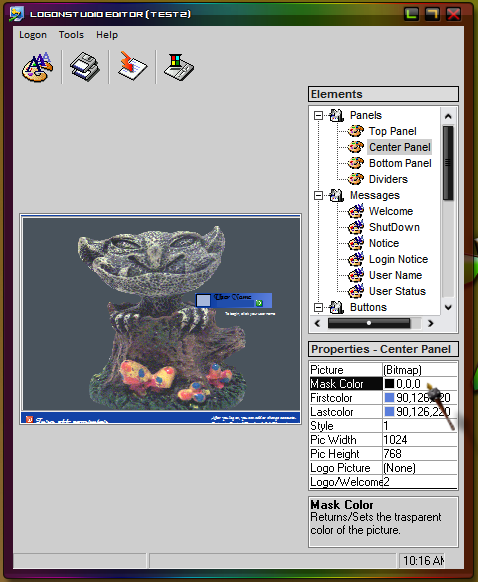
change the mask color to black
Reply #6 Top
change the mask color to black


How (resp. where) do I change the mask color to black?

Do I have to modify the mask for the original *.bmp picture
or a "mask" parameter in the *.logonxp container?
Reply #7 Top
if it's normal, edited in LogonStudio, logon:


if it's a 'splash' style you DO NOT want to edit in LogonStudio - you'll have to edit it manually in the uifile
Reply #8 Top
Bichur is right. Mask any stretched picture for regular logons in the editor to black. I'm not versed in splash yet. And boss019 or maybe brainiac would be good people to ask.