Skinstudio 6

Should I get it?

I've been using Skinstudio 5 for a long while now and have been wondering what people think of Skinstudio 6. I didn't like the Beta version of it at all, and was wondering if the Pro version is better? Are most people switching over to 6 and if you have, do you like it? I've been thinking of renewing my Object Desktop subscription but don't want to screw things up.  :/
12,249 views 41 replies
Reply #1 Top
i personally cannot live with out the tree menu........id be totally lost in sk6 without it....... :NOTSURE: 

it is a dive in the deep end.......but after doggy paddling for a bit, the water warms up and you get used to it............ :) 
Reply #2 Top
SkinStudio 6 is easier to use once you get used to it. The same as MS Office 2007 ribbons. Needed 2 weeks to get used to them and now can't live without them.

I do miss the feature for building WinMedia skins in SkinStudio 6 so I have SkinStuid 5 installed as well to create WinMedia skins.
Reply #3 Top
SKS 5 is much easier to navigate,a more configurable workspace and has live preview.
It only lacks Vista elements...hint hint Stadock.
SKS 6 is a blunt instument in comparison. ;) 
Reply #4 Top
Anyone who's used SK5 can use SK6. However, SK6 is so seriously stunted that I find myself editing the uis with notepad. That's how skinning was done 8-9 years ago...
Reply #6 Top

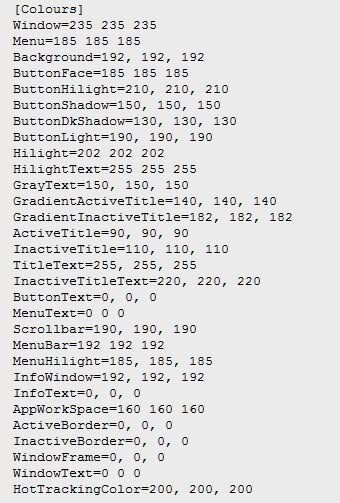
To change the colours. SK5 had a section for this, SK6 doesn't. Also the font angle. The uis takes just a few seconds to set up.

I still haven't found some colours though, like the blue text in explorer under 'favourite links'

Reply #7 Top

The colours can be changed from change skin colours top level item.  Open that up and then change the drop down box from "Show me the skin colour presets" to "Show me the skin defined system colours"

Support for the blue text under favorite links is coming soon.

Are you just setting the angle to 90 degrees?

Reply #8 Top
Start menu all programs text fix - when you use an image to replace the all programs text, set the angle to 900 and it stops the all programs area stretching when foreign text is there (which messes up the image alignment).
Reply #9 Top

I will be glad to see the back of that blue text, it drives me nuts to see the wrong colour in the wrong place. While we are on the subject of text, is there plans to change the colour of the text on IE tabs? Having this as plain black text is messing up my skin  ;) 

Reply #10 Top
SKS6 was a major disappointment for me, I was SO hoping it would make things easier, but I find it more of a nightmare than SKS5! I tried and tried to make a per pixel skin in 5 but it just screws up time after time for no apparent reason. I thought it was me at first, but I now suspect it isn't.
When 6 came out I jumped straight in hoping I could finally make a per pixel skin, but I found it twice as hard as SKS5 to use.

As a side note to the general skinning of WindowBlinds, the biggest step forward for me would be some kind of documentation that tells you the optimum size for EVERY image that you have to make, especially when it comes to the actual window frames and button sizes.
For instance, how wide should the titlebar image be to make sure that it stays useable at any size? and should the start button, taskbar buttons and the systray images all be the same size for the best results?

I accept that I'm not the most technical person in the world, but I'm sure many others who would like to make a WB aren't either. I guess it comes down to a lack of good, in-depth tutorials and walk throughs for Skinstudio.

This isn't a blast at Stardock or the developers, those guys know that I love them and couldn't live without the software they produce, it's just the honest opinion of a hobbyist skinner who likes to make pretty pictures yet struggles with the technical stuff.

Have Fun!! B[]
Reply #11 Top
boxxi, i can help you any time you wish with per pixel frames.they are not hard at all...and it would be my absolute pleasure. :) 

yes, i am not very happy with sk6, i dont want to sound ungreatful, but it is very hard to navigate around....and like i said before, if it didnt have a tree node, id really be lost in the dark and wouldnt know what to do.........
Reply #12 Top
kudos for the blue font going soon.........cant wait
Reply #13 Top
Thanks Kitty, that's very kind, but I've had problems that Treetog and Mike Bryant can't fix!! And not just with the per pixel frames either. For instance, I was going along nicely with a new skin the other day, and when I applied the drop down menu image, the taskbar went black and nothing I did brought it back. And other problems such as, every time I import a new image, skinstudio insists on deleting the previous image I imported before it will do anything else!!

You see? it's not my understanding of how things work, it's things that the program does for no reason that I don't understand, and it all becomes very tedious after a while.

Thanks again for the offer though. :)
Reply #14 Top
I've adjusted to SKS6 fairly well. My only real complaint is the lack of the ability to do a few things, which I still use SKS5 to do.
Reply #16 Top
Pictoratus: Which things?


Start Menu shadow and Fonts for Classic Widgets.


Reply #17 Top
As far as I've been able to determine, Sks6 does not rename images on import. That means I have to make a new image for every single element. Take for example I make a button image and import it. Then I use the same image in another section. If I edit the one image in any way then it changes the other section as they share the same image.

Also on import the checkbox for "re import if disk copy changes" is by default checked, so one has to remember to uncheck that every time :(

Feel free to correct me if I'm wrong about these things
Reply #18 Top
Anyone who's used SK5 can use SK6. However, SK6 is so seriously stunted that I find myself editing the uis with notepad.


Still using 6 just have to find somethings in 5 and edit uis.
Reply #19 Top
I used SKS6 for my first blind. SKS5 seems to be more difficult, to me. I did have to use SKS5 however, to move the username text to exactly where I wanted it and to remove the start panel shadow.

Reply #20 Top
So it sounds to me that overall, people aren't very happy with 6 so far. I've been pretty happy with 5 up until now, but was hoping to get some more Vista skinning elements. But I don't want to have to switch back and forth between them. That's too bad. (:(
Reply #21 Top
I skin XP 100% in SKS5.. move over to SKS6 for Vista substyles. Works out well.

Given a choice.. 5 is far easier imo. Quicker too.. not being able to click an image and go directly to the section is a massive drawback in 6 for me. Far too much navigating compared to click and there in 5.

Regardless.. thanlks to Neil for giving us what we have to use.
Reply #22 Top
every time I import a new image, skinstudio insists on deleting the previous image I imported before it will do anything else!


Try saving .tga's directly to the skin folder as opposed to converted png's via import.
Reply #23 Top
I didnt mean to sound like an ugrate in my last response to wb6.....i kind of think i did, so I would like to rephrase my comment......i DO like sk6, but i do find it hard to navigate. I also use sk5 to check my skin and make sure its okay...... I also want to thank Neil for the hard work he has put into wb6 to make it possible for us to even be able to skin vista.
Reply #24 Top
Start Menu shadow and Fonts for Classic Widgets.


The ability to enable/disable Start Menu Shadow is now in SKS6.  :CONGRAT: 
Reply #25 Top
If your wanting to do Vista then you really have no choice...SKS6.
You can install both versions if you need them.