Tray arrow stacking.

tga's stack from underneath with each click of the start button

I had noticed the tga tray arrows getting garbled up before...mouse into it and they would fix themself.(cant see it happen to pinked bitmaps because of the total opaqueness)

Then I found it was happening everytime you click the start button.(but not when you use the windows key)This isnt a prob with some designs if you dont care how your arrow blends with the tray.Some designs will look real bad...each successive image state stacks under the first state.

If translucency is necessary...your gonna have trouble.
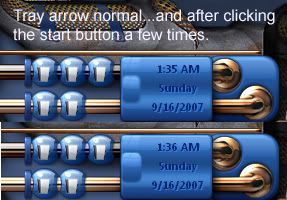


Need a fix.  
3,027 views 11 replies
Reply #1 Top
  
Reply #2 Top
I wish I knew...
Reply #4 Top
Interesting IRB but I would need to check the skin and the images as I usually do.
This can have many reasons for acting the way it does and it is hard to say...
But I'll bet it has to do with the taskbar background and it's sizing of both the image and that of the tray arrow with of course that of the start button. I've seen where if things do not follow some kind of form for sizing of the images in the taskbar to tray and start button; there is problems in how it gets presented when the other is used and such.

Contact me and I'll give it a try here when I get sometime. Been very busy here with things for my server lately. But will try to give you a bit of my time to get this worked out if I can...?

SGT  
Reply #5 Top
  
Reply #6 Top
Its not just my skins,it happens to the stardock skins too.  
Reply #7 Top
each successive image state stacks under the first state.


Seems I am a little off here...it seems to be stacking the initial state...not succesive states.  
Reply #8 Top
Did that happens with all skins IR?
here it's the last WB6 beta
Arileen works fine
Leo
Diamond
and every skins i tried works fine too so...
Reply #9 Top
Yeah, I'm not sure I've ever seen a 'blurred out' look like that before.

I do agree with Shelby in that all the taskbar images should be the same uniformed height or it will cause problems.
Reply #10 Top
If the arrow is totally opaque...no prob...check one with some translucency...look close while you click the start button.

The blurred out one IS the arrow(initial state)...the sharper look is from it being stacked on itself.

Tray arrow graphics do not need to be as tall as the taskbar(default image isnt)Shelby has some misinformed ideas about graphics...they DO NOT need to all be the same height.Content margins determine height of the taskbar irregardless of graphic size.  Content margin descepancies CAN cause unexpected results.

Main determining factor is which graphic has the largest margin settings.  
Reply #11 Top
Tray arrow graphics do not need to be as tall as the taskbar(default image isnt)Shelby has some misinformed ideas about graphics...they DO NOT need to all be the same height.Content margins determine height of the taskbar irregardless of graphic size. Content margin descepancies CAN cause unexpected results.

I've made skins with a specific taskbar size in mind. I ran into a few sizing problems until I made each 'part' uniformed in height... maybe this will not work for you but always has in my case. You are right that content margins DO determine size, but the graphics 'overall' height itself plays its own part.... as I said, it has helped with problems I have experienced.

Maybe I should state I was shrinking the taskbar not enlarging it too

If nothing else is working you could at least give it a try.... do let us all know what does work