WB & DX Can we combine the best of both?

I know this has been going around here as far as DX being "skinned".

I have begun working on a widget that will be able to change based on the WB skin you are running. I have the code i need to make this work as far as finding the info... but its KNOWING the right info im looking for, THAT is the hard part.

The idea (for this one) is to make a "FRAME" that would pull the info from the current WB skin.

Please understand i know DX, NOT WB, I have never skinned anything in WB, so im asking q's of those who know the UIS file format.

The "FRAME" would be made up of multiple images, look below.
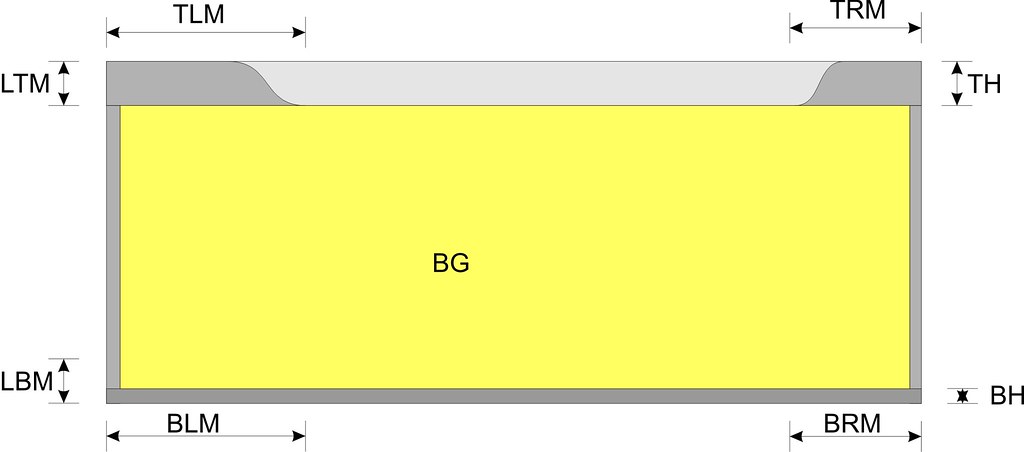


The INFO I need is:
TOP Image Left Margin (TLM)
TOP Image Right Margin (TRM)
Top Height (TH)

Left/Right Top/Bot Margins: LTM/LBM (same for right side)
Left right WIDTH as well.

Bottom Left/Right Margins BLM/BRM - Bottom Height

Also would need to know how to figure out what kind of BG (Background image) to use, image, or some color?

What I need is to know what "KEY" in the UIS file points to these items.

IE: TLM = TopTopHeight
TRM = TopBotHeight

If those are correct. I think this could really be kind of cool if it can be worked out. But since i know zippo about WB, im hoping one of you WB MASTERS will help me.

Is there anything else that we might be able to use? Buttons would be good to. I love it idea of making the widget look like a normal window, skinned of course. But if you have other ideas on how to do that to, please let me know. Lets make this a great community project!!

Thanks in advance!
RomanDA
13,431 views 34 replies
Reply #1 Top
Another thought...

On the TOP, it would be good to put in the text like "CALENDAR" "WEATHER".. i would need to know what the offsets are for that too, im sure its in this file..

Thanks!!
Reply #2 Top
I dont know zippo about DX but I'd be willing to help you in anyway I can   
Reply #3 Top
Can you look at what i have and supply some help?
Reply #4 Top
Here's a snippet with some comments..

[Personality]
; how many titlebar buttons do we have
BUTTONCOUNT=10
; are we custom color aware
ColourAware=0
; frame images
Top=NoiX\NoiXWindowFrameTopUis2.bmp
Left=NoiX\NoiXWindowFrameLeftUis2.bmp
Right=NoiX\NoiXWindowFrameRightUis2.bmp
Bottom=NoiX\NoiXWindowFrameBottomUis2.bmp

; maximised clip
TopFrame=2
LeftFrame=2
RightFrame=2
BottomFrame=2
; stretching.. 1 = stretch
TopStretch=1
LeftStretch=1
RightStretch=1
BottomStretch=1
; text
TextAlignment=0
TextShift=13
TextShiftNoIcon=-3
TextShiftVert=0
TextRightClip=76
; margins

TopTopHeight=5
TopBotHeight=5
BottomTopHeight=1
BottomBotHeight=1
LeftTopHeight=23
LeftBotHeight=5
RightTopHeight=23
RightBotHeight=5

[Metrics]
; titlebar height
CaptionHeight=23
Reply #5 Top
Im not gonna be much coding help Roman, any other capacity, let me know.
Reply #6 Top
Thanks PurrBall.... just what the DR ordered!!

I have the frame working, sorta.. gotta work out bug and issues in different skins, etc.
Still need to know how it does the Background image/color, etc.
Reply #7 Top
dl a windowblind skin and change the extension to .zip...extract and open the UIFiles in notepad.  
Reply #8 Top
Still need to know how it does the Background image/color, etc.


The desktop color \ image?
Reply #9 Top
Still need to know how it does the Background image/color, etc.

You could try using this color:
[Colours]
ButtonFace=176 165 141 <----rgb values
Reply #10 Top
I.R., He know HOW to read them . . just not WHAT he's reading all the time. 
Reply #11 Top
Is this the one?

Reply #12 Top
Thanks everyone..

1. Got the frame working -- sorta.. some skins are not right.
2. Have to try the background info provided above
3. Still have to work out the title text area.
I have to find what images/items are used for the area around the title
4. Also, need to work out the buttons for close/min/help, have to see how i can do that with the way the buttons are made in WB.

Thanks to all that have helped, here is a simple screen shot of 2-3 skins in "action"


As you can see there are issues with the text size, and the blue box is for the background, have to work that out too. Also some skins don't seem to work, have to see what they are missing or have different. This could be a pain if different skins have problems. Wonder if its WB5 skins that work right, and the older ones that dont. Have to work on it.

Any help is appriciated.
Reply #13 Top
David : You are always welcome to send me a copy of the object/code as You know I am very interested in this and am willing to help...
Reply #14 Top
Hey David! I have already done this a several month ago for SD Desktop. This is a little tool which can change current WB skin and(or) Toolbar Icons. It uses Shutdown dialog box and these icons for a simple preview. Let me know if you need this code and I'll send it for you (as a code because it is not a widget).
Reply #15 Top
VAD,

Sure, id like to see what you did for this one.

C242,

I will be happy to share this once i get it working, or if i hit a wall.

Thanks for the help everyone!

I think its something that could be really cool, but it all depends on how easy it is to get things working right.
Reply #16 Top
Ok. Already sent... Check your e-mail please.
Reply #17 Top
Zubaz loves community projects!
Reply #18 Top
hey, this sounds neat.
But what happends if the suer don't have WB?
Reply #19 Top
But what happends if the suer don't have WB?


They go home.. LOL they GET IT!!

I will have to make some kind of default "state" to each item, as it would also be the same when someone changes to "standard" skin (IE no WB skin).
Reply #20 Top
Have a look at CerebroJD's Skinnable WMP skin...it uses whatever WB skin you are running to skin the player.

He could help you I bet.  
Reply #21 Top


But what happends if the suer don't have WB?


What need would he/she have for a fitting Gadget then ?
Reply #22 Top
Ok.. some more problems/issues.

Some skins have areas at the top for the title that are things like Rounded area, or Blocked out areas. Based on what i can see of the skins and the UIS file this is in the:

[Headerbar]
Image=


You can see the smaller images under them that seem to match the Image in the HEADER section. The problem is some have 3 images, some have 5, etc. How can i pick what one is the right one?

Its really confusing.

Vad,

I looked at the code, very similar to what i came up with, but I was "trying" to make this use a frame, that could be resized, and the "Shutdown" window image i dont think is what im after. Thats why this is so much more complicated.

Also,

The fonts still dont seem to match. The font (I Guess) I want to match is the one u see in the previews above. The one in just about any other window. But the font seems to be to large, etc. Im not sure, I really dont know all the details on how this works.

Any more suggestions on how to get the "right" font, Header, etc? Thanks all!!
Reply #23 Top
Maybe you could try Windows 2 by myself. It used all features (other than animation) found in version that was out during the year I uploaded that skin.
Reply #24 Top
XX,

The GOAL here is to make this work with any WB skin, the problem is i know little to nothing about WB. As i have stated, im trying to find parts of these skins, and implement them into DX.

Im not 100% thrilled with a frame, but i dont know.. maybe this was just a bad idea, and the right idea is/was the skinnable DX widget where the format is setup for DX not WB. Who knows.
Reply #25 Top
Headerbar is not the titlebar text background.

; titlebar fonts
[Fonts]
Fontname=Segoe UI
; titlebar font size.. PIXELS (WB likes negatives)
FontHeight=-12
; we're bold..
FontWeight=700

; titlebar text background.. if there is none, this section does not exist
[TopBorder.TextBack]
; different images for inactive and active states = 2, same = 1
FrameCount=2
; image
Image=NoiX\textbg.bmp
; margins
LeftWidth=12
RightWidth=12