Wallpaper problem in DesktopX

I have created a desktop theme, complete with a wallpaper I downloaded. My problem is, that whenever I switch to Desktop Client, the wallpaper disappears and is replaced with a solid grey/black colour.
I am also running a windowsblinds theme with the same wallpaper selected. However...every time I reboot, the wallpaper is replaced by the same flat grey colour.
I have tried clearing the cache...I have the same wallpaper selected in Control Panel.Display, as well.
What am I doing wrong?
Many thanks in advance.

BTW In DesktopX Builder I open the wallpaper option & choose my wallpaper, I get a message saying the file has been copied to my current theme, but when I hit "Apply" nothing happens...still that drab grey colour!
5,367 views 16 replies
Reply #1 Top
i have basically the same problem, but i'm also using a wallpaper changer and guess what - none of my wallpapers loads. but if i manually reload the theme everything is ok
Reply #2 Top
In reply to ackland's problem, you have to configure desktopx>desktop tab>wallpaper,click ok and desktopx builder should restart. you always have to do this when you change your default wallpaper...
Reply #3 Top
I have the exact same problem. Every time I load desktopX, regardless of which one I load, the default wallpaper shows for a fraction of a second and then is replaced by solid color. I could manually then assign any wallpaper I want, except for the default wallpaper, it just will not show, UNLESS, I unload desktopX, then I will again see the default wallpaper again, for a fraction of a second. Although I am not a scripter I am not a newbie either, I have really toyed around with DesktopX trying to get it to work.

This may not be a common problem because I have searched several forums with no luck. If someone has any suggestions I would love to try them!

PLEASE help, I will try any and all suggestions. Some of the DesktopX themes are of no value without their default wallpaper.

OS System XPpro. MOBO MSI 7220 AMD Athlon X2 Dual.
Reply #4 Top
Hi guys, to things who can help
1°) in dxbuilder select an object in his properties go to Summary "custom files" and add the wallpaper you want; save the theme then go to configureDX(right click under the systray icon)->Desktop->Wallpaper->and set the wallpaper you want who can be find now here
C:\Documents and Settings\%username%\Local Settings\Application Data\Stardock\DesktopX\CurrentTheme
2°) an other thing if it's a problem of refresh click on desktop (screen) and press F5 or lock/unlock the taskbar.
Reply #5 Top
oops forgot this:
be sure to select the radio button "background" and save the theme after any change.
Reply #6 Top
BTW In DesktopX Builder I open the wallpaper option & choose my wallpaper, I get a message saying the file has been copied to my current theme, but when I hit "Apply" nothing happens...still that drab grey colour!


Try clicking on OK after you click apply. I have had this same problem and usually this works for me. Also as Quentin said you need to save the theme after you make the change.
Reply #7 Top
I have also seen this happen because you turn off desktop icons via windows right-click on the desktop. I was using natural desktop and none of the wallpapers would work.

Just another thought.
Reply #8 Top
I have also seen this happen because you turn off desktop icons via windows right-click on the desktop. I was using natural desktop and none of the wallpapers would work.


you know, I hide the icons and when I use ND the walls don't change = hadn't thought to put the 2 together until you posted.

when I knew it was time to change and it didn't - right click desktop, props, desktop and it would be shown as active - click the one above, click back apply

now it seems to have disassociated the wall from WB skins

wonder if it's also an issue with differeent apps that load walls (wb, dtx, nd) conflicting as dtx and iconx did?
Reply #9 Top
Bichur,

I only found this out when Natural Desktop was not working at all. I spent about a week working on this, trying to figure it out, then someone at SD asked me if i have my icons turned off.. that was it.

Im not sure what other programs do this same thing. But i was told how it "turns off" the icons is to take the current wallpaper and place a COPY of it over TOP of the icons, thats how it turns them "OFF". Sooo.. thats why, if i went in and changed the wallpaper it would change, but not when a program made a change in the reg to the wallpaper. The dialog box that does the change, can tell (i guess) when you have the icons hidden, and it makes that duplicate. LOVE windows.. dont ya?
Reply #10 Top
just remembered i'v got this mater after install WB don't know if that is the problems...
But Before DX wallchanger runs well now not
Reply #11 Top

Fences also interferes with wallchanging abilities,  I had a time discovering why certain tools which worked before wouldn't work anymore.  Go back to the last few applications installed and voila!  I hope someone can find a solution to making Fences work with Desktop X.

Reply #12 Top

So has anyone really sorted this and applied a reliable solution? I've tried the above suggestions with no luck - I still get the dull grey background. Is there anything else than can be done to correct this? Just the same, I find it strange because I can load some desktops with their wallpapers and some I cannot. And so in this case, I figure that "if" another application was blocking the wallpaper from showing, then it would do the same for all desktops... but that's not the case... some load - some don't...

So where do we go from here...?!

Can anybody help me with this?


thx


Reply #13 Top

possible causes


desktop didn't come with a wall

desktop didn't have the wall properly associated

Reply #14 Top

I think I have found the solution (at least for me and I hope for others as well)...

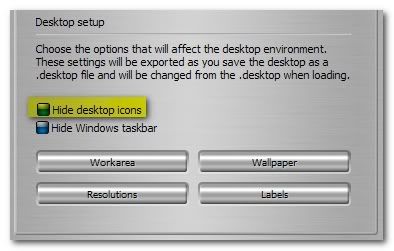
I was busy making tests with Windows and other applications that control the icon display on the desktop - but - I overlooked the real place to look...! Right there inside DesktopX, is the OPTION to turn on/off desktop icons - just above the "wallpaper" selection - to the left. When I "untick" the HIDE DESKTOP ICONS selection, the wallpaper appears.

Now, I can't explain why this happens... I guess it's called a "bug"!

Nonetheless, now it works just fine. I hope this will help others also...


Reply #15 Top

'hiding' or using the desktop right click option to not 'show' the icons doesn't really 'hide' or 'not show' - the hide/not show basically (as I understand it) overlays everything on the desktop with a copy of the wall inside a borderless window - so that window stays there while your wall is actually changing underneath

Reply #16 Top

Right there inside DesktopX

I forgot about that


:blush: