
DX Tutorial #7: Microsoft Access DB in DX
How to access your access data from inside DX
 WinCustomize Forums
RomanDA's
DekstopX Tutorials:
My goal is to make a set
of tutorials for DekstopX. If you have ideas on what you would like to
see, please email me at
[email protected]
Database Access
- PART 7:
I am working on something
that will require access to a local (on the hard drive) database.
I do a LOT of ASP work on web sites, and was hoping that there would be some
carry over.
I believe the DX code is about 3-4 lines different than the ASP (web page)
code.
This will be a VERY short
tutorial, its more like an article but I want this to be around for future
people.
I will add more later if I can.
| Text object / DB Access: | |
| Local database is on my D
drive under TEMP, i want to access the TABLE in it called "Hooked Up"
Be aware this is a TEST I pulled a db from a web site i have running just to verify this works. I'm not uploading anything for this, its just some code examples |
|
|
Creating the Objects: |
||
| We will make a
TEXT object and put the DB access code into the On Start. LOAD DekstopX and go into the CREATE mode: * if you do not have DekstopX (builder) you will need to download it. |
||
| TEST OBJECT: | ||
| Create the BASE object by | ||
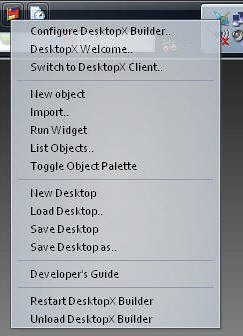 |
RIGHT-CLICK on the DekstopX Icon in the system tray. Select "New object" <-- See this for more info |
|
 |
The Object Properties Dialog will show up. Click the "States" Tab Change to "TEXT" Type in something for the text Set the font to whatever you want. hit APPLY |
|
 |
Click the "Summary" tab Set the width to 400-500 it keeps the text from going off the edge of the screen. Hit Apply |
|
 |
Click on the "GENERAL" tab. Click on "NEW" for the script the window like this will load. |
|
|
The Script: |
||||||||||||
| The Code for this little bit we are doing is VERY simple. | ||||||||||||
Click the "File" menu item, then "Save and Close editor", then click "OK" in the properties dialog box. That's it, the db will be read when you save this and the info displayed in the object. |
||||||||||||
Again, this is just a "Proof of concept" that shows that you can access a Microsoft DB with DX, and actually VERY easily too!!
I assume no comments means no one is finding these useful. If this is the case, I can stop a lot easier then I can continue. This one tutorial alone has taken me around 3 hrs to type up and setup.
 |
Enjoy, RomanDA AKA: David A. Roman http://romanda.wincustomize.com http://www.romanda.org [email protected] |
 Stardock Forums





