
DX Tutorial #4: Let's all just Fade Away
RomanDA's DX Tutorial Series
 WinCustomize Forums
RomanDA's DesktopX Tutorials:
My goal is to make a set
of tutorials for DesktopX. If you have ideas on what you would like to
see, please email me at
[email protected]
| Lets all just Fade Away (and BACK TOO!): | |
| How to add fading to your DX project. | |
Lets see how this would work:
| Hidden (image 1):
|
Shown: (image 2)
|

This will involve several steps.
| STEP 1: What's in your Drawers? | |
| Lets see what we have to
hide! In order to fade things in and out, we have to know what the names
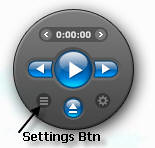
of the items we want to fade. In the case above we will use danilloOc's new DX player widget http://danillooc.wincustomize.com/ . When you click on the "Settings Button" (see image 1) it runs a script that first checks to see if the "Settings drawer" is open (shown) and if it isn't it fades it in, if it is, it fades it out. |
|
The problem is there are a lot of items in the Settings Drawer:
- Panel Back
- Repeat Btn
- Help Btn
- Shuffle Btn
- Mute Btn
- Open_folder Btn
- Close Settings Drawer Btn
I decided that its easier to make the fade in/out use an array so you only have to put the info in 1 location. And its a lot easier to add new items, or change existing ones.
| Lets
look over the example here. The DIM sets up the Vars to be read by the object. (these are put ABOVE the "Sub Object_OnScriptEnter") It saves the "count" in FadeSettingsX and the objs in FadeSettingsObj
Dim FadeSettingsObj(30), FadeSettingsX You would have to use the names that match your items. Its VERY important that the first item is the background item for the drawer (you will see why later). |
| STEP 2: I have a Fading Feeling | |
| Once you know the objects you want to fade in/out, you need to made a function that does this fading. Lets start with fading things in first. | |
| One
thing we need to do is to HIDE everything first. This is done in the OnScriptEnter Portion of our object. Sub Object_OnScriptEnter |
Now lets Fade things IN
| '-- I
made a separate function for each drawer that needed to be faded in and out. '-- It was easier for me to do this so I could call the right one based on the BTN pressed.
Function FadeIn_Settings() |
Ok, that's the basic fading IN part, now lets show how to fade it OUT as well.
| '--
Again, Each Drawer has a Fade out/in function and timer. '-- Im not annotating every line here, look above to see what I'm doing, '-- Its basically the reverse of above.
Function FadeOut_Settings() Sub object_ontimer20 |
| STEP 3: Button, Button, who's got the.. oh heck who cares, just get on with it... | |
|
Ok, now we need to make the Buttons do the fading we just setup. Its not so bad with the functions we just created. The first button we have to work on is the "Settings Button" shown in (image 1) |
|
| Add
this code to the Button
Function Object_OnLButtonUp(x,y,dragged) |
That's all that's needed to fade the drawer in and out. You would also have to add this to the "close" button on the drawer itself.
| In Conclusion: | |
| DX code is not as hard as people make it out to be, and I feel more tutorials like this one will (I hope) help people to see what can be done with just a little code, and some ingenuity. | |
There were some other issues with particular widget.
- Since this has 2 drawers I
had to setup a test to see if the other drawer is open and fade it out, as it
fades in.
So I had to add an IF into the button code. - There was also an issue with
3 DX Plugin items (volume control items - see image 2)
Had to make them just Visible = true/false since they wouldn't fade right.
Please let me know if you find these Tutorials useful, they take a lot of time and effort to setup and I don't want them to be for my own benefit, as I can just take my own code and use it.
 |
Enjoy, RomanDA AKA: David A. Roman http://romanda.wincustomize.com http://www.romanda.org [email protected] |


