DX Tutorial #3: Let's Create a Right-Click Menu

RomanDA's DX Tutorial Series

RomanDA's DesktopX Tutorials:
My goal is to make a set of tutorials for DesktopX.  If you have ideas on what you would like to see, please email me at [email protected]

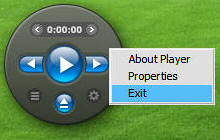
Lets make a RIGHT-CLICK menu
Would you like to have a right-click menu that isn't the "standard" one
that DX supplies when you export a widget?

Ok, Read on...


The code for this isn't really all that hard.

( danilloOc's new player)

 
'--- Function to handle the RIGHT-Click

Function Object_OnRButtonUpEx(obj,x,y,dragged)
  If Not dragged Then            
'-- Do not do anything if someone is dragging the widget
    Object_OnRButtonUpEx = True
    Call CreateSectionMenu()     
'-- Call the Function that Shows the Menu
  End If
End Function

'--- Right Click Menu Creation Function -------

Sub CreateSectionMenu()
     Set mainmenu = nothing
     Set mainmenu = DesktopX.CreatePopupMenu    
'-- Create Main Menu
     mainmenu.AppendMenu 0, 1, "About Player"    '-- First item in the menu
     mainmenu.AppendMenu 0, 2, "Properties"     
'-- Second item in the menu
     mainmenu.AppendMenu 0, 3, "Exit"           
'-- Third item in the menu (this can continue)
     result = mainmenu.TrackPopupMenu(0, System.CursorX, System.CursorY) '-- Save the results of mouse movements
     Call ExecuteSectionMenu(result,snum)       
'-- Run the Function that handles the menu function called
End Sub

'-- Function to handle the results of the right-click menu action

Sub ExecuteSectionMenu(result,snum)
     Select Case result                       
'-- Look thru the results to see what was selected
          Case 1                              
'-- Look in the function above 0, 1, "About" - this is the 1
               desktopx.Object("About_Window").Visible = True
'-- show your custom ABOUT window
          Case 2                              
'-- Look in the function above 0, 2, "Prop.." - this is the 2
               widget.OpenProperties          
'-- Open the Properties for the widget
          Case 3                              
'-- Look in the function above 0, 3, "Exit.." - this is the 3
               widget.Close                   
'-- Close the Widget
          ' Case 4
     End Select
     Set mainmenu = nothing                   
'-- clear the menu
End Sub

There are a lot of things that can be done with this, things like SUB menus, etc.  Maybe I will look into that at a later date.  Its just a simple example

This script needs to be attached to any object that you want to have the right-menu active.
This code is part mine, mostly VAD_M's who is quickly becoming the GOD of DX scripts!

Enjoy,
RomanDA
AKA: David A. Roman
http://romanda.wincustomize.com
http://www.romanda.org
[email protected]
11,854 views 13 replies
Reply #1 Top
I am sure I am not the only one who appreciates your efforts.

I hope that the others who gain from your knowledge will post their gratitude.

Personally, I think tutorials as good as these should either be "stickied" or, have their own link all together.

One concern I have is, can a person use "your" script without permission? In my mind, art is art. Knowledge is an art within itself. Without your knowledge, there is no script. I may be over-complicating the issue, but I thought it worth asking.


A clearly defined "newbie" link for DX language would only benefit this community. Your tutorial skips ahead of where I am.


Either way, what you have done by posting your tutorials is as close to unselfish as it gets. I look forward to using the printed version of your wisdom in the future! I will gladly share my efforts as you have. Good 4 U!
Reply #2 Top
The "DX Language", so-to-speak, is just VBscript, for which there are many tutorials around the internet for. Take a look over at w3schools for a really good start!
Reply #3 Top
By posting the code here I am essentially giving everyone the rights to use the code, if I didn’t do that the tutorials would be useless.
Reply #4 Top
RomanDA, thanks a lot for the tutorials and for helping me with the player scripts, I couldn't make it without your help my friend.
Please keep doing the tutorials
Reply #5 Top
Thanks CerebroJD! That link is great!

By posting the code here I am essentially giving everyone the rights to use the code, if I didn’t do that the tutorials would be useless.


^^That's what I figured. Still, I thought it was worth asking.^^

Thanks all!

PC
Reply #6 Top
Thanks for these tutorials RomanDA! I don't think alot of people realize how many newbies start out really excited to use DX and then end up struggling and discouraged because they have little knowledge of scripting. I know I had alot of dynamic ideas for cool widgets and then spend most of the time frustrated with the scripting. So, keep up the good work!
Reply #7 Top
Roman : First I really enjoy what You do here.

But a question as that isn't in the official tutorials also : Is it possible to assign an icon to the menu entries ? I couldn't figure that one out.
Reply #8 Top
That i dont know.. illl check in a few days when im back "on-line"
Reply #9 Top
David, I just re-read these tuts and am amazed.

If any Stardockians are following this thread, may I suggest that these tutorials be included or linked in the on-line documentation for DX in the tutorials section (with permissions and props of course): https://www.stardock.com/products/desktopx/documentation/index.html


Posted via WinCustomize Browser/Stardock Central
Reply #10 Top
thank you for all of the wonderful tutorials.One day In the future I will show my own objects on wincostomize it will be thanks to Your tutorials
Sprinkle
Reply #11 Top
Ms. SprinkleSB,

Im very glad they have been of help to you. I look forward to seeing your objects.
Reply #12 Top
By posting the code here I am essentially giving everyone the rights to use the code, if I didn’t do that the tutorials would be useless.


I appreciate your sharing your codes, people like myself that have no knowledge of vb script wouldn't be able to make a thing. Looking forward to more of your Tutorials.
Thankyou.