
DX Tutorial #1: Resizing an object
RomanDA's DX Tutorial Series
 WinCustomize Forums
My goal is to make a set of tutorials for DesktopX. If you have ideas on what you would like to see, please email me at [email protected]
DesktopX Object
Resizer:
Lets try this one again...
Resizing an object in DX "should" be easy but it always seems to take a lot more
effort then it should.
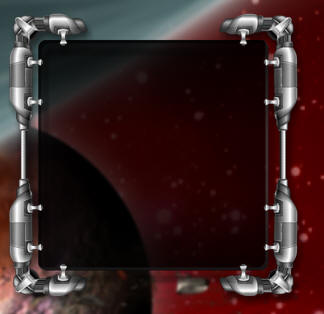 This is the "Background item" in this case its called: GalCivII-MenuBar-Graphics-Back |
We will use the resizer to
drag around and make the master object resize. The resizer object sites
on-top of the master item. I pulled a small part of the bottom right and saved it back out as "resizer". When you drag the resizer, it
changes its x/y position. ---NOTE --- |

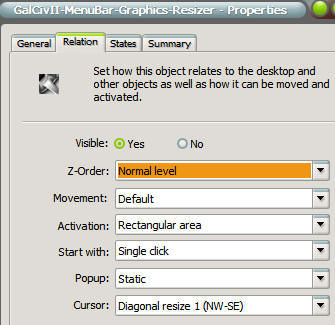 |
The
Resizer object has its "Parent/Owner" set to: It is NOT set as a CHILD object, that will not work. To make it show
the "resize arrows" you have to
|
| Lets look at the script. | |
| This is ALL inside the "resizer" there is nothing in the master obj. First lets assign some vars so we can make this work easier on other object. |
|
|
Dim Min_width, Min_height, ObTop, ObLeft, masterobj MasterObj = "GalCivII-MenuBar-Graphics-Back" '- Name of the master object Min_width = 300 'Minimum width of the master object) Min_height = 300 'Minimum height of the master object) ObTop = 39 'Offset from Bottom for Resizer ObLeft = 35 'Offset from Right for Resizer |
This part moves the resizer (it was easier to make it a sub so I could just CALL it when I needed it)
|
Sub MoveMe object.left = desktopx.Object(MasterObj).width - ObLeft object.top = desktopx.Object(MasterObj).height - ObTop End Sub |
This is called when the object is drawn so it puts it in the right place every time.
|
Sub Object_OnScriptEnter Call MoveMe End Sub |
This is the resizing, it uses "OnDrag" to reposition the resizer object, then make the master object change width/height.
| Sub
Object_OnDrag(x,y,newX,newY) newh = newY + ObTop 'Take the newY plus the top offset to get the width neww = newX + ObLeft 'Take the newX plus the left offset to get the height If neww > Min_width Then 'if the new size is greater than the min width then resize it (or stop it at the min size) DesktopX.Object(MasterObj).width = neww Else DesktopX.Object(MasterObj).width = Min_width End If If newh > Min_height Then 'if the new size is greater than the min height then resize it (or stop it at the min size) DesktopX.Object(MasterObj).height = newh Else DesktopX.Object(MasterObj).height = Min_height End If Call MoveMe 'move the resizer so its always in the right spot End Sub |
The next step would be to "hide" the inside objects and then unhide them after the resize was done. (might update this if i get a min).
CLICK HERE to download the working version of this and see how it works.
 |
Enjoy, RomanDA AKA: David A. Roman http://romanda.wincustomize.com http://www.romanda.org [email protected] |


 .
.